















A community space to collaborate on Box APIs, explore SDKs, and build powerful applications
Recently active
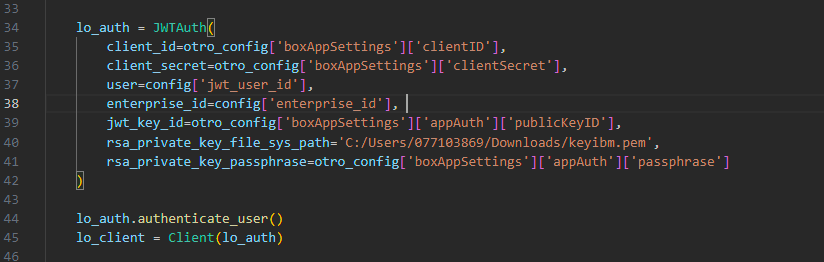
I have the following error when creating the JWT connection: Error: (‘The key data could not be deserialized. The data may be in an incorrect format, may be encrypted with an unsupported algorithm, or may be an unsupported key type (for example, EC curves with explicit parameters).’, [<OpenSSLError (code=503841036, lib=60, reason=524556, text_reason=unsupported)>])
Life moves forward, whether certain features stay behind or vanish into digital oblivion altogether. [Sigh] We’d like to announce that Box will end support the File Picker UI Element. At this time, customers will be able to use their existing applications with the File Picker UI Element with no impact, but will not receive new features, updates, or bug fixes. This is a companion discussion topic for the original entry at https://medium.com/box-developer-blog/end-of-support-for-box-file-picker-ui-element-4557fdf7a78c?source=rss----a995c24848a3---4
I’m excited about box_sdk_gen! I’m trying this , but “ModuleNotFoundError: No module named ‘box_sdk_gen.auth’” occured. of cource I’ve done pip install box_sdk_gen. where’s box_sdk_gen.auth?
I’m following these instructions and I am struggling to decrypt the private key in ColdFusion/Lucee. Here’s how it’s done in PHP: $private_key = $config->boxAppSettings->appAuth->privateKey; $passphrase = $config->boxAppSettings->appAuth->passphrase; $key = openssl_pkey_get_private($private_key, $passphrase); Has anyone managed to get it working?
I generated a script to be able to upload backup files from a database to my BOX account developed with python. When I run the script it works correctly but when I go to the box I don’t see the uploaded files. The script is configured to upload the files to folder id 0. Running the script returns it tells me that the files already exist. Do you have any idea what could be happening?
Hi, I’d like to set up a watch folder on my Box account that will automatically download to a specified location on my local storage whenever a new file appears. I can currently do this manually with the CLI but would like to trigger this with a watch folder. Is that possible? Thanks, Chris
Hello team, I’m currently engaged with the Box Platform and Box Webhook. I have a question regarding the folder creation event – does it trigger when all files within the folder are uploaded, or does it happen immediately upon creating the folder? Furthermore, is it possible for me to promptly make an API call to retrieve the list of files in the folder and download them right after receiving the folder created event? Thanks,
Background: We have a github cicd on a self-runner host from AWS. In this workflow we build our daily software and upload to Box using below command. This has been working for the past 6 month. Issue: Last couple of months, I am getting frequent errors that “item already exists”. (1) The problem is that files get uploaded correctly and when I check the box, I do see all the files. However, not sure why I am getting these errors. (2) It is not possible to have “same name” since each build has a unique github commit ID attached to our release target name. i.e, There are 3 different unique IDs concatenated together. Here is an example “0514.2_A_0.0.48_5b57cb4_0308”. Hence it is impossible to have same name. What is going on here? I need support from Box Team. This is not something we can afford to constantly have errors for no apparent reason. Error Error: Unexpected API Response [409 Conflict | 4t6w1ehnkir5p8jc.0786afe948d834788dc1f0ba396b1cc64] item_name_in_use - Item with the same nam
Box recently released a brand new .NET SDK that has full api coverage, fast and predictable updates thanks to the generated nature of the SDK and is even easier to use than the old .NET SDK. It was also recently published to the Nuget, so now it’s the perfect time to learn how to take full advantage of it’s capabilities. This is a companion discussion topic for the original entry at https://medium.com/box-developer-blog/getting-started-with-the-new-box-net-sdk-c3c39a9d3337?source=rss----a995c24848a3---4
I am using box-python-sdk ver3.7.2. GitHub GitHub - box/box-python-sdk: Box SDK for Python Box SDK for Python. Contribute to box/box-python-sdk development by creating an account on GitHub. I referred to the issue below. Is it the same with version 3.7.2 or later? folder.get_items() limit param seems not working. folder.get_items() limit param seems not working for me · Issue #366 · box/box-python-sdk · GitHub There seems to be an issue with slow response times when there are a too many files in a folder. It seems that there are a large number of files(about 12,000 files) under folders in the Box environment that the customer is using. I think the response would be faster if get_items() could limit the number of records retrieved, but I think it would be difficult because it retrieves all records. Is there a source code workaround for this problem other than reducing the number of files in the folder?
Explicitly requesting the extension attribute from the BoxFile.Info object’s getInfo method provides the expected value. However, if requesting the entire BoxFile.Info object’s getInfo’s set of attributes, not explicitly specifying fields to be returned, the extension attribute value is missing. In addition, the SHA1 attribute, which is another specific BoxFile extension to BoxInfo, exists. I would expect both to be provided, but extension is not. Attempted with Box Java SDK versions 4.7.0 and 4.8.0. For example: BoxFile.Info info = file.getInfo("extension"); System.out.println(info.getExtension()); BoxFile.Info info = file.getInfo("sha1"); System.out.println(info.getSha1()); BoxFile.Info info = file.getInfo(); System.out.println(info.getExtension()); System.out.println(info.getSha1()); Example output: doc bddf8a01e139522c81c59b10df840c4379e24cfb null bddf8a01e139522c81c59b10df840c4379e24cfb The null output is unexpected.
Hello there, I am using your API to upload/download files to Box. I have managed to list all the folders and files but when trying to upload or download files and i’m receiving 403 error insufficient_scope. I have created a OAuth 2.0 app and i have all permissions (having a free account). So any solve for me? Thank you for your time.
can anyone help me by getting an esign request Id using the folder Id? I did try requesting extra fields on listing out the esign requests but no luck. Thank you
I am using an App Token as my authentication and I am attempting to find a file by its name by submitting a cURL request to /search?query={filename}&type=file. While the response is successful in both my PHP code and doing it from the terminal, nothing is ever returned. Is there something I’m missing? For what its worth, here is my PHP function: function findRecordByFilename($accessToken, $filename) { $encodedFileName = urlencode($filename); $curl = curl_init(); curl_setopt_array($curl, [ CURLOPT_URL => "https://api.box.com/2.0/search?query=$encodedFileName&type=file", CURLOPT_RETURNTRANSFER => true, CURLOPT_HTTP_VERSION => CURL_HTTP_VERSION_1_1, CURLOPT_CUSTOMREQUEST => "GET", CURLOPT_HTTPHEADER => [ "authorization: Bearer $accessToken" ], ]); $response = curl_exec($curl); $curlError = curl_error($curl); curl_close($curl); // do something meaningful here, this is just an example if ($curlError) { echo '<pre><code>' . jso
Hi all, I created an app using JWT authentication and assigned it all permissions in the dev portal, and subsequently authorized it. When trying to run basic commands like “box users”, I am getting a 403 forbidden error. The app has the manage users checkbox checked, and has been authorized. Any ideas why I’m getting an error here? I appreciate your insights, thanks.
I’m calling the Box API directly from JavaScript to upload a new file. As the docs suggest, I run a preflight check first, and that check succeeds (200). The code for the preflight check looks like this: const preflightResponse = await fetch(url, { method: "OPTIONS", headers: { Authorization: `Bearer ${this.#token}`, "Content-Type": "application/json", }, body: JSON.stringify({ name, parent: { id: parentId, }, }), }); After that step succeeds, I move on to the next step of uploading the actual file. For this text, I’m just sending the text “Hello, world!” to a file named hello.txt. The parentId is the folder to upload to, and it exists (otherwise the preflight check would fail). The code to upload the file looks like this: const form = new FormData(); form.append("attributes", JSON.stringify({ name, parent: { id: parentId, }, })); form.append("file", new Blob(["Hello, world!"])); const response = await fetch(url, { method: "POST", headers: { Authorization:
i am try to do some action in box , like add new task , get comments etc … i only know the user email but in api side we need account id , so do we have API to get account id by email ? or the api can using email to repacle account id ? BTW , i am using box-python-sdk-main , thank you!!
Hello box folks, I’ve created a new app with JWT authentication and while most everything so far has worked as expected, I’m getting a 403 error when trying to create an app user: ‘The request requires higher privileges than provided by the access token.’ Question for you: do I need a paid enterprise account to create app users or can it be done with a developer account. If it can be done with a developer account, can you point me to any documentation about what app permissions need to be enabled to create an app user? Thank you.
Hi. I’m trying to find the best way to give a consumer using my mobile app a set of files created by my app when they click a button. Most of my users will not have a desktop computer or a printer. They will need to either (a) forward the documents to a FedEx email for printing or (b) upload the files to an online e-filing system. I don’t want the user to create a Box.com account, because that would be confusing to consumers using a mobile app. The simplest thing would be to email the attachments to the user, but I’ve gathered Box.com can only email share links that cannot be easily forwarded to FedEx for printing or uploaded to an online e-filing system from a mobile device. Any suggestions on the best way to go about this? Need a secure way to make it easy for a user to email the docs to a FedEx printing email or upload them to an online portal, from their phone.
There is a Box folder that has over 360,000 items. When I attempt to list items in the folder I receive the following error: Context Info: {‘errors’: [{‘reason’: ‘invalid_parameter’, ‘name’: ‘offset’, ‘message’: ‘The offset plus limit must not exceed the maximum limit of 300000’}]} How can I limit the number of items returned? Is there a technique I can use to adjust the limit and offset when listing over 300,000 items?
Do you have questions about the Box AI API? This is the place to ask!
It use to be easy but i do not see an option anymore on how too see how many folders I have.
We use the Content Preview UI element to display a variety of files that are different dimensions. Some are long portrait, some are narrow landscaped. Is there a way to have the height property of the Content Preview automatically adjust or be in better proportion to the content. I have considered inserting metadata into the file at the time of file generation with the dimensions so I could calculate an appropriate dimension but to do that it looks like I would need to pass the file from box to another service.
Its Trailblazer DX 2024 week!As I previously mentioned in our upcoming events post, Box is sponsoring TrailblazerDX this year. Stop by booth 32 to learn how to extend the value of Box for Salesforce. You’ll also want to check out Box’s session “Supercharge your Content in Salesforce with Box AI & Slack” on March 6th at 1:30pm PT presented by our chief product officer Diego Dugatkin, Nick Read, and myself! This is a companion discussion topic for the original entry at https://medium.com/box-developer-blog/box-salesforce-flows-with-metadata-c8979b02acb1?source=rss----a995c24848a3---4
I’ve encountered an issue with conflicting styles between the modal and btn elements in our site’s Bootstrap framework and the styles in https://cdn01.boxcdn.net/platform/elements/19.0.0/en-US/explorer.css. There might be additional conflicting styles that I haven’t identified yet. Any suggestions on how to resolve this? Currently, the only solution I can think of is to create a customised version of explorer.css. It would have been beneficial if the Box styles were prefixed to mitigate conflicts. Any insights would be appreciated. Thanks.
Already have an account? Login
No account yet? Create an account
Enter your E-mail address. We'll send you an e-mail with instructions to reset your password.