








-
Recently active
Hi, We are trying to connect box to a salesforce sandbox to run a few tests before this goes into Production. We keep getting the error “AccountId for User XXXXXX AccountId for Service Account null” We have installed the latest version of the package and we have never had box connected to Salesfoce before. We are a new customer. Some support and help on this would be great! Thanks.
Our company currently uses Box for Salesforce installed within our Salesforce environment. To further enhance integration with Box, we are considering adding new functionality to Salesforce. Specifically, we plan to develop a feature that automatically grants access permissions to the corresponding folder in Box when record-level access permissions are granted in Salesforce. In the standard Box for Salesforce specification, Box access permissions are granted when the user accesses the corresponding record in Salesforce. However, we want to be able to search and access Box content without accessing related records in Salesforce. To achieve this, we are considering using box.Toolkit, which is included in Box for Salesforce. Before proceeding, please allow us to confirm the following technical constraints and specifications regarding the use of box.Toolkit: We want to synchronize permissions to Box for Box users linked to Salesforce users. However, it is possible that Box users are not li
We have installed and are currently using Box for Salesforce in our Salesforce environment.We are now considering adding new functionality in Salesforce to integrate more closely with Box. Specifically, we are planning to develop a feature that automatically grants permissions to the corresponding folder in Box when a user is granted record-level access in Salesforce.Under the standard specifications of Box for Salesforce, permissions on the Box side are granted when the relevant user accesses the corresponding record in Salesforce. However, we would like to enable users to search and access content in Box without requiring them to first access the related record in Salesforce.To achieve this, we are considering using the box.Toolkit included in Box for Salesforce.Before proceeding, we would like to confirm the following technical constraints and specifications regarding the use of box.Toolkit: Is it correct to understand that API calls made via box.Toolkit are not counted toward the B
I encountered the following error.Could you please advise me on how to resolve it? An Apex error occurred: box.Toolkit.BoxApiException: Unable to create folder for record id 0019D00000Z9QJyQAN - Details: The folder was returned with a null id.
Hello! I'd like Salesforce field values to pull into the document template dynamically so that the completed document is specific to the client and the values entered in Salesforce. I'd then like to send that document for signature via Adobe Sign that is integrated through Box. Ideally, everything done within the Salesforce UI. I'm not finding specific documentation for this (probably since it’s across 3 different tools). Any insights would be helpful! Thanks,Stephanie
Hello, I am new to developing for the Box platform and having a hard time understanding the first steps. I went through Getting started with Box for Salesforce development: Part 1 and Part 2, but they are using the box Toolkit which doesn’t offer the full API functionality. I’ve installed the Box SDK in my Salesforce Sandbox but there’s so many classes and seemingly no guide for how to get started. Can I use the box.Toolkit along with the SDK? My initial tasks will be to maintain a folder structure separate from the default to hold archived files, and to push files into this separate folder structure.
SalesForce内の取引先、取引先責任者、商談に対して、同じ名前でBOXにフォルダが作成されるように設定されていたが、現在フォルダを作成することができない状態です。どうしたら、いいのか分かりません。
Hello! I’ve seen documentation stating that the Box Visualforce page is available on custom object, but it is only available on the account object. How should I proceed in order to make it available on custom objects or even objects like Opportunities or Contacts?
Hello there,I am working on integrating Box to Salesforce with account H*******@***.com, but give me service account null error. Can you help me to fix it?Thanks very much,Xin Ma
Hello,I’ve have setup Box Sign request from template in saleforce, currently the sender of the sign request is viewer by default, is there a way to setup a template that the sender is always the first signer of the template?
Hi,I’m running an API Call to upload a PDF file to Box. I get the PDF URL from another API call to another software, and then input the URL into this apex class, it downloads it and uploads it into Box folder of specific folder Id which I input. For some reason, everything works, but the file that comes into Box is not PDF and is of unsupported file type (can’t be opened or downloaded). Can anyone find what my error could possibly be? public class HV_BoxPDFUploader { @InvocableMethod(label='Upload PDF to Box' description='Uploads a PDF from a URL to Box using Box Toolkit') public static List<Result> uploadPDFToBox(List<Request> requests) { List<Result> results = new List<Result>(); for (Request req : requests) { Result res = new Result(); try { // Download PDF content Http http = new Http(); HttpRequest pdfRequest = new HttpRequest(); pdfRequest.setEndpo
I realize this is probably the wrong forum. And I am sure I am overlooking something simple - but I am having an issue with new users view of folders within Box. I haven’t had this problem in the 2+ years we have been using Box and I have spent more time than I care to admit trying to figure it out. For the last two years my existing users will navigate to the folders in Box via the path - All Files>Salesforce Root Folder>Object Folder>Record Folder. All collaboration is granted via the Box for Salesforce integration. They don’t have collaboration rights granted to anything but the selected Record Folders - but they are housed in the above tree and makes their All Files page much cleaner.The issue is that my recent new users (last 2 months) are not getting this same tree. Instead it is All Files>Record Folder. And results in a cluttered mess on their All Files page. Ultimately they can still get the folders and files they need to do their job - but the user experience
Hello, new member here. I have a question concerning the connection to Salesforce.I asked the Admin of our account to make my account a co-admin with all the rights to connect Box to Salesforce but the admin is getting an error that indicated nothing. Just Impossible to modify user.Does anyone have a Lead or a Box contact I can get help from ?Thanks
When certain conditions are met, I need to Move a box folder to a different Object and Record ID association. What is the best way to do this? I have access to both the Salesforce SDK and developer toolkit. Should i just update the box_FRUP__c object? I dont see a method for changing association, so it looks like I may need to move the folder to the Opportunity root, then change the FRUP association? I tried this though and BOX doesn’t like it. Maybe I’m doing it wrong.I have tried a few things but, its not quite working correctly: I call these two methods in a Queueable context method post conversion. public static void moveFolder(Id currentRecordId, Id destinationRecordId){ box.Toolkit toolkit = new box.Toolkit(); String currentFolderId = getRecordFolder(currentRecordId); String destinationObjectId = getObjectFolder(destinationRecordId); toolkit.moveFolder(currentFolderId, destinationObjectId, null); toolkit.commitChanges(); } public stati
System.HttpRequest[Endpoint=https://api.box.com/2.0/files/####/, Method=GET when calling above api we are getting this error.System.CalloutException: arraycopy: last source index 32 out of bounds for byte[31] We seem to be getting this error periodically at random intervals. I removed the number in the endpoint and replaced it with #### for the sake of this post.
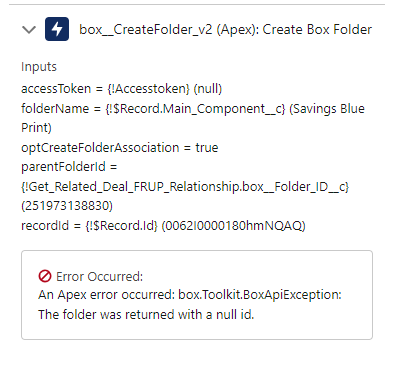
We are creating a folder via a flow, when we debug, we get the following error: An Apex error occurred: box.Toolkit.BoxApiException: The folder was returned with a null id. When we debug, it appears the folder id exists to be passed. Any advice?
Hi,We are trying to add a custom UI using the Box Content Explorer javascript library from the UI Elements SDK. The Box Content Explorer requires an auth token to authenticate. This must be the Salesforce user rather than a service account in our case so security and access is respected.There does not appear to be a method to retrieve a user's auth token from the Salesforce toolkit. Looking outside the toolkit to the Salesforce SDK, there isn't an implementation of the OAuth user flow (this must be implemented by the application) and my understanding is that this would be an additional log in to the Box for Salesforce login.I'm currently looking into using the toolkit to query a Box managed user's Id using the username from Salesforce and then getting a user token through a Client Credentials custom app. What is the best way to seamlessly integrate the Box for Salesforce toolkit with the Box UI Elements SDK so that there is a single authentication process? Thanks
Hello, We are trying to bulk create Box folder/subfolders for existing Person Accounts in Salesforce. We have different Record Types available in Salesforce and our Box folder structure will be slightly different for each of those Record Types. Is there any way we can bulk create these folders in Box without consuming too many API callouts? Thanks Deepak
Need advice on how to pull from salesforce to box without file size limitation
Box and Salesforce integration using Box for Salesforce. When you create a record in Salesforce using Box for Salesforce, a folder is created on the Box side. If you do not reference the Salesforce record at this time, the user will not be granted privileges to the Box folder. Therefore, even if a folder is created, most users will have to go to Salesforce to see the corresponding record in order to access the folder. Is there a better way to grant privileges without access to the records? I tried Box tool kit createCollaboration and https://api.box.com/2.0/collaborations, but this one did not create a FRUP record and the Box for Salesforce delete batch did not work properly.
Hi Team, I am using Box Toolkit for Salesforce; I have authenticated one service account. But I don’t want add user account in user settings as we are having users in large number. So, we can’t add users every time. Is there any other way of using Box Toolkit to upload files on box folder without providing user account? Thanks Jahanvi
Hi, I have a requirement where, once an object is updated from an external system, a process is triggered that will fetch all the files from the updated object and save the files into a specified box folder into another object that is newly created. I have used the Box toolkit method - createFileFromAttachment() to add the files to the new folder. The method is also getting executed in the future context and callouts are allowed. Yet the process throws an authentication error that starts with: "boxtoolkitToolkit:[AUTH_WRAPPER_PREPARE_FAIL_MESSAGE=Unable to use default credentials to make a callout to Box (maybe this is in a trigger, constructor, or after a DML statement):, authWrapper=BoxAuthWrapper:[adminSettings=box__BoxUser_Settings__c:{}, " Once the process gets executed, if multiple files need to be transferred, only one file gets transferred to the destination folder, and the other files are stopped after the same error is encountered. I’m implementing the requirement in Salesfor
Hi, We would like to implement a flow to delete folder after 30 days of case being closed. Support have advised we should use the Send Request Action in a flow however it isn’t visible to us, any ideas why this may be? We are using Version 4.28 Thank you
We are integrating using SF and would like to assign a zone to files depending on the region on the account record. Does anyone have any suggestions on how we can achieve this using SF flow? Thank you
When trying to add Salesforce UI Elements into Lightning Page or Flow - I am seeing this error when opening page or running the flow Refused to frame 'https://mydomain--mysandbox-box.sandbox.vf.force.com/' because an ancestor violates the following Content Security Policy directives: "frame-ancestor 'self'" Additional Info: https://developer.box.com/guides/tooling/salesforce-toolkit/ui-elements/
Already have an account? Login
No account yet? Create an account
Enter your E-mail address. We'll send you an e-mail with instructions to reset your password.

