











Q&A, Conversations for End Users
Recently active
Ever wondered how to make the most of file annotations in Box preview? in this video we go through how to add comments and annotations to specific places on files from right within Box! Let me know if you have any questions down below
Trash? What on earth is “trash”? 🤔 As someone who speaks 🇬🇧UK English thankfully I don’t have use Google Translate on Box to find out. The native Box applications have support for a range of different languages and variations and it’s really easy to change to the one that suits you best. All you need to do is log in to Box and then click your profile picture (or initials if you haven’t set a picture yet) in the top right hand corner. From there select ‘Account Settings’ and then you’ll see a range of options including your language. A screenshot of the account settings page showing the language dialogue box Flick that to the dialect of your choice and then choose ‘Save’. Much better!Got a top tip to help others feel more at home in Box? Share it in the comments below.
When I try to access my account I receive this message. "Your password has expired. Enter your email address and we'll send you steps to create a new password." The problem is that I no longer have access to this email, as it no longer exists. Does anyone know how I can solve this problem, so I can regain access to my files? Thanks in advancedE. Lopes
My computer is not syncing to Box, and I am unable to sign in.
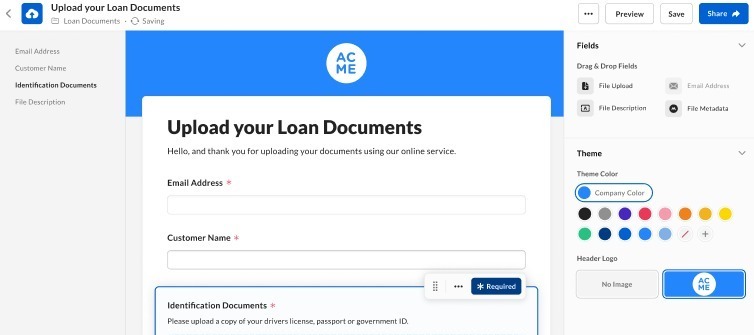
In today's digital age, efficient collaboration and seamless file sharing are crucial for businesses and organizations of all sizes. Box offers a powerful tool called File Request, designed to simplify the process of collecting files and associated metadata securely. Whether you're managing projects, gathering client documents, or collaborating on team assignments, Box File Request provides a fast, user-friendly solution.Box File Request allows you to create customized web forms where individuals can securely upload files without needing direct access to your Box folders. Here’s a breakdown of its key features:User-friendly Interface: Using an intuitive drag-and-drop interface, you can quickly create a web form tailored to your needs. This form enables you to request files from anyone outside your organization without adding them as collaborators. Metadata Customization: Enhance the clarity and context of file submissions by adding metadata attribute fields. You can define these fields
Checkout our support site on steps to get started as a Box User, including video instructions. Link Step 1: Logging into BoxStep 2: Navigating the All-Files pageStep 3: Creating a new workspaceStep 4: Sharing content with othersStep 5: Staying organized
Already have an account? Login
No account yet? Create an account
Enter your E-mail address. We'll send you an e-mail with instructions to reset your password.