All things API and SDK related
Recently active
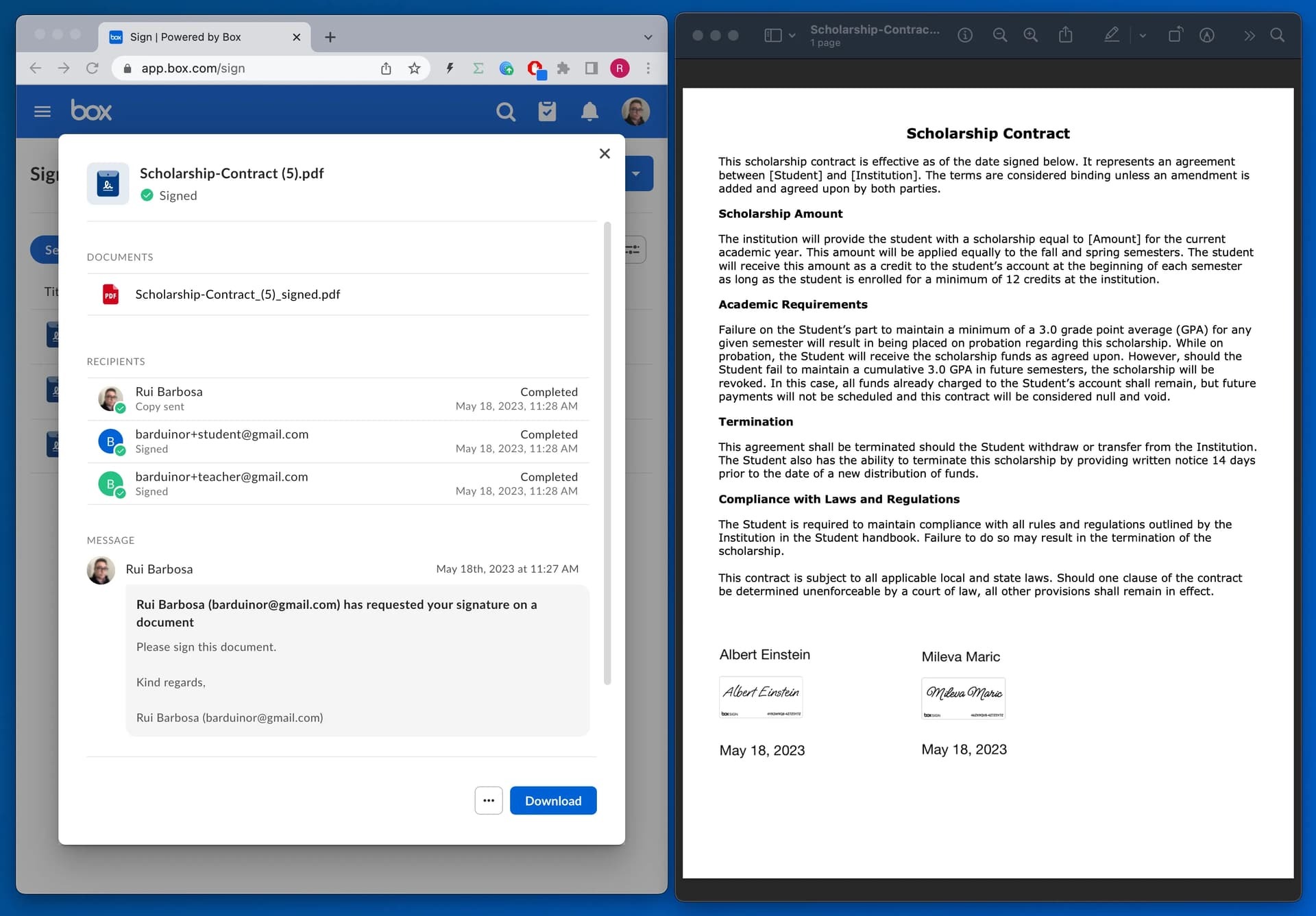
We are excited to introduce new extensibility features that enable developers to leverage the power of Box Sign within custom applications! Developers can now leverage Box Sign reusable template capabilities within custom applications with reusable template APIs. With template APIs , developers can enable the following capabilities for senders when integrating Box Sign with custom applications: Provide a list of all their Box Sign reusable templates Obtain template details via associated template IDs Initiate signature requests using specific templates The first step to leveraging this capability is to create the reusable template within the Box Sign native web application within Box. From there, senders can send a sign request using the template they just created, and pre-populate the full name placeholders. First, users need a ‘template_id’ to identify which template they will be using. We can list all the available templates using the ‘/sign_templates’ end point: curl --location '
We started to create Python workshops around the Box Platform. The idea is to have a set of exercises any developer can do, for a hands-on exploration of the Box API. You can find these workshops here: GitHub GitHub - barduinor/box-workshop-python Contribute to barduinor/box-workshop-python development by creating an account on GitHub. In this early stage, we are looking for feedback, ideas and comments, so please drop us a line. Cheers
Hi folks, Check out the new blog article: Medium – 5 Jul 23 How to recursively upload a folder to Box using Python In this article, learn how to recursively upload files to Box using Python, while taking advantage of Box API features such as pre-flight… Reading time: 5 min read When uploading files recursively, we also need to check if the folders and files already exists, because the user may upload an entire folder a second and third time. Take a look at this example, where we use the prefilght_check to verify if the file can be accepted, and decide if we are uploading a new file or creating a new version of an existing one. Here is something to whet your appetite: def main(): """main app demo""" settings = get_settings() # check if sample folder exist and create them if not sample_folder = check_sample_folders(settings.sample_folder_base_dir) # get a client service_client = box_client_ge
Hi everyone, I’m new here and would appreciate your help with some questions I have about the Content Explorer. I’m trying to set it up so that the preview opens when I double-click an image in thumbnail view. Is there any way to achieve this? Currently, the preview only opens when I click on the filename or a button. I set ‘select’ for the event in addListener, but it’s triggering when I hit other buttons like the ‘share’ button. Is there a way to limit the ‘select’ event to only when a file is selected? Also, what would be the way to make the preview open again when clicking on the same file? Thanks for taking the time to read this Apologies in advance if I’ve posted this in the wrong topic, as this is my first time here.
@matt.riley Could you share thoughts and/or tips on how to automatically apply metadata to file uploads done through the “File Request” feature? The use case is wanting file request uploaders to upload specific types of documents in each separate upload field and to automatically apply a metadata label to the upload done in that field. For example, a File Request form with a Diploma field and a Resume field, upon upload / completion of the File Request those uploads would be tagged in metadata as diploma and resume, respectively. Thus later we could search by metadata for diploma and get all diploma uploads but not resumes, and vice-versa. As a side note, I find metadata in Box confusing because of the requirement to create a “template” which is unusual compared to other tools where one can just create and define metadata independently.
Does the ability to specify a template file id in a document signing request exist is the SDKs yet? If so, I’d like some documentation for the Python SDK at least. Basically the same question was asked here by another but not sufficiently answered: Box Support Box Sign API - Template ID I have just been informed that template_id is a new POST body param, and while you can use template_id and it will utilize a template in the box sign request creation, it does not seem to be popula... Edit: Just noticed this: Introducing: Template APIs for Box Sign! Box Sign I can’t wait for this to be available in the SDK’s Stay tuned! Any movement on this? Thanks.
I have created an application as the documentation says, but I always get this error. https://developer.box.com/guides/authentication/client-credentials/ This is your documentation, can you help me? This is my app client id: alhd08bt4pv1gt6n9i4ipi8andjscofb curl -i -X POST "https://api.box.com/oauth2/token" \ -H"Content-Type: application/x-www-form-urlencoded"\ -d"client_id=alhd08bt4pv1gt6n9i4ipi8andjscofb"\ -d"client_secret=*****"\ -d"grant_type=client_credentials"\ -d"box_subject_type=user"\ -d"box_subject_id=2629647****" Response { "error": "invalid_grant", "error_description": "Grant credentials are invalid" }
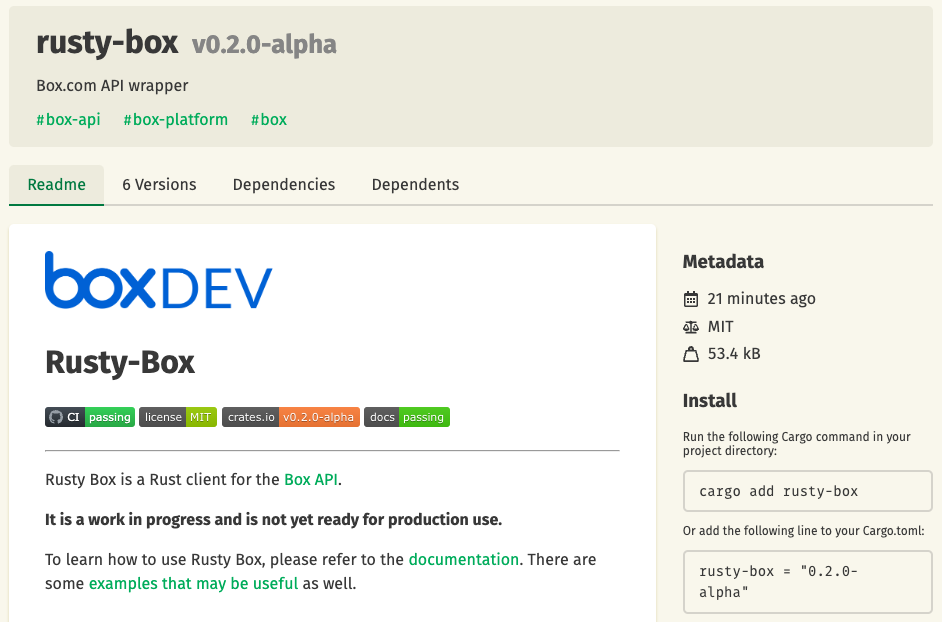
Following up with the Rusty Box: Creating a Rust client for a hackathon, we have released a crate with an initial implementation of the users API end points. You can find the crate here. You can follow up and participate in this open source project at this GitHub repo. If you want to try it: Create a new rust project cargo new my-box-project cd my-box-project Add rusty-box to your dependencies cargo add dotenv cargo add rusty-box Create a .dev.env file in the root of your project DEVELOPER_TOKEN=YOUR_DEVELOPER_TOKEN Open your main.rs file and add the following code use rusty_box::{ auth::{auth_developer::DeveloperToken, AuthError}, box_client::BoxClient, config::Config, rest_api::users::users_api, }; use std::env; #[tokio::main] async fn main() -> Result<(), AuthError> { dotenv::from_filename(".dev.env").ok(); let config = Config::new(); let auth = DeveloperToken::new( config, env::var("DEVELOPER_TOKEN").expect("DEVELOPER_TOKEN
At the beginning of June, Box Platform launched a new brand API to manage mapping folders in Box to channels in Slack, and also recently launched a new scripts for admins and developers to complete repetitive tasks using the Box CLI. Today, we are releasing a new automation template script using the integrations mappings for Slack API. This is a companion discussion topic for the original entry at https://medium.com/box-developer-blog/new-box-cli-automation-template-to-manage-slack-integration-folder-mappings-a174f9985768?source=rss----a995c24848a3---4
Was trying to create an app user following this guide, developer.box.com App Users - Box Developer Documentation Explore the Box APIs and SDKs to use for app development, API documentation, developer support resources, and access the Box Developer Console and with the following api request: POST - https://api.box.com/2.0/users request: {“is_platform_access_only”: true , “name”:“test”} response: { “type”: “error”, “status”: 403, “code”: “access_denied_insufficient_permissions”, “help_url”: “http://developers.box.com/docs/#errors”, “message”: “Access denied - insufficient permission”, “request_id”: “avrw5xhevqe1xti8” } What is missing? Can you please assist? (I have verified I have sufficient permissions to create a user which is not an app user and it was created successfully) Thanks
最近Boxが開催した社内ハッカソンに、Box API用のRustクライアントを作成するというアイデアで参加しました。この演習には3つの目標がありました。Rustは、システムプログラミング用に特別に設計された堅牢な言語です。多くの利点があります。RustでBox APIクライアントを構築することで、メモリの安全性、パフォーマンス、並行処理と並列処理、開発者の生産性、クロスプラットフォームの互換性など、主要な機能を活用できます。 This is a companion discussion topic for the original entry at https://medium.com/box-developer-blog/rusty-box-box-api%E7%94%A8rust%E3%82%AF%E3%83%A9%E3%82%A4%E3%82%A2%E3%83%B3%E3%83%88%E3%81%AE%E4%BD%9C%E6%88%90-5948c3f1bc2d?source=rss----a995c24848a3---4
Hello, I am using Box API Python SDK to list files. The metadata of files is important for my work. The files in the source folder are uploaded by myself and I am in UTC+09:00 timezone. But when I list the files using the API, all the timestamps returned by the API are in UTC-07:00. Please let me know if that is the default case? or is there anything I can do. SDK Version: 2.7.1 API: client.search.query(...) Thank you 🙂
I’m trying to build some features using the Folder Lock API: https://developer.box.com/reference/post-folder-locks/. However, when I try to do a simple curl POST command to lock a folder, I always receive a 404 “not_found” regardless of the folder I pass to it. The GET command works fine and obviously returns an empty array since I haven’t successfully locked a folder yet, but I know the endpoint and my access token works fine. Are there other exceptions to this feature that aren’t documented? I have ensured I am the sole owner of the folder (no co-owners), but it has been shared with others a Editors. For added detail, I am using the Oauth 2.0 method for access. Any help/guidance on locking folders via the API would be much appreciated!
Hello, I am having issues using the box-ui-elements React package. I have gotten the other “simpler” react components to work correctly with a developer token, but for w/e reason the ContentPreview component never renders the preview of the file. There are 0 errors in the console and if I enable the header it is able to display the file name correctly. So, the file ID is correct and the dev token is accurate since it works with other components on the same screen. Is this a known issue? It doesn’t seem like a sizing issue since it’s given plenty of space and the other components work just fine. Is there a working example repo I could run and supply my dev token & file ID to and see if it works? I ended up just using the raw JS CDN approach that some of the Docs outline to display the ContentPreview and that works just fine. So, I ended up just removing the entire box-ui-elements package since it wasn’t buying me much. I would like to actually use the package though since it is simp
Hi Rui, Thank you very much for your answer. This is exactly what I was looking for. Now I think the way to achieve my goal is to create a webhook with ‘COLLABORATION.ACCEPTED’ trigger, that way I can assign the approval task to the user. So I need the user id to assign the task. But is ‘collab.id’ the user id? The API documentation doesn’t say so but I note that you wrote ‘Collaborator:’. Cheers
While sending multipart-form data POST request to BOX from ServiceNow, I am getting this error from the Box API: {“code”:“bad_request”,“help_url”:“http://developers.box.com/docs/#errors",“status”:400,“message”:"API upload did not contain a file part”,“type”:“error”} The payload which is being sent over on this request, looks something like this: –xXxxxxxxxxxxxxxxxxXx" ,Content-Disposition:form-data; name=“attributes”,{“name”:“config.txt”,“parent”:{“id”:“0”}},–xXxxxxxxxxxxxxxxxxXx,Content-Type:text/plain,Content-Disposition:form-data; name=“file”; filename=“config.txt” ,[B@7e8de4,–xXxxxxxxxxxxxxxxxxXx– Any idea of what I am doing wrong here?
Hello, I came across an article discussing the monitoring of user activity on files and the process of extracting them using the GUI. Box Support Tracking User Activity on Files Box enables you to track user activity on virtually any file in two ways: Recent activity, via avatars that display when you preview a file Lifetime activity via Content Insights, which provide co... I’m curious to know if this functionality is currently available through an API or if there are plans to make it available in the future. Thank you!
Hi all, I have been currently tasked to automate the transfer of reports on a network drive to a shared folder on box. I was told to use box cli in conjunction with batch scripting to complete this. I have hit a roadblock in the creation of said script, and was looking for some additional perspective, as I may have missed a command or argument. Attached below is the “script” I tried to create for this project: robocopy "\\Network Folder" "\\Network Folder Archive" /MOV *.xlsx box folders:upload "\\Network Folder Archive" --parent-folder=(Shared Box Folder ID) The roadblock I have hit is in the transfer to box. Because box cli doesn’t overwrite folders, I cannot update the folder with new reports that come in. The other direction I wanted to take was to upload all of the files in the folder directly to box, but I couldn’t find a command to send all of the files to box at once. I experimented with the bulk csv commands, but because the monthly reports are going to have different file n
I talk to a lot of customers who want to start using or expand use of Box for secure and easy collaboration with external users like partners, vendors, customers and contractors. Some are very happy to use Box ‘out of the box’ but others already have a significant investment in a custom experience for these users or a desire to provide it, and don’t want to introduce a separate app with yet another login for their users. This is a companion discussion topic for the original entry at https://medium.com/box-developer-blog/lets-talk-about-box-app-users-3ee3692c64f1?source=rss----a995c24848a3---4
Hi, i’m new in programming. I’m developing a website that needs a Cloud. And our boss wants the BOX Cloud Services. I have little knowledge in API. I can’t a tutorial in youtube that specifically deals with how to integrate Box into a website, how to upload and retrieve data. Can someone please help me
開発はやりがいがありますが、時には苛立たしいこともあります。だからこそ、緊急の課題について質問する適切な場所があることは重要です。開発者のニーズ、問題、質問への対応として、Boxは、専門家と愛好家が集まり、アイデアを交換し、問題を解決して、Boxの技術領域のコミュニティ意識を育むことができるコミュニティフォーラム (英語のみ) を立ち上げました。このコミュニティは、生産性を自動化および改善する方法を模索しているBox管理者にもご利用いただけます。誰もが歓迎され、あらゆるテクノロジと経験レベルの人が交わる場所です。 This is a companion discussion topic for the original entry at https://medium.com/box-developer-blog/%E6%96%B0%E3%81%97%E3%81%84box%E9%96%8B%E7%99%BA%E8%80%85%E3%82%B3%E3%83%9F%E3%83%A5%E3%83%8B%E3%83%86%E3%82%A3%E3%81%AB%E3%81%94%E5%8F%82%E5%8A%A0%E3%81%8F%E3%81%A0%E3%81%95%E3%81%84-908f62bfa6c9?source=rss----a995c24848a3---4
Box Enterpriseユーザーは、Microsoft Teams、Salesforce、Zoom、Slackなど、1500以上の統合を利用できます。人気の高い統合の中にBox for Slackがあります。このアプリケーションには、共有ファイルに対する権限をすばやく選択および共有する機能、Slack内で直接Box通知を受信する機能、Slackでのすべての会話に単一の安全なコンテンツレイヤーを提供する機能など、便利な機能が用意されています。 This is a companion discussion topic for the original entry at https://medium.com/box-developer-blog/box-api%E3%82%92%E4%BD%BF%E7%94%A8%E3%81%97%E3%81%9Fslack%E3%83%81%E3%83%A3%E3%83%B3%E3%83%8D%E3%83%AB%E3%81%A8box%E3%83%95%E3%82%A9%E3%83%AB%E3%83%80%E9%96%93%E3%81%AE%E7%B5%B1%E5%90%88%E3%83%9E%E3%83%83%E3%83%94%E3%83%B3%E3%82%B0%E3%81%AE%E7%AE%A1%E7%90%86-7ce23f8d004f?source=rss----a995c24848a3---4
Recently Box held an internal hackathon, and I participated exploring the idea of creating a Rust client for the Box API. What was I thinking? I wanted to see what it would take to build a Rust client for the Box API. Rust, my friends, is a powerful language designed for systems programming. It comes with a bunch of awesome features like memory safety, performance, concurrency, and developer productivity. So, why not harness its power? Sure, Rust may not be the easiest language to learn, but it’s like a strict teacher who won’t tolerate any errors easily. And you know what? I’ve come to appreciate its capabilities immensely. After working with Python for a while, I found myself yearning for a more disciplined approach, and Rust fit the bill perfectly. Now, you might be thinking, “But wait! Box already has SDKs for C#, Java, Python, Node, iOS, and Android. Do we really need Yet Another SDK (YASDK)?” Well, we’ve got you covered. If your favorite language isn’t on the list, you can always
I have created an app with a v2 webhook. The webhook triggers a JAVA application when it runs locally everything is good, but when the same application is being run inside a VM, the webhook is not getting triggered. Can anyone help what could be the issue or where can I see the logs to find the problem?
Recently Box held an internal hackathon, and I participated exploring the idea of creating a Rust client for the Box API. This is a companion discussion topic for the original entry at https://medium.com/box-developer-blog/rusty-box-creating-a-rust-client-for-the-box-api-404fc3f5b03a?source=rss----a995c24848a3---4
Already have an account? Login
No account yet? Create an account
Enter your E-mail address. We'll send you an e-mail with instructions to reset your password.