All things API and SDK related
Recently active
Development can be rewarding, but sometimes it can also be frustrating. That’s why having the right place to ask burning questions is priceless. As a response to developer needs, problems, and questions Box is launching a community forum where professionals and enthusiasts can come together to exchange ideas, solve issues, and foster a sense of community within the Box tech realm. The community is also dedicated to Box administrators who are looking for ways to automate and improve productivity. It’s a place where everybody is welcomed, all technologies and all levels of seniority. This is a companion discussion topic for the original entry at https://medium.com/box-developer-blog/join-our-new-box-developer-community-d4f2fc3d2157?source=rss----a995c24848a3---4
Box enterprise users enjoy 1500+ integrations like Microsoft Teams, Salesforce, Zoom and Slack. Among the most popular integrations is Box for Slack. The application offers convenient features such as the ability to quickly select and share permissions for shared files, receive Box notifications directly within Slack, and provide a single secure Content Layer for all conversations in Slack. This is a companion discussion topic for the original entry at https://medium.com/box-developer-blog/managing-integration-mapping-between-slack-channels-and-box-folders-using-the-box-api-2dca6074b17a?source=rss----a995c24848a3---4
Have general or non-technical questions about Box Platform? Looking to answer questions like, “Can I…” or “How does…?” This is your space.
この記事では、開発者がBoxクラウドにコンテンツをアップロードするために使用できる3つの方法 (通常のアップロード、分割アップロード、手動アップロード) について説明します。各方法にはそれぞれメリットとユースケースがあります。ここでは、Box Python SDKを使用してこれらの方法を実装する方法について説明します。この記事を読み終えると、使用できる各種アップロード方法と、特定のニーズに最適な方法について理解を深めることができます。 This is a companion discussion topic for the original entry at https://medium.com/box-developer-blog/python%E3%82%92%E4%BD%BF%E7%94%A8%E3%81%97%E3%81%A6box%E3%81%AB%E3%82%B3%E3%83%B3%E3%83%86%E3%83%B3%E3%83%84%E3%82%92%E3%82%A2%E3%83%83%E3%83%97%E3%83%AD%E3%83%BC%E3%83%89%E3%81%99%E3%82%8B3%E3%81%A4%E3%81%AE%E6%96%B9%E6%B3%95-db0e26ec3d74?source=rss----a995c24848a3---4
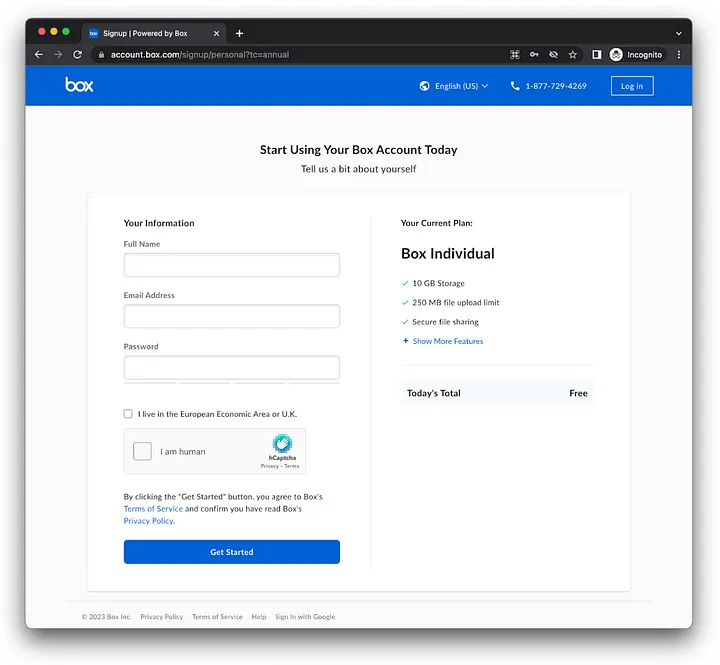
Get started with the Box Python SDK, using OAuth 2.0 in under 3 minutes I was looking for a way to get developers started using the Box platform as quickly as possible. Although Box provides many authentication methods, a recent incident with free developer accounts forced Box to limit the options for new free developer accounts. So I’ve decide to create a Python template application with built in OAuth 2.0, ready to go, allowing you to immediately start sending requests to the API. Create a free Box individual account Navigate to the personal sign up page, fill in your information, and submit. No credit card required… Box registration page for free individual accounts Complete the registration process, verifying your email. Tip: If you have a gmail.com account and don’t want to create a brand new account just for this, you can use something like your.normal.email+box@gmail.com. You can also use this to create multiple free accounts on box under the same email, and still be able to d
Question from developer: When working with BoxCLI or the Node SDK, the examples reference a file path to a .pem file. How do I create a .pem file, and have it work with the box app?
Got an interesting question from a developer: I would like to maintain the tags assigned to Box in bulk, is there any good solution? I was considering a way to use Box CLI, but the description of the CSV template does not mention tags, so I am looking for a solution. What I want to achieve and the conditions are as follows. What we want to achieve: I want to change the tags assigned to files in bulk with CLI. (e.g. tagA→tagB) I want to delete all tags assigned to files in bulk with CLI. Conditions: I am not an admin user. I am an ordinary user of a company.
Got an interesting question from a developer: Hi Team iI am new to Box REST API. Is it possible to download folder and all of its sub folder/files in 1 call ? if yes, whats the code for that in Python? I checked available docs and at link https://developer.box.com/guides/downloads/folder/ I can see there is some code to download folder contents but thats in .Net, Java and Node. Do we have something in python?
Got an interesting question from a developer: I have been provided a box folder from another user for me to upload files. I have a lot of files to upload to this folder. I created a personal account so I can get access. The files are on a remote Linux box. Is there a convenient way to bulk upload these files from the command-line? I’ve tried different ways (SFTP, generating access token, etc) but having issues with one restriction or another. I posted to your community support page but haven’t heard back. What’s the best way to bulk-upload from Linux to Box?
Got an interesting question from a developer: I am accessing box to download an xlsx file, the file gets downloaded, yet it is corrupted, may you help ? thanks in advance file_id = '1234' download_file = client.file(file_id).get() transfer_file = open("/home/wsuser/work/" + download_file.name, 'wb') download_file.download_to(transfer_file)
Got an interesting question from a developer: I need to rename a file in Box using the Python SDK API. I know the filename, but I guess to rename it I need a file object. How do I create a file object when all I have is the name of the file? The file is located in the root folder.
Got an interesting questions from a developer: I’m looking to get video durations for a list of box.com files but can’t find anywhere in the API how to do it. I’m needing this for lots of videos uploaded to Box so I’m hoping to grab the video duration (you can see it on the video preview) instead of downloading the entire file. I’m working in Python.
Got an interesting question from a developer: I have been shared a Box folder via the following link: https://asmodeeuk.app.box.com/v/HobbyOrder I would like to programatically access these files in python or at least download them locally. I have set up a developer box account and I am just using the developer token for now. TOKEN = 'DEV_TOKEN' auth = OAuth2(None, None, access_token=TOKEN) box = Client(auth) I have also added this to my favourites in Box. favourites_id = 8166214818 items = box.collection(collection_id=favourites_id).get_items() for item in items: print(item.id) I can use the above code to see that the folder is in my favourites collection {'etag': '0', 'id': '20105505368', 'name': 'Asmodee Box', 'sequence_id': '0', 'type': 'web_link', 'url': 'https://asmodeeuk.app.box.com/v/HobbyOrder'} However I cannot figure out how to use the above to open the folder and list / download the items within. Can anyone help wit
In this article, we’ll discuss three ways that developers can use to upload content to the Box cloud. These include the normal upload, chunked upload, and manual upload. Each method has its own benefits and use cases, and we’ll explore how to implement them using the Box Python SDK. By the end of this article, you’ll have a better understanding of the different upload methods available to you and which one may be the best fit for your specific needs. This is a companion discussion topic for the original entry at https://medium.com/box-developer-blog/3-ways-to-upload-content-to-box-using-python-5c41d015faf9?source=rss----a995c24848a3---4
This is a companion discussion topic for the original entry at https://developer.box.com/changelog/#2023-05-26-salesforce-ui-elements
Box Sign APIの新しいテンプレート機能でドキュメントの署名プロセスを強化し、APIによるデータの直接統合と事前設定を可能にします。先日、Boxアプリで作成したテンプレートをAPIで直接使用する機能を追加してBox Sign APIを強化しました。 This is a companion discussion topic for the original entry at https://medium.com/box-developer-blog/box-sign-api%E3%81%A7%E3%81%AE%E3%83%86%E3%83%B3%E3%83%97%E3%83%AC%E3%83%BC%E3%83%88%E3%81%AE%E4%BD%BF%E7%94%A8-21532f568e33?source=rss----a995c24848a3---4
This is a companion discussion topic for the original entry at https://developer.box.com/changelog/#2023-03-08-downloading-zip-archives
Happy Cloud Content Summit 2023! If you haven’t signed up for the event yet, its not too late to join in today. There are three developer focused sessions on using Box Platform and a wealth of other cool demos and announcements you won’t want to miss. This is a companion discussion topic for the original entry at https://medium.com/box-developer-blog/box-salesforce-flow-tutorial-dbb782ac82a6?source=rss----a995c24848a3---4
Box has quite a broad range of SDKs, including Python, Java, .NET, iOS and Node.js. Let’s create a simple project using the Box Node.js SDK and create an app where users can authenticate with OAuth 2.0. The app will consist of a login page and a main page with basic Box user data, accessible after successful OAuth 2.0 authentication. This is a companion discussion topic for the original entry at https://medium.com/box-developer-blog/getting-started-with-box-node-js-sdk-with-oauth-2-0-5ca2e2e9c713?source=rss----a995c24848a3---4
This blog is a repost from Appsmith — written originally by Joseph Petty. This is a companion discussion topic for the original entry at https://medium.com/box-developer-blog/building-a-crud-app-using-box-and-appsmith-fb7eabf0236c?source=rss----a995c24848a3---4
Get started with the Box Python SDK, using OAuth 2.0 in under 3 minutesI was looking for a way to get developers started using the Box platform as quickly as possible. This is a companion discussion topic for the original entry at https://medium.com/box-developer-blog/box-python-sdk-from-zero-to-first-request-in-3-minutes-b88599458df7?source=rss----a995c24848a3---4
現在Cloud Content Summit 2023を開催中です。このイベントにまだ申し込んでいない場合は、今日参加すれば間に合います。(注: 本イベントはすでに終了しています) Box Platformの使用に関する開発者向けの3つのセッションに加え、その他にも見逃せないすばらしいデモや発表が多数用意されています。 This is a companion discussion topic for the original entry at https://medium.com/box-developer-blog/box%E3%81%A8salesforce%E3%83%95%E3%83%AD%E3%83%BC%E3%81%AB%E9%96%A2%E3%81%99%E3%82%8B%E3%83%81%E3%83%A5%E3%83%BC%E3%83%88%E3%83%AA%E3%82%A2%E3%83%AB-e63e9bd18830?source=rss----a995c24848a3---4
Enhance your document signing process with Box sign API’s new template capabilities, allowing direct integration and pre-population of data via the API. This is a companion discussion topic for the original entry at https://medium.com/box-developer-blog/using-templates-with-the-box-sign-api-3404688f21a7?source=rss----a995c24848a3---4
OAuth 2.0を使用して、3分以内にBox Python SDKを利用できるようにしましょう。私は、開発者が可能な限り迅速にBox Platformの使用を開始できるようにする方法を探していました。 This is a companion discussion topic for the original entry at https://medium.com/box-developer-blog/box-python-sdk-3%E5%88%86%E3%81%A7%E3%82%BC%E3%83%AD%E3%81%8B%E3%82%89%E6%9C%80%E5%88%9D%E3%81%AE%E3%83%AA%E3%82%AF%E3%82%A8%E3%82%B9%E3%83%88%E3%82%92%E8%A1%8C%E3%81%86%E3%81%BE%E3%81%A7-dd54727500e2?source=rss----a995c24848a3---4
Boxには、Python、Java、.NET、iOS、Node.jsなど、さまざまなSDKが用意されています。Box Node.js SDKを使用してシンプルなプロジェクトを作成し、ユーザーがOAuth 2.0を使用して認証できるアプリを作成しましょう。このアプリは、ログインページと、Boxユーザーの基本データを含むメインページで構成し、OAuth 2.0認証に成功した後にアクセスできるようにします。 This is a companion discussion topic for the original entry at https://medium.com/box-developer-blog/box-node-js-sdk%E3%81%A8oauth-2-0%E3%81%AE%E4%BD%BF%E7%94%A8-df0058773c26?source=rss----a995c24848a3---4
Already have an account? Login
No account yet? Create an account
Enter your E-mail address. We'll send you an e-mail with instructions to reset your password.