

Question

Box CLI - Recursively list all files within a folder older than a certain date

  • May 22, 2025
  • 4 replies
  • 51 views

Forum|alt.badge.img

Hi, I'm looking for a way to use the Box CLI or Box API to recursively list all files/folders within a parent folder that are older than a certain date. I've been playing with the Box CLI/search commands and I've gotten close but it seems like there isn't a wild card option (*). I'd need the object id's of all items so that's why I was going down the path of Box CLI/search command. 


Any info will be appreciated. 
4 replies

Forum|alt.badge.img

Hi  ,


You can do something like this to list all files in a folder (0 in the example), sorted by date, and returning a content_modified_at field as well:


box folders:items 0 --fields=content_modified_at --sort=date --json


 You can then parse this list for only the data older than the date you're looking for.


- Jon


Forum|alt.badge.img

But this only reports against the folder ID that I've listed and doesn't report on the folders within it. Does that mean I'd have to run this command against every subfolder as well?


Forum|alt.badge.img

,


Unfortunately yes, you'll need to traverse the subfolders with the same call to get their data as well. There isn't a direct API method for obtaining data for the folder and all sub-folders. 


As you mentioned your original post, search is a potential other option, but it really won't give you what you need because of the lack of a wildcard search. You have the ancestor_folder_ids parameter in search to explore within a series of folders, but unless there is a common search query that can be used to capture all results then you won't get everything.


I'd recommend going with a recursive function that traverses the folder tree to get you all results. It's longer to set up and makes multiple API calls, but the data is far more accurate and doesn't incur the same 5-10 minute indexing delay that search has for newly uploaded files / folders.


When creating this just be aware of the 16.67 API calls / sec / user rate limit and stagger your API calls to Box so that you don't receive a 429 rate limit error. 


- Jon


Forum|alt.badge.img

Thanks for the info. Very helpful.


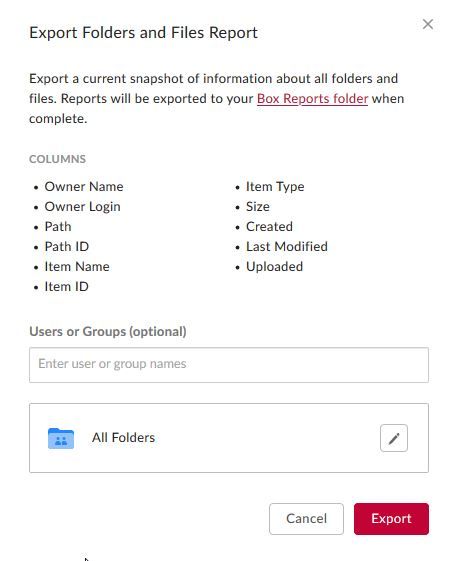
Btw, are there any Box CLI / API commands that will report back similar to what is offered in the console?


What I mean is under [Admin Console > Reports > Folders and Files}


BOX_om8ovrg7e0z6n003ydziwmykgnfj8ju8.png