


Upload files from Linux machine using command-line

  • May 31, 2023
  • 1 reply
  • 486 views

rbarbosa Box
Forum|alt.badge.img

Got an interesting question from a developer:

I have been provided a box folder from another user for me to upload files. I have a lot of files to upload to this folder. I created a personal account so I can get access. The files are on a remote Linux box. Is there a convenient way to bulk upload these files from the command-line? I’ve tried different ways (SFTP, generating access token, etc) but having issues with one restriction or another. I posted to your community support page but haven’t heard back.

What’s the best way to bulk-upload from Linux to Box?
1 reply

rbarbosa Box
Forum|alt.badge.img
  • Author
  • Developer Advocate
  • 556 replies
  • May 31, 2023

Have you tried the box-cli?

For a remote linux box you need to use JWT authentication, take a look here.

Walkthrough:

1❯ box -v
2@box/cli/3.7.0 linux-x64 node-v14.21.2
3

Get your config.json from creating a JWT app. (save it on the remote server, be conscious of security)

Configure your box-cli:

1❯ box configure:environments:add -n your-app-name ./.config.json
2Successfully added CLI environment "your-app-name"
3

Switch to the configuration:

1❯ box configure:environments:set-current
2? Which environment?
3uie-sample
4❯ your-app
5

Check connection and user context:

1❯ box users:get --fields=id,name
2Type: user
3ID: '20344589936'
4Name: UI-Elements-Sample
5

I have create a “Bulk Upload” folder in the root, so lets get that folder id:

1❯ box folders:items 0 --csv
2type,id,sequence_id,etag,name
3folder,163422716106,0,0,Box UI Elements Demo
4folder,189803765719,2,2,ClassificationService
5folder,177388203339,0,0,100k
6folder,172599089223,0,0,Bookings
7folder,172611202270,0,0,My Signed Documents
8folder,170845975022,1,1,Waivers
9folder,176837925976,0,0,Webhook
10

As you can see it is not there… This is because I created the folder on my person user (Rui) and the CLI is using the service account associated with the app and the JWT.

So we need to use my person user.

To get a list of users do:

1❯ box users --fields=id,name --csv
2type,id,name
3user,18662105676,Administrator
4user,18662356345,Administrator
5user,18661971368,Administrator
6user,22240548078,Investment User
7user,22240405099,Wealth User
8user,22240545678,Wholesale User
9user,**18622116055**,**Rui** Barbosa
10

So if I wanted my JWT app to impersonate me I would use my id on the --as-user

1❯ box users:get --as-user=18622116055 --fields=id,name --csv
2type,id,name
3user,18622116055,Rui Barbosa
4

And now I can list the folders of Rui:

1❯ box folders:items 0 --csv --as-user=18622116055
2type,id,sequence_id,etag,name,file_version.type,file_version.id,file_version.sha1,sha1
3folder,163422716106,0,0,Box UI Elements Demo,,,,
4folder,172599089223,0,0,Bookings,,,,
5folder,172759373899,0,0,Barduino User Folder,,,,
6**folder,191176042455,0,0,Bulk Upload,,,,**
7folder,189803765719,2,2,ClassificationService,,,,
8

Now we can use the destination folder if directly.

I also have a folder with the files to upload:

1❯ l files_to_upload
2total 0
3-rw-rw-r-- 1 lab lab 0 Jan 20 21:10 file_a.txt
4-rw-rw-r-- 1 lab lab 0 Jan 20 21:10 file_b.txt
5-rw-rw-r-- 1 lab lab 0 Jan 20 21:10 file_c.txt
6

Now we need to upload the files to the folder, in my case: 191176042455

We have several options depending if you are dealing with a large list of files and their location.

To upload an entire folder:

1❯ box folders:upload --parent-folder 191176042455 --as-user 18622116055 files_to_upload --csv --fields type,id,name
2type,id,name
3folder,191177421988,files_to_upload
4

To upload a single file:

1❯ box files:upload --parent-id 191176042455 --as-user 18622116055 files_to_upload/file_a.txt --csv --fields type,id,name
2type,id,name
3file,1119062117269,file_a.txt
4

Of course you can play with bash or use a CSV as an input file with a list of paths.

Let us know if this helped.

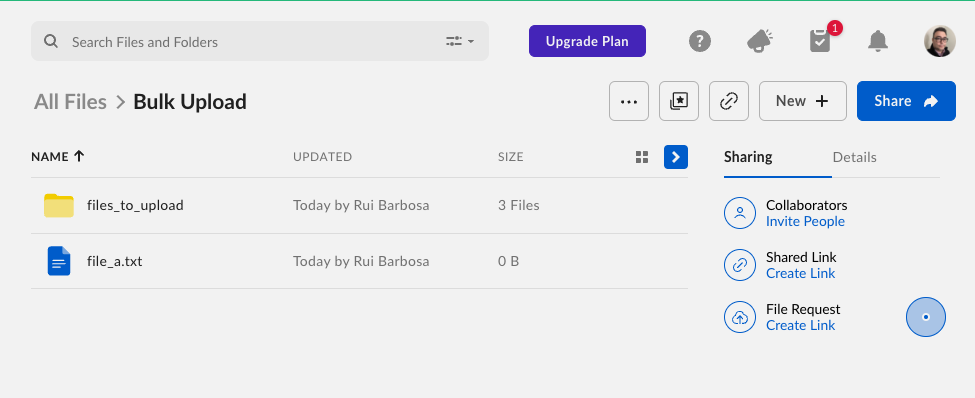
The end result:


Cookie policy

We use cookies to enhance and personalize your experience. If you accept you agree to our full cookie policy. Learn more about our cookies.

 
Cookie settings