








-
Recently active
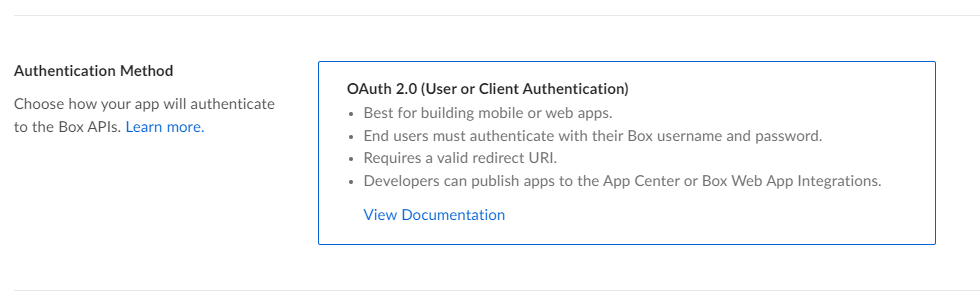
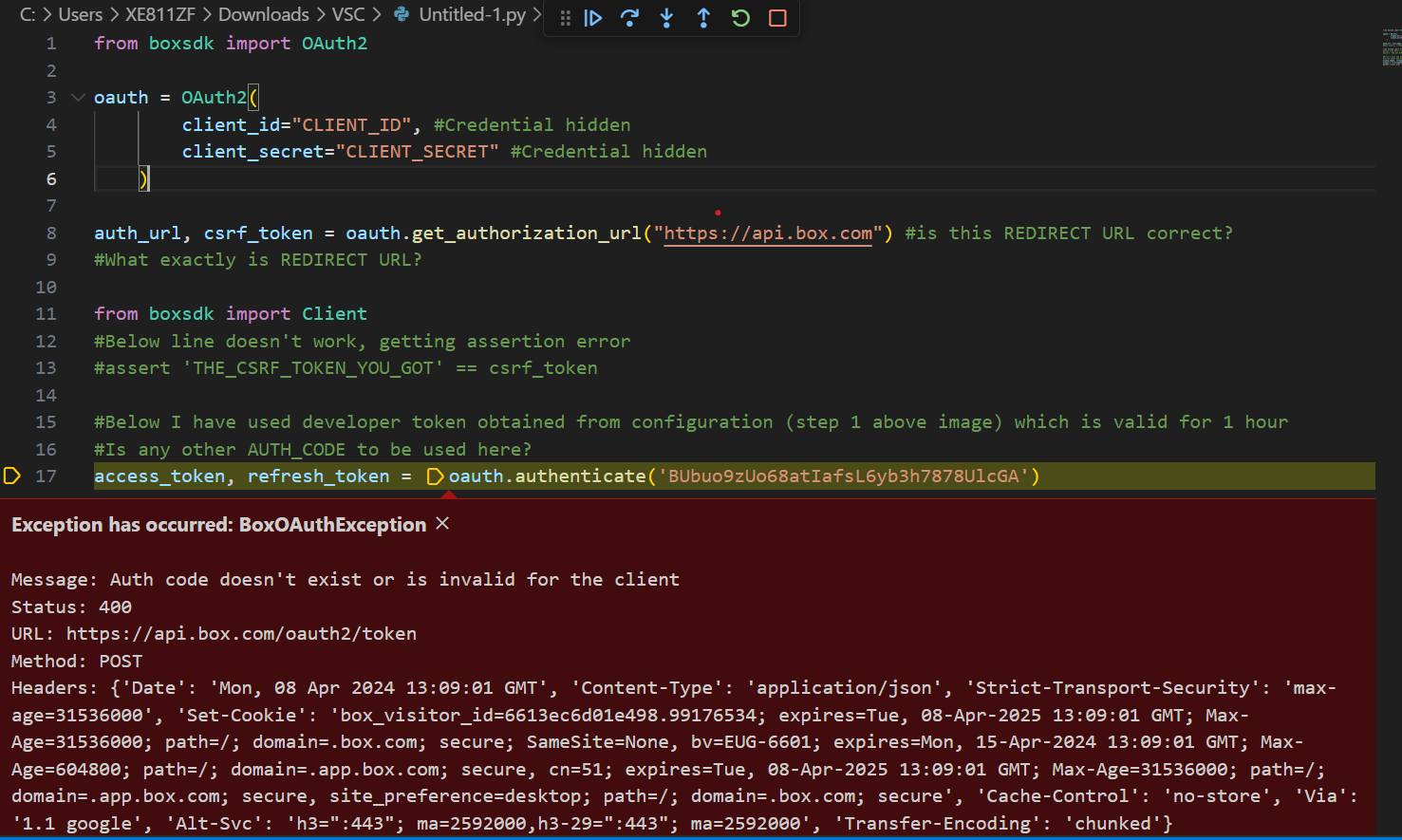
Hi, I am very new to using python. I tried to follow documentation of python SDK. I want to use GET / POST requests on box via python. I am using OAUTH, is it alright? (Or should I use basic auth / JWT - I am unaware of these methods but willing to learn) Here is the process I followed : a) Created a new app in Box Developers with Oauth. I am able to use this clientID & clientSECRET in postman app to fire all API commands. I have generated “Developer Token” as well on this page. b) Downloaded boxsdk to use it in python environment Please tell me what I am doing wrong. What should I use as Auth Code, if not the developer token? How to generate this auth code? Is my redirect URL Correct? PLEASE HELP!!!
I am trying to query files based on their metadata template that contain an ampersand ex: “A/7-8&9/389-399” using node box sdk metadata query method but it does not return values. It matches other values that do not have ampersand. Is there a way to handle special characters when trying to query them. I notice it works only if the query is setup as shown below var from = 'enterprise_someid.somekey', ancestorFolderId = 'somefolderid', options = { query : "DocumentId ILIKE :arg1 OR bookAndPageNumber = :arg2", query_params: { arg1: '%' + params + '%', arg2: params }, limit: 10 }; type or paste code here If i include the pattern matching operation it does not work var from = 'enterprise_someid.somekey', ancestorFolderId = 'somefolderid', options = { query : "DocumentId ILIKE :arg1 OR bookAndPageNumber ILIKE :arg2", query_param
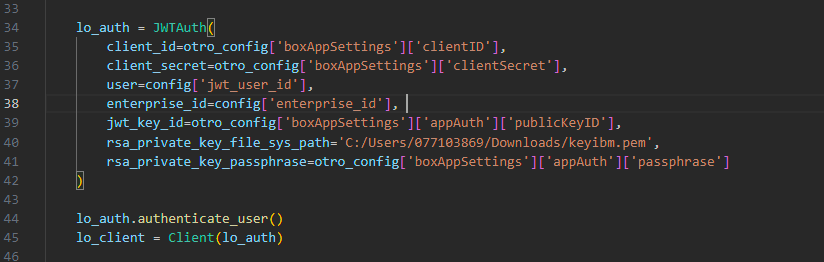
Hello, I am looking to create a Python script that can read from and write to Box. I followed the Box Dev instructions and created an App, so that I can use the generated Client ID and Client Secret to authenticate with JWT. Am I able to restrict the scope of the Client ID and Client Secret to certain directories? I would like my app to have read/write access for a subset of Box directories, and to be restricted from read/write permissions to all others. Thanks, Alex
I am trying to create a shared link from a not root box folder by Java SDK using an enterprise account credential. log.info("Start createSharedLink. id: {}, canDownload: {}, canPreview: {}", id, canDownload, canPreview); BoxFolder folder = new BoxFolder(boxProvider.getConnect(), id); BoxSharedLinkRequest boxSharedLinkRequest = new BoxSharedLinkRequest() .permissions(canDownload, canPreview) .access(BoxSharedLink.Access.COLLABORATORS) .unsharedDate(Date.valueOf(LocalDate.now().plusDays(3))); BoxSharedLink sharedLink = folder.createSharedLink(boxSharedLinkRequest); log.info("End createSharedLink. Created Url is: [{}]", sharedLink.getURL()); This request can work when I use either of following" BoxSharedLink.Access.COMPANY BoxSharedLink.Access.DEFAULT BoxSharedLink.Access.OPEN But only when I use COLLABORATORS, it will return me a 400 error com.box.sdk.BoxAPIResponseException: The API returned an erro
I need develop help to move 850 files from a source path ID to a new folder that I have identified. I do not have the developer skills to do myself. Let me know if you can help! Happy to pay for this assistance.
Hello everyone, I’ve been encountering an intermittent issue when trying to use the Box API to preview Excel Online files. Sometimes the files load successfully, but at other times, I receive an error stating that the Excel Online Previewer encountered an error and suggests refreshing the page. Here’s a snippet of the code I’m using: var preview = new Box.Preview(); preview.enableViewers('Office'); preview.show(fileId, accessToken, { container: "#preview-container", showDownload: true, }); The access token is obtained on the server side using JWT authentication. I am using the following URL version of JS via CDN: https://cdn01.boxcdn.net/platform/preview/2.93.0/en-US/preview.js Error Words: Excel Online failed to load. There was an error previewing your file with the Excel Online Previewer. Please refresh the page to try again. The error resolves temporarily when I log out and then log back into Box, but it reappears if I log out again. This leads me to wonder if the issue m
var sdkConfig = require(‘…/…/config/0_l3tozglf_config.json’); var sdk = BoxSDK.getPreconfiguredInstance(sdkConfig); // var client = sdk.getAppAuthClient('enterprise'); var client = sdk.getAppAuthClient('user', '32656874023'); const parentFolderID = '0'; const folderName = 'New Folder'; let create_folder = await client.folders.create(parentFolderID, folderName)
Hello, I am currently building an integration that downloads & uploads files from Box using the Box Python SDK. I am having issues using the upload_stream function (https://github.com/box/box-python-sdk/blob/main/docs/usage/files.md#upload-a-file) with an IOBase stream. I am doing the below (taken from the docs): new_file = parent_folder.upload_stream(object_bytes, file_name) The error I get it is: TypeError: unsupported operand type(s) for -: 'NoneType' and 'int' File "upload_to_box", line 174, in upload_small_file new_file = parent_folder.upload_stream(object_bytes, file_name) File "/usr/local/lib/python3.10/site-packages/boxsdk/util/api_call_decorator.py", line 63, in call return method(*args, **kwargs) File "/usr/local/lib/python3.10/site-packages/boxsdk/object/folder.py", line 322, in upload_stream file_response = self._session.post( File "/usr/local/lib/python3.10/site-packages/boxsdk/session/session.py", line 100, in post return self.request('POST', ur
Are there any Drupal (10.x+) modules for uploading files from Drupal forms to BoxAPI? I see a few of Drupal 7 modules, but nothing solid and nothing upgrade to the latest Drupal. I am looking for a form (or webform) element. I’ve used the API before to upload and download. But I’d prefer to not have to write this. And I’m very surprised not to see an existing module or suite of modules that integrate well.
I have abandoned using Box with PHP because the support is abysmal. Since this is an internal only application anyways, I’m using JavaScript. I can successfully download a file by searching for it using the /search?query=filename.ext&type=file endpoint. In the response, there are several entries, but I can find the specific file I’m looking for by using JavaScript’s find method checking the entry’s name and parent.id. When I try to upload a file using the /files/content endpoint, I am getting a 404 from the response using this function: async uploadFile(filename, rawFiles) { if (!this.#accessToken) { const errorMessage = 'Access Token is not set. Please authenticate first.' console.error(errorMessage); throw new Error(error); } const uploadUrl = 'https://api.box.com/2.0/files/content'; const parentFolderId = '-redacted-'; if (rawFiles?.length === 0) { const errorMessage = 'Please select a file.' console.error(errorMessage); throw new Error(error); } const file
Goal: Iterate through folder and get list of files. Upload files to box folder, and if successful, remove the file. Service running as a scheduled task in Windows Server 2022 to run Powershell script nightly. I cannot get a response from box files:upload when its successful. Any Suggestions?
Hi, We are using jenkins tool to upload files on box folder but due to the below mentioned error box uploads are failing: Please check the ‘exp’ claim. The ‘exp’ value exceeds the maximum value of 60 seconds beyond the issue time Please suggest. Shailendra Jetpuria
I have the following error when creating the JWT connection: Error: (‘The key data could not be deserialized. The data may be in an incorrect format, may be encrypted with an unsupported algorithm, or may be an unsupported key type (for example, EC curves with explicit parameters).’, [<OpenSSLError (code=503841036, lib=60, reason=524556, text_reason=unsupported)>])
I’m excited about box_sdk_gen! I’m trying this , but “ModuleNotFoundError: No module named ‘box_sdk_gen.auth’” occured. of cource I’ve done pip install box_sdk_gen. where’s box_sdk_gen.auth?
I generated a script to be able to upload backup files from a database to my BOX account developed with python. When I run the script it works correctly but when I go to the box I don’t see the uploaded files. The script is configured to upload the files to folder id 0. Running the script returns it tells me that the files already exist. Do you have any idea what could be happening?
Hi, I’d like to set up a watch folder on my Box account that will automatically download to a specified location on my local storage whenever a new file appears. I can currently do this manually with the CLI but would like to trigger this with a watch folder. Is that possible? Thanks, Chris
Background: We have a github cicd on a self-runner host from AWS. In this workflow we build our daily software and upload to Box using below command. This has been working for the past 6 month. Issue: Last couple of months, I am getting frequent errors that “item already exists”. (1) The problem is that files get uploaded correctly and when I check the box, I do see all the files. However, not sure why I am getting these errors. (2) It is not possible to have “same name” since each build has a unique github commit ID attached to our release target name. i.e, There are 3 different unique IDs concatenated together. Here is an example “0514.2_A_0.0.48_5b57cb4_0308”. Hence it is impossible to have same name. What is going on here? I need support from Box Team. This is not something we can afford to constantly have errors for no apparent reason. Error Error: Unexpected API Response [409 Conflict | 4t6w1ehnkir5p8jc.0786afe948d834788dc1f0ba396b1cc64] item_name_in_use - Item with the same nam
I am using box-python-sdk ver3.7.2. GitHub GitHub - box/box-python-sdk: Box SDK for Python Box SDK for Python. Contribute to box/box-python-sdk development by creating an account on GitHub. I referred to the issue below. Is it the same with version 3.7.2 or later? folder.get_items() limit param seems not working. folder.get_items() limit param seems not working for me · Issue #366 · box/box-python-sdk · GitHub There seems to be an issue with slow response times when there are a too many files in a folder. It seems that there are a large number of files(about 12,000 files) under folders in the Box environment that the customer is using. I think the response would be faster if get_items() could limit the number of records retrieved, but I think it would be difficult because it retrieves all records. Is there a source code workaround for this problem other than reducing the number of files in the folder?
Explicitly requesting the extension attribute from the BoxFile.Info object’s getInfo method provides the expected value. However, if requesting the entire BoxFile.Info object’s getInfo’s set of attributes, not explicitly specifying fields to be returned, the extension attribute value is missing. In addition, the SHA1 attribute, which is another specific BoxFile extension to BoxInfo, exists. I would expect both to be provided, but extension is not. Attempted with Box Java SDK versions 4.7.0 and 4.8.0. For example: BoxFile.Info info = file.getInfo("extension"); System.out.println(info.getExtension()); BoxFile.Info info = file.getInfo("sha1"); System.out.println(info.getSha1()); BoxFile.Info info = file.getInfo(); System.out.println(info.getExtension()); System.out.println(info.getSha1()); Example output: doc bddf8a01e139522c81c59b10df840c4379e24cfb null bddf8a01e139522c81c59b10df840c4379e24cfb The null output is unexpected.
Hello there, I am using your API to upload/download files to Box. I have managed to list all the folders and files but when trying to upload or download files and i’m receiving 403 error insufficient_scope. I have created a OAuth 2.0 app and i have all permissions (having a free account). So any solve for me? Thank you for your time.
I am using an App Token as my authentication and I am attempting to find a file by its name by submitting a cURL request to /search?query={filename}&type=file. While the response is successful in both my PHP code and doing it from the terminal, nothing is ever returned. Is there something I’m missing? For what its worth, here is my PHP function: function findRecordByFilename($accessToken, $filename) { $encodedFileName = urlencode($filename); $curl = curl_init(); curl_setopt_array($curl, [ CURLOPT_URL => "https://api.box.com/2.0/search?query=$encodedFileName&type=file", CURLOPT_RETURNTRANSFER => true, CURLOPT_HTTP_VERSION => CURL_HTTP_VERSION_1_1, CURLOPT_CUSTOMREQUEST => "GET", CURLOPT_HTTPHEADER => [ "authorization: Bearer $accessToken" ], ]); $response = curl_exec($curl); $curlError = curl_error($curl); curl_close($curl); // do something meaningful here, this is just an example if ($curlError) { echo '<pre><code>' . jso
Hi all, I created an app using JWT authentication and assigned it all permissions in the dev portal, and subsequently authorized it. When trying to run basic commands like “box users”, I am getting a 403 forbidden error. The app has the manage users checkbox checked, and has been authorized. Any ideas why I’m getting an error here? I appreciate your insights, thanks.
i am try to do some action in box , like add new task , get comments etc … i only know the user email but in api side we need account id , so do we have API to get account id by email ? or the api can using email to repacle account id ? BTW , i am using box-python-sdk-main , thank you!!
Hello box folks, I’ve created a new app with JWT authentication and while most everything so far has worked as expected, I’m getting a 403 error when trying to create an app user: ‘The request requires higher privileges than provided by the access token.’ Question for you: do I need a paid enterprise account to create app users or can it be done with a developer account. If it can be done with a developer account, can you point me to any documentation about what app permissions need to be enabled to create an app user? Thank you.
There is a Box folder that has over 360,000 items. When I attempt to list items in the folder I receive the following error: Context Info: {‘errors’: [{‘reason’: ‘invalid_parameter’, ‘name’: ‘offset’, ‘message’: ‘The offset plus limit must not exceed the maximum limit of 300000’}]} How can I limit the number of items returned? Is there a technique I can use to adjust the limit and offset when listing over 300,000 items?
Already have an account? Login
No account yet? Create an account
Enter your E-mail address. We'll send you an e-mail with instructions to reset your password.