Participating Frequently
Apr 24, 2024 7:22 AM UTC
Solved

Unable to use upload API from REST as http request

Hi, I am currently looking for fixing the issue when uploading a multipart request through a http request, showing the error as
{
“code”:“bad_request”,
“help_url”:“http://developers.box.com/docs/#errors”,
“status”:400,
“message”:“API upload did not contain a file part”,
“type”:“error”
}
and the input is
------BOUNDARY
Content-Disposition: form-data; name=“attributes”

{
“name”: “Sample.png”,
“parent”: {
“id”: “0”
},
“content_created_at”: “2012-12-12T10:53:43-08:00”,
“content_modified_at”: “2012-12-12T10:53:43-08:00”
}
------BOUNDARY
Content-Disposition: form-data; name=“file”; filename=“Sample.png”
Content-Type: image/png

------BOUNDARY--

I couldn’t use the SDK’s and the curl’s because I am using a low code platform and its very complicated there. I used a web socket to check out the request and the binary file was getting send.

    rbarbosa Box
    Developer Advocate
    Apr 24, 2024 10:44 PM UTC

    Hi Viswaas,

    Took me a while to figure that one out, but it is on OutSystems side where things need to be fixed.

    I wasn’t aware OutSystems had a Multi Part REST request, this must be fairly new. We used to do this by creating the binary multipart manually.

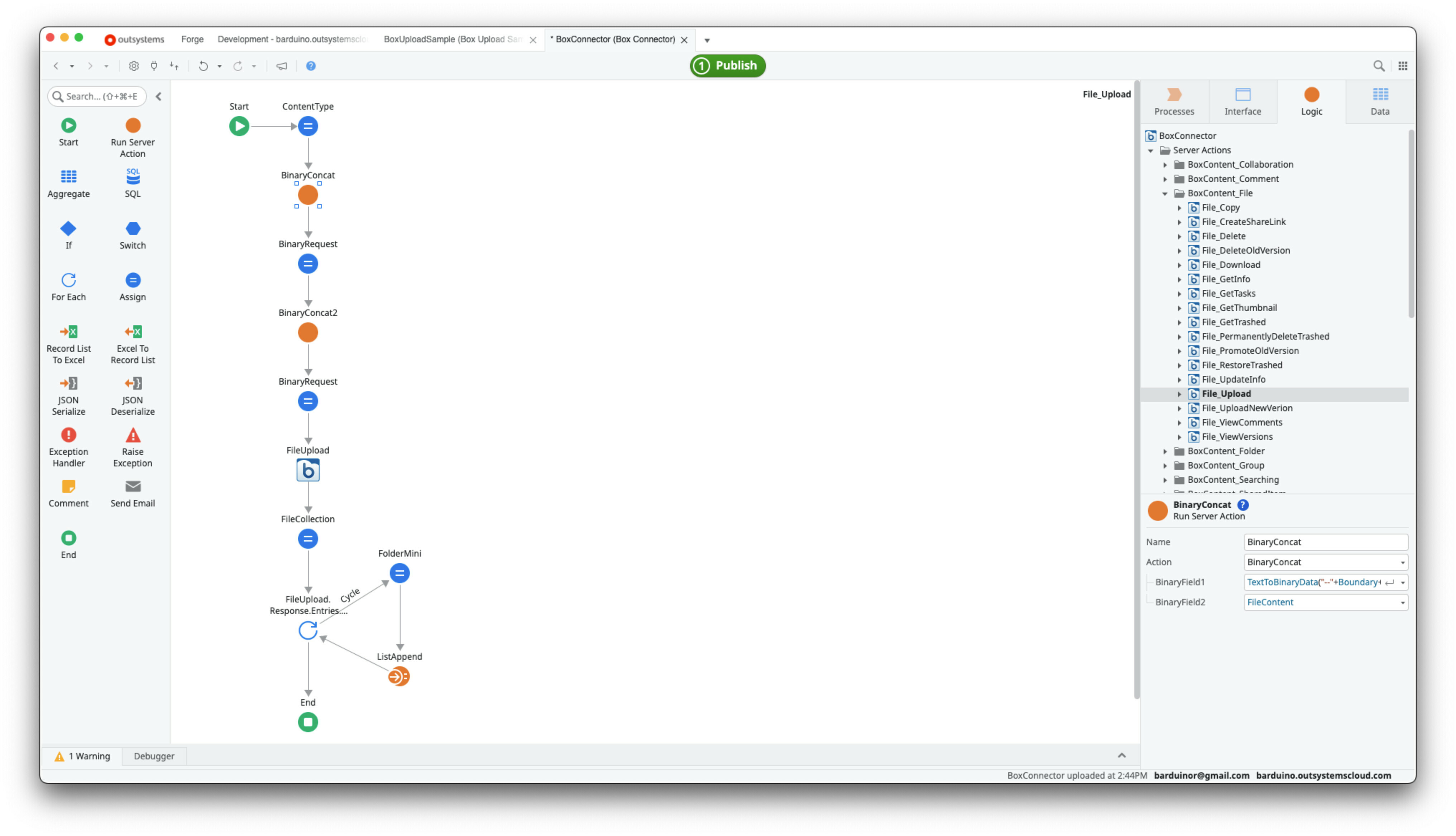
    If you look at the Box Connector sample code you can see the author building the multi-part binary by hand:

    However with the new multi-part support in the REST request this is no longer necessary. You can just specify multi-part and go from there, like you probably did.

    When I tested this I also got a bad request. There is an important detail that must be present, in my case it was the file name on the file multipart.

    Let me go step by step…

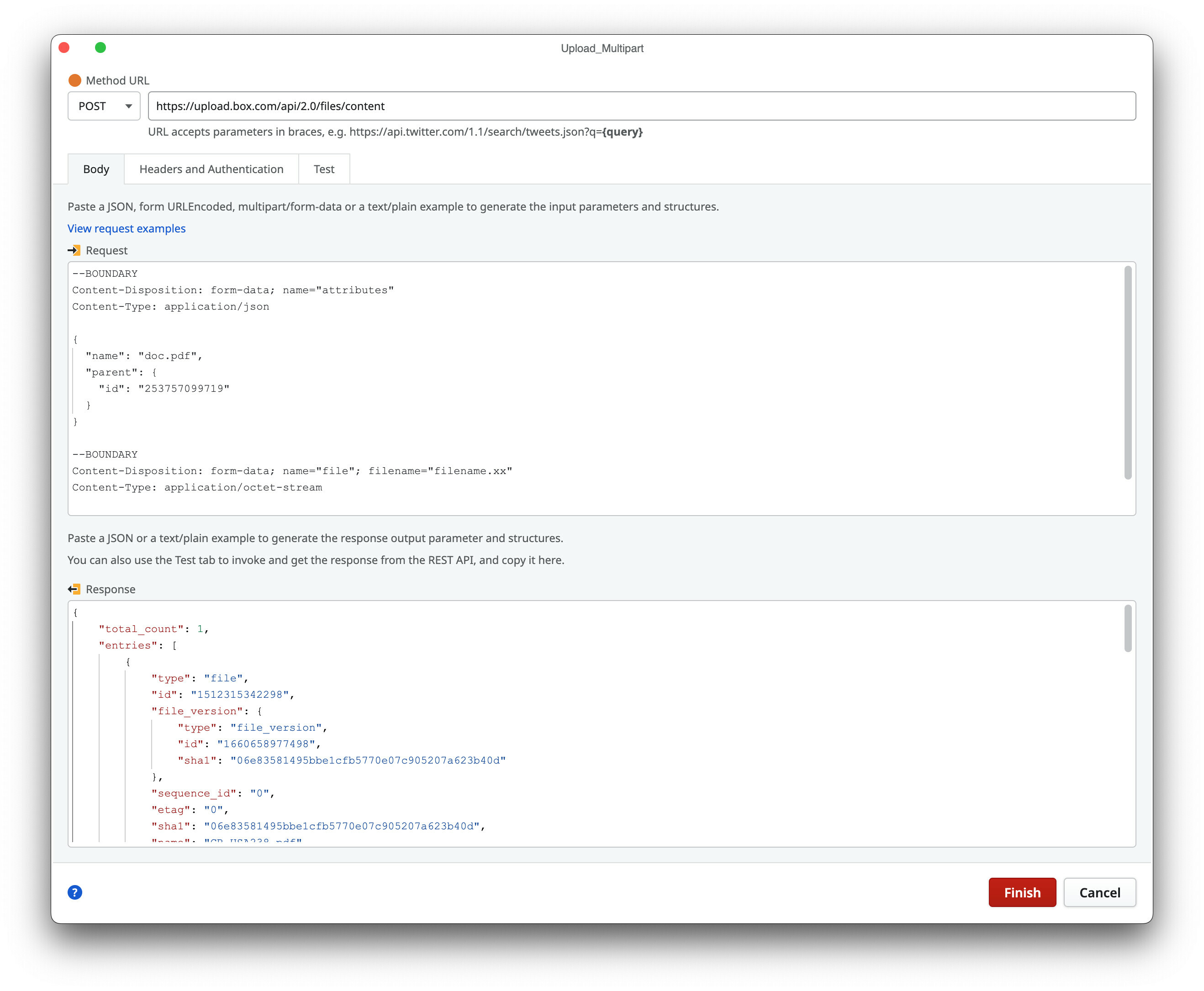
    First create the POST method and specifying multi-part, and like you, I used the formatting suggested by OutSystems:

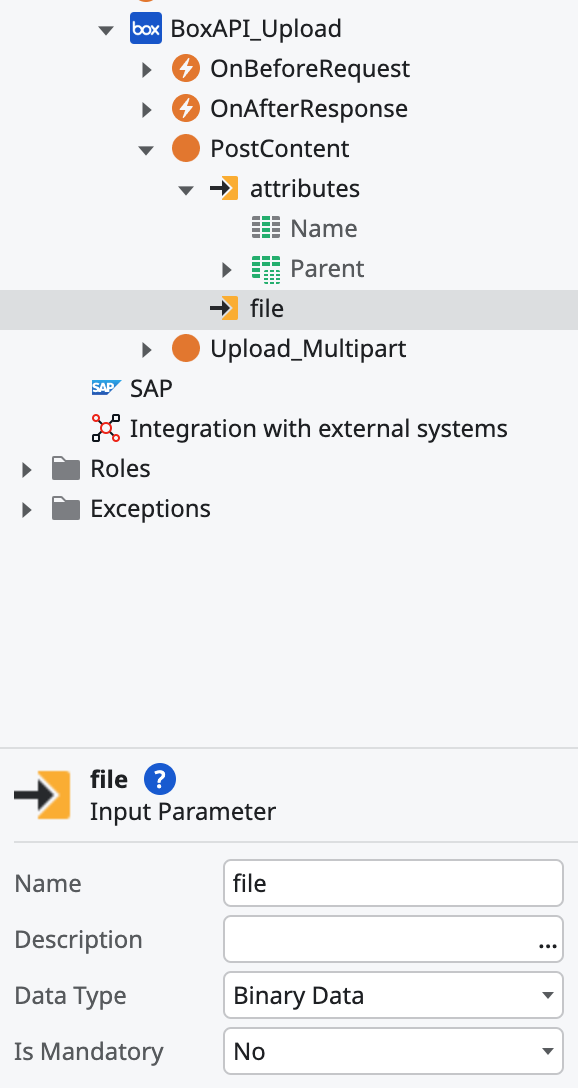
    This automatically created 2 parts, but the file part was incomplete, it just had file of type binary, although it picked up the attributes:


    This wont work because the Box API is expecting the file name, and without it it returns the 400 bad request.

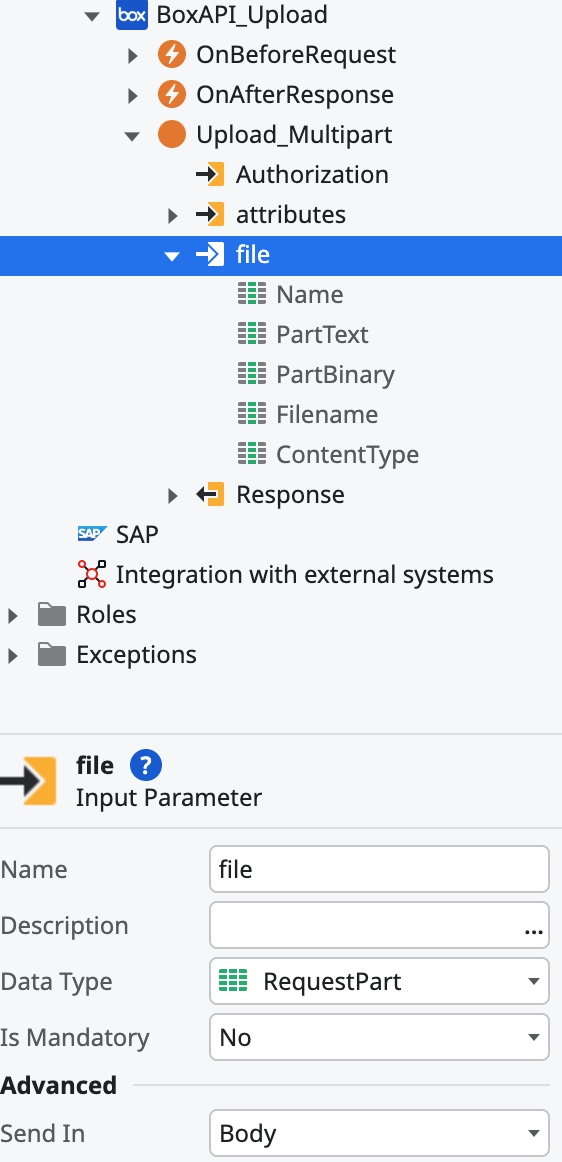
    Whenever an API contains at least one method with its Request Format set to multipart/form-data, the RequestPart data structure is created. We can use that structure in the request:


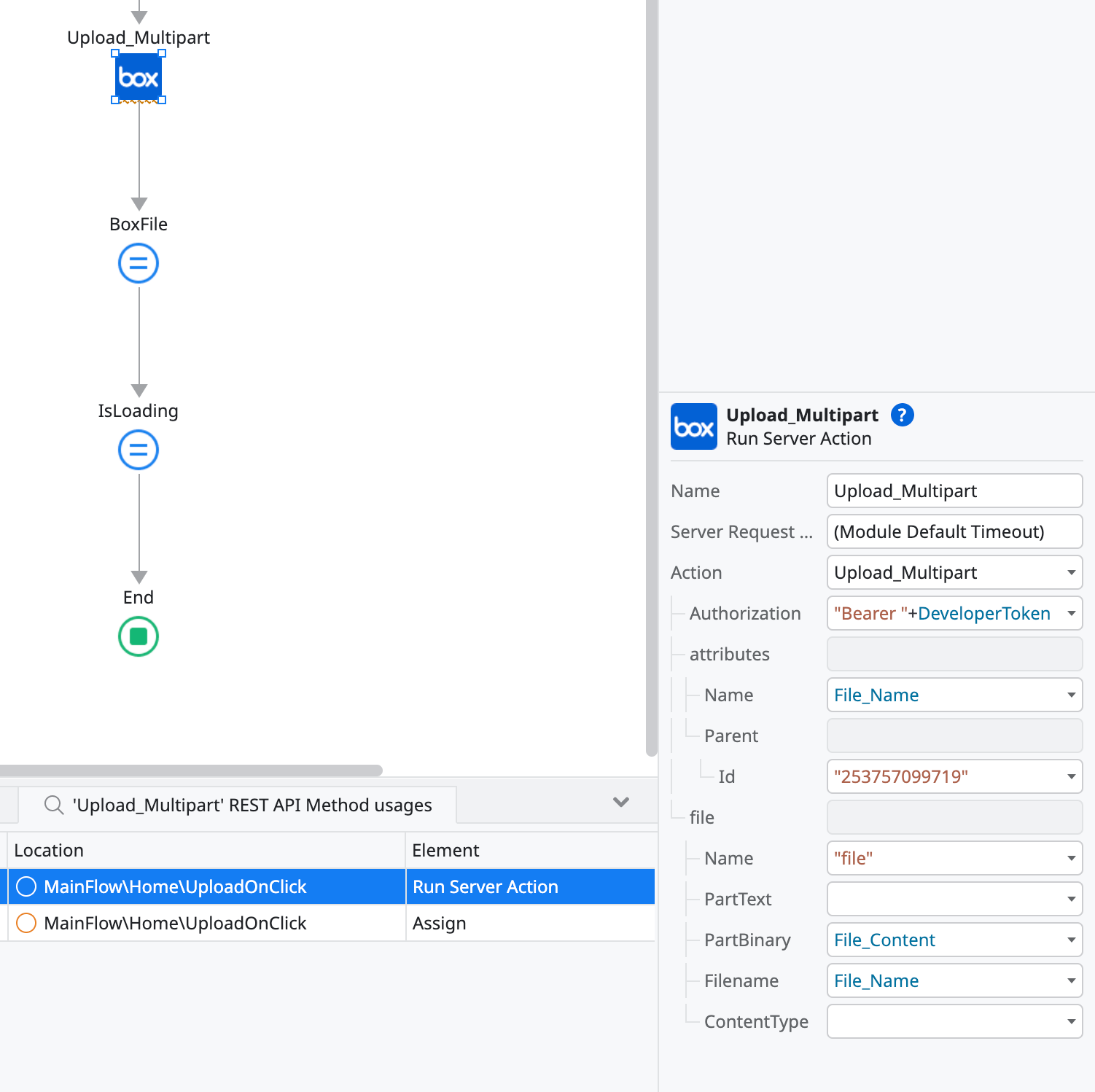
    Specifying the file name (both on the attributes and on the file multipart):

    You can download this sample OAP from here.

    Finally I want to mention that there are quite a few Box components available on the forge.
    They might be a bit outdated, but it is easy to update.

    Let us know if this helps

    6 replies

    rbarbosa Box
    Developer Advocate
    Apr 24, 2024 2:46 PM UTC

    Hi,

    It would help if you shared with us what low code are you using.

    In the forum there are several Bubble, OutSystems and other low code developers that perhaps can help.

    In your post I’m not sure your request is missing parts or you just omitted them.

    Typically the issue with making these manual requests is sending the file in binary, and making these requests by hand is always tricky.

    My approach is to compare what is being sent from a tool like Postman or cUrl of a successful request to what is being sent from the low code tool.

    So, for example Postman sends this:

    POST /api/2.0/files/content?fields=id,type,name HTTP/1.1
    Host: upload.box.com
    Content-Type: multipart/form-data; boundary=----WebKitFormBoundary7MA4YWxkTrZu0gW
    Authorization: Bearer Vx4g3daqhjFTgS37ZDC2w8LZIs7jQJYe
    Cookie: box_visitor_id=65d64b39d64cc8.84093859; site_preference=desktop
    Content-Length: 417
    
    ------WebKitFormBoundary7MA4YWxkTrZu0gW
    Content-Disposition: form-data; name="attributes"
    
    {
      "name": "CR-USA238.pdf",
      "parent": {
        "id": "253757099719"
      }
    }
    ------WebKitFormBoundary7MA4YWxkTrZu0gW
    Content-Disposition: form-data; name="file"; filename="Document (PDF).docx"
    Content-Type: application/vnd.openxmlformats-officedocument.wordprocessingml.document
    
    (data)
    ------WebKitFormBoundary7MA4YWxkTrZu0gW--


    Where the (data) was omitted because it is difficult to represent a binary file in characters.

    Another tool to get a full trace you can use is cUrl, for example:

    curl  --trace-ascii /dev/stdout --location 'https://upload.box.com/api/2.0/files/content' \
    --header 'Content-Type: multipart/form-data' \
    --header 'Authorization: Bearer y788...hkH' \
    --form 'attributes="{
      "name": "Photo.png",
      "parent": {
        "id": "0"
      }
    }"' \
    --form 'file=@"/Users/rbarbosa/Downloads/box_admin_pic.png"'
    

    Returns:

    0000: POST /api/2.0/files/content HTTP/2
    0024: Host: upload.box.com
    003a: user-agent: curl/7.88.1
    0053: accept: */*
    0060: authorization: Bearer y788...uhkH
    0098: content-length: 3111
    00ae: content-type: multipart/form-data; boundary=--------------------
    00ee: ----acf11690303b651d
    0104:
    => Send data, 3111 bytes (0xc27)
    0000: --------------------------acf11690303b651d
    002c: Content-Disposition: form-data; name="attributes"
    005f:
    0061: {.  "name": "Photo.png",.  "parent": {.    "id": "0".  }.}
    009d: --------------------------acf11690303b651d
    00c9: Content-Disposition: form-data; name="file"; filename="box_admin
    0109: _pic.png"
    0114: Content-Type: image/png
    012d:
    012f: .PNG
    0135: ......IHDR...@...@.....%.......pHYs................zIDATx..Y{lV.
    0175: ..=.{......J..JK[67E....)........,f..........{.]]HD.2.8...d.ef..
    01b5: ,....m)..~...n.}..q.......Ic.'..4.w......%U..Yx....L..h.$0.2I`.e
    
    #####################
    
    0bb5: b.$.hwt........@....O..h.$0.2I`.e..D.$...O=...H*..Vy.Y....IEND.B
    0bf5: `.
    0bf9: --------------------------acf11690303b651d--
    

    Now you have something that works to compare with what you are sending.

    To check what is actually being sent, you can use the Postman echo service. For example:

     curl --location 'https://postman-echo.com/post' \
    --header 'Content-Type: multipart/form-data' \
    --form 'attributes="{
      "name": "CR-USA238.pdf",
      "parent": {
        "id": "253757099719"
      }
    }"' \
    --form 'file=@"/Users/rbarbosa/Downloads/CR-USA238 Box_Upload_18 - CR DA - DocuSign.pdf"'
    

    Returns:

    {
      "args": {},
      "data": {},
      "files": {
        "CR-USA238 Box_Upload_18 - CR DA - DocuSign.pdf": "data:application/octet-stream;base64,JVBERi0xLjUKJfv8/f4KMTAgMCBvYmoKPDwvTGVuZ3RoIDQ
    

    … many more lines …

    +PnN0cmVhbQp4nGMAgf9AwMjAdCQJxGFkYJ7dA2IwAXEgMoMRKLWAD1mECcZghjFYYQx2GIMFxmCDMThAdr2C2MV0Sh/KOPcbyrg0BeqM6XJQxsJuEAMAXnUR3QplbmRzdHJlYW0KZW5kb2JqCnN0YXJ0eHJlZgoyMzc5NjMKJSVFT0Y="
      },
      "form": {
        "attributes": "{\n  "name": "CR-USA238.pdf",\n  "parent": {\n    "id": "253757099719"\n  }\n}"
      },
      "headers": {
        "x-forwarded-proto": "https",
        "x-forwarded-port": "443",
        "host": "postman-echo.com",
        "x-amzn-trace-id": "Root=1-660ed7a2-58c55cba3e0cac2f1d3cb085",
        "content-length": "238720",
        "user-agent": "curl/8.4.0",
        "accept": "*/*",
        "content-type": "multipart/form-data; boundary=------------------------eFaCmpNpRCS4r0ODRNxhbg"
      },
      "json": null,
      "url": "https://postman-echo.com/post"
    }
    

    Let us know if this helps

    Translate
    user225Author
    Participating Frequently
    Apr 24, 2024 5:41 PM UTC

    Hi,

    Thank you for replying.

    So I am using OutSystems low code platform. Here I am using their REST API services and sending the http request to the server.

    I compared the response from the https://postman-echo.com/post you gave and the differences were like this

    Response when sent from OutSystems REST API

    {
      "args": {},
      "data": {},
      "files": {
        "undefined": "data:application/octet-stream;base64,SGVsbG8gV29ybGQNCg=="
      },
      "form": {
        "attributes": "{"name":"Hello World.txt","parent":{"id":"0"},"content_created_at":"2024-04-24T17:38:52.311Z","content_modified_at":"2024-04-24T17:38:52.311Z"}"
      },
      "headers": {
        "x-forwarded-proto": "https",
        "x-forwarded-port": "443",
        "host": "postman-echo.com",
        "x-amzn-trace-id": "Root=1-662943ad-615cadfd68008a971b73824d",
        "content-length": "450",
        "user-agent": "OutSystemsPlatform",
        "content-type": "multipart/form-data; boundary=c13fef3c-932d-4bf3-b166-d847cc1d6470"
      },
      "json": null,
      "url": "https://postman-echo.com/post/"
    }
    

    Response when sent from POSTMAN

    {
        "args": {},
        "data": {},
        "files": {
            "Hello World.txt": "data:application/octet-stream;base64,SGVsbG8gV29ybGQNCg=="
        },
        "form": {
            "attributes": "{\n  "name": "Testing3.png",\n  "parent": {\n    "id": "0"\n  },\n  "content_created_at": "2012-12-12T10:53:43-08:00",\n  "content_modified_at": "2012-12-12T10:53:43-08:00"\n}"
        },
        "headers": {
            "x-forwarded-proto": "https",
            "x-forwarded-port": "443",
            "host": "postman-echo.com",
            "x-amzn-trace-id": "Root=1-66293e9b-58eb5b4857710d8f65ad9b19",
            "content-length": "503",
            "authorization": "Bearer NWExflfVHx1PrA69YmtmQT0CPJt1btcC",
            "user-agent": "PostmanRuntime/7.37.3",
            "accept": "*/*",
            "postman-token": "b03688ba-0f47-4546-9bf3-518e5f862919",
            "accept-encoding": "gzip, deflate, br",
            "content-type": "multipart/form-data; boundary=--------------------------665164472202127655413292"
        },
        "json": null,
        "url": "https://postman-echo.com/post"
    }
    

    The request send from OutSystems (This request only contains the body)

    --BOUNDARY
    Content-Disposition: form-data; name="attributes"
    
    {
      "name": "Hello World.txt",
      "parent": {
        "id": "0"
      },
      "content_created_at": "2012-12-12T10:53:43-08:00",
      "content_modified_at": "2012-12-12T10:53:43-08:00"
    }
    --BOUNDARY
    Content-Disposition: form-data; name="file"; filename="Hello World.txt";
    Content-Type: text/plain
    
    (data)
    --BOUNDARY--
    

    and with POSTMAN the request is send through the form-data option.

    Translate
    user225Author
    Participating Frequently
    Apr 24, 2024 5:45 PM UTC

    This scenario is when I was sending a txt file in both requests.

    When coming to the BOX upload API the error is showing that the API upload did not contain a file part.

    Translate
    rbarbosa Box
    Developer Advocate
    Apr 24, 2024 10:44 PM UTC

    Hi Viswaas,

    Took me a while to figure that one out, but it is on OutSystems side where things need to be fixed.

    I wasn’t aware OutSystems had a Multi Part REST request, this must be fairly new. We used to do this by creating the binary multipart manually.

    If you look at the Box Connector sample code you can see the author building the multi-part binary by hand:

    However with the new multi-part support in the REST request this is no longer necessary. You can just specify multi-part and go from there, like you probably did.

    When I tested this I also got a bad request. There is an important detail that must be present, in my case it was the file name on the file multipart.

    Let me go step by step…

    First create the POST method and specifying multi-part, and like you, I used the formatting suggested by OutSystems:

    This automatically created 2 parts, but the file part was incomplete, it just had file of type binary, although it picked up the attributes:


    This wont work because the Box API is expecting the file name, and without it it returns the 400 bad request.

    Whenever an API contains at least one method with its Request Format set to multipart/form-data, the RequestPart data structure is created. We can use that structure in the request:


    Specifying the file name (both on the attributes and on the file multipart):

    You can download this sample OAP from here.

    Finally I want to mention that there are quite a few Box components available on the forge.
    They might be a bit outdated, but it is easy to update.

    Let us know if this helps

    Translate
    user225Author
    Participating Frequently
    Apr 25, 2024 4:23 AM UTC

    Thank you @rbarbosa for the solution. It really helped.

    Translate
    system
    Box Employee
    Apr 29, 2024 4:24 AM UTC

    This topic was automatically closed 4 days after the last reply. New replies are no longer allowed.

    Translate