All things API and SDK related
Recently active
Previously, the Get Box Sign request by ID endpoint at https://api.box.com/2.0/sign_requests/**:sign_request_id** would return a filled in document_tag_id if one existed, as shown at https://developer.box.com/reference/get-sign-requests-id/ e.g. "inputs": [ { "document_tag_id": "1234", "text_value": "text", "checkbox_value": true, "date_value": "2021-04-26", "type": "text", "content_type": "signature", "page_index": 4, "read_only": true } However, now document_tag_id is always null for all inputs on sign requests made June 13th and after. Prior to that (June 12th and before) those requests seem to be functioning correctly still and returning document_tag_id as expected. My assumption would be this is just a bug that was introduced in the API endpoint? Expected behavior: document_tag_id is not null Actual: document_tag_id is null
I’ve integrated box with my dotnet application, I’ve created folder via our application in box and after uploaded few files in the particular folder. After I tried to search that specific file with file name and parent folder id it returning empty result at the time of file uploaded, after few minutes(around 5-10 minutes) later when we try with the same API call, it bring the expected results. Please find the used code in below and suggest or share your thoughts. Client.SearchManager.QueryAsync( fileName, ancestorFolderIds: new List<string>() { parentFolderId }, fields: new[] { "id,name,type,path_collection,size,created_at,modified_at" }, limit: 30)
Hello I am Using Box Search API and Also Try To Search With dll When I Give the Search Keyword “disposition” In response I Get the files Which contain “disposition” in file name and file content.But ,Here i also get files Which Contain Different Keyword “dispositive” and “disposal”Hello ,Box Team Can You explain me this ?and i also try with Exact Match using operator “disposition” but return same result.
I am currently developing an application using the Box Sign API and encountering a persistent 404 Not Found error when attempting to create a sign request. Here are the details of the issue: API Endpoint: URL: https://api.box.com/2.0/sign_requests HTTP Method: POST Access Token: Full-authorization Payload Sent: { "signers": [ { "role": "signer", "email": "<personal email-redacted>" } ], "source_files": [ { "type": "file", "id": "1611107706949" } ], "parent_folder": { "type": "folder", "id": "278098710623" }, "is_document_preparation_needed": true } Response Received: { "type": "error", "code": "not_found", "status": 404, "message": "Not found", "help_url": "https://developer.box.com/guides/api-calls/permissions-and-errors/common-errors/", "request_id": "0e33bee75ee29cf32c3c2aefc0b0b7adb", "context_info": { "
Hi -We have a JWT service account that was used more than 1 1/2 year and that stopped working.Auth token generates but can't connect to shared folder with our client. Getting follow error message.{"type":"error","status":404,"code":"not_found","context_info":{"errors":[{"reason":"invalid_parameter","name":"parent","message":"Invalid value 'd_XXXXXXXX'. 'parent' with value 'd_XXXXXXXX' not found"}]},"help_url":"http:\/\/developers.box.com\/docs\/#errors","message":"Not Found","request_id":"----"}Out client have shared the folder again with service account (AutomationUser_XXXXX_XXXXX@boxdevedition.com). But it seems service account needs to accept the shared folder invite. Not sure how to accept the invite.Would you be able to assist please?
I’d like to apply a metadata template from another enterprise (let’s call it Enterprise B) to files from my enterprise (Enterprise A). When I attempt to do so via the Box API, I receive 403 Forbidden. I’ve tried a number of variations, to get an idea of what responses I can expect: If Enterprise B doesn’t exist - 400 Bad Request, Invalid metadata scope. If Enterprise B does exist but the metadata template does not - 404 Not Found, Specified Metadata Template not found. If Enterprise B does exist and the metadata template does exist - 403 Forbidden. I suspect that the user making the call needs permissions that they don’t have, but it’s not clear to me what permissions that user needs - there don’t appear to be any permissions specific to metadata. What must I do to allow a user from Enterprise A to apply a metadata template from Enterprise B to files in Enterprise A?
I am Searching For File Which Have Keyword “Disposition” I am Getting the Files Which have Keyword “Disposition” But Getting files Which Have Keyword “Dispositive” Which is not appropriate or match the keyword .Check This For Reference..
I know that calls to api.box.com count against an API limit of 50k to 100k calls. Do requests to `dl.boxcloud.com` count against that limit as well? e.g., if I call `https://api.box.com/2.0/files/:file_id/content`, is that two chargeable requests counting the redirect, or one?
Hi,At this time, there appears to be no way to search for managed users by email alias.So if I want to find a user by email alias, I have to get all users and check each user's email alias one by one, which requires a lot of API calls.To reduce unnecessary API calls, could you provide an API endpoint to search for users by email alias?Akihiko
I'm seeing an error when moving folders between different owners.The request contents and response are as follows.It has been pointed out that a new owner should be specified, but how should I specify it?Request:PUT: https://api.box.com/2.0/folders/277094708559raw body:{ “parent”: { “owned_by”:{“id”:“34690427263”}, “id”:“277094005474” }} Response:{ “type”:“error”, “status”:400, “code”:“cannot_make_collaborated_subfolder_private”, “help_url”:“http://developers.box.com/docs/#errors”, “message”:“Cannot move a collaborated subfolder to a private folder unless the new owner is explicitly specified”, “request_id”:“cajrjnhs2ugc7ixz”}
Dear Box Support Team,I hope this message finds you well. We are currently in the process of integrating Box API functionalities into our application. While we have successfully accessed sign requests through the Box API, we have encountered specific requirement that we are seeking clarification on:Checking if a User Has Signed a Document: We need functionality in the Box API that allows us to determine whether a specific user has already signed a document. Unfortunately, We didn't find this functionality in the current Box API for sign requests. Are there alternative methods we could utilize?Thanks.
Hi,I am generating a token following the tutorial for JWTs (grant_type: "urn:ietf:params:oauth:grant-type:jwt-bearer"). The API does return an access token, and it does work, but it doesn't seem to have the structure of a JWT (3 sections separated by dots...).I am requesting it using a RSA key pair to sign the request.I wonder if the tokens are encoded in a particular way, encrypted, or it is just an access token and not really a JWT.Thanks!
What types of user interactions with Box AI are recorded in the User Activity Report, and how can Box Admins utilize this information?
Hello, I hope this email finds you well. I am writing to inquire about the status of my custom app Auth 2.0, which was submitted for approval on 27th June. It appears to still be under review. Could you kindly provide an update on when it is expected to be approved?
I use Claris FileMaker to upload a file via https://upload.box.com/api/2.0/files/contentI use following cURL: "--location --header \"Content-Type: multipart/form-data\" --header \"Authorization: Bearer XXX\" --form \"attributes=@$JSON\" --form \"file=@$Fil\" -D $header"I get HTTP/1.1 400 Bad Request with this in return: {"code":"bad_request","help_url":"http://developers.box.com/docs/#errors","status":400,"message":”API upload contained multiple file parts","type":"error"}I dont see any info on “API upload contained multiple file parts” in the link, or on the web. Someone knows what it mean and how to solve it?
I want to login box using okta SSO token I have box integrated with okta for SSO but then i use box SDK in node and try to login in box am unable to pass correct user id of box , i am using okta sub as my box user id but it thronging error user not valid
I’m playing around with the next generation .Net SDK and at least half of my calls to upload a file or create a folder are throwing an exception about RSA parameters in a cryptography library. The full exception is like this: System.Security.Cryptography.CryptographicException: The specified RSA parameters are not valid. Exponent and Modulus are required. If D is present, it must have the same length as Modulus. If D is present, P, Q, DP, DQ, and InverseQ are required and must have half the length of Modulus, rounded up, otherwise they must be omitted. at System.Security.Cryptography.CngHelpers.ToBCryptBlob(RSAParameters& parameters) at System.Security.Cryptography.RSABCrypt.ImportParameters(RSAParameters parameters) at System.Security.Cryptography.RSA.Create(RSAParameters parameters) at Microsoft.IdentityModel.Tokens.AsymmetricAdapter.InitializeUsingRsaSecurityKey(RsaSecurityKey rsaSecurityKey, String algorithm) at Microsoft.IdentityModel.Tokens.AsymmetricAdapter..c
Hi, Some time we are getting “socket hang up” error (/oauth2/token) during call file upload and download method. This is not happening every time. But we stuck when it occurs. Could you please help us to resolve this issue. Thanks.
We are a software house, currently we signed up box.net, and we would like to share out different folders based on client, e.g. my-box.net account + ClientA folder + ClientB folder and our client A, B are not box’s subscribers. Hence, is it possible for us to share any credentials (similar to SFTP) and allow client A, B to access their folders respectively and pull out their files?
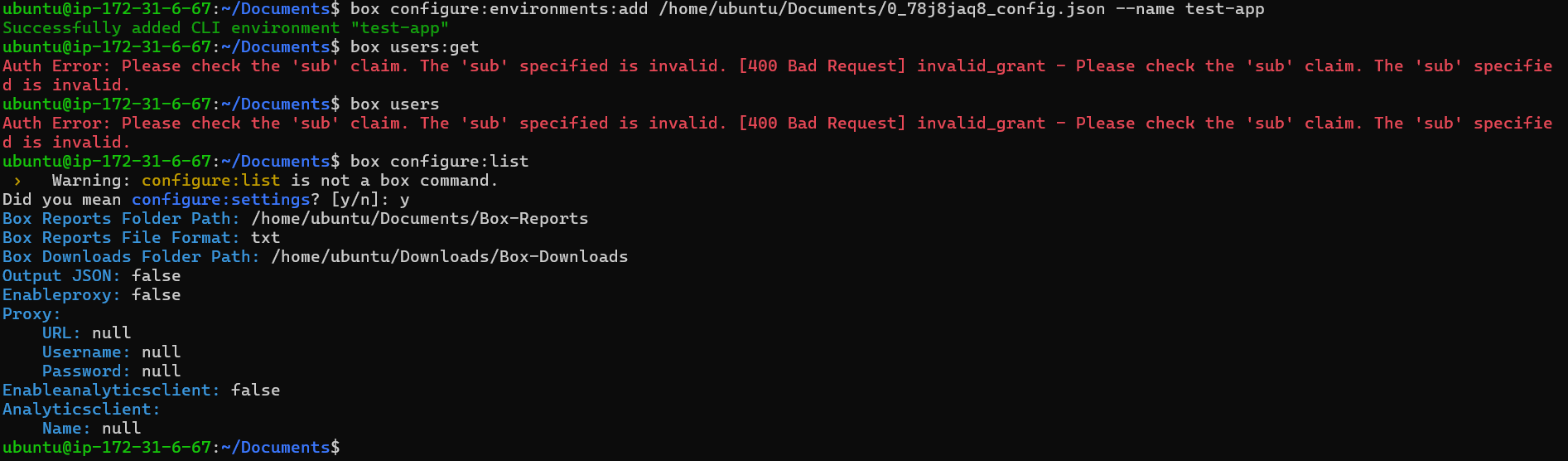
I’m using a free personal BOX account, and I’m trying to connect to a JWT BOX app through a aws EC2 instance of Ubuntu. I’ve configured my JWT app, created the public and private key, and run “box:configure:environments:add [json path file]” on my server. I then tried to run “box users” to see if I’m connected with my app, but that resulted in the error: “Auth Error: Please check the ‘sub’ claim. The ‘sub’ specified is invalid. [400 Bad Request] invalid_grant - Please check the ‘sub’ claim. The ‘sub’ specified is invalid.” Does anyone know how to fix it? Thanks!
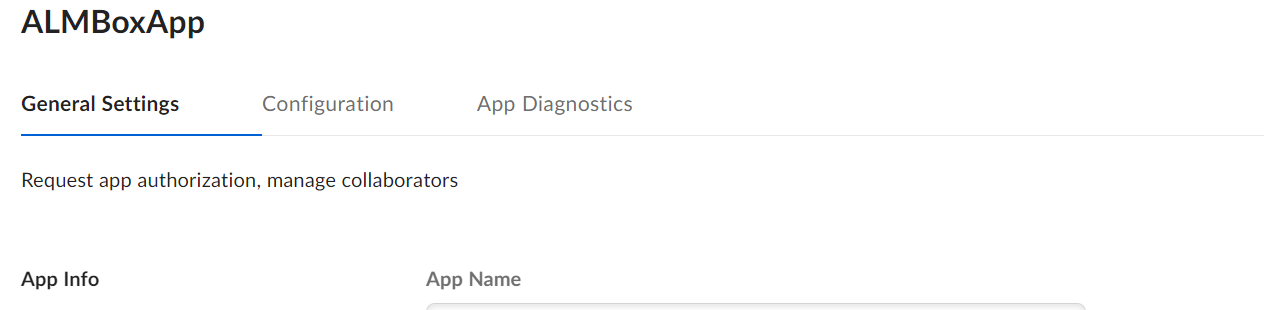
I have created a custom app, create public/private key as well but not getting an option to submit app for authorization. There is no Authorization tab. In General Settings tab, it is showing Enterprise id as 0
We want to make you aware of a recent effort by certain third-party bad actors to leverage free Box developer accounts in a social engineering attack on certain Box free individual accounts. Upon discovery of this issue, Box decided to temporarily disable new sign-ups for free developer accounts while we work to implement additional technical controls to prevent similar efforts in the future. The security and integrity of our Service is of utmost priority to Box, and we must ensure that we are providing the most secure product experience to our customers. We understand that some Enterprise customers use these free developer accounts for their own business purposes, and that they may have questions about their inability to sign-up new free accounts. Please use the following talking points when addressing these Customers’ questions or concerns: Any free developer accounts that were in place before March 9, 2023 are unaffected by this action; Customers may continue to use these pre-exist
Hi, Last year we had to disable the creation of free developer accounts due to abuses from some bad actors. You can read about it here: Free developer accounts -Please READ I’m happy to inform that creation of free developer accounts is now back! To create a free developer account simple navigate to the developer signup. The main difference between the free developer account and a simple free account is that the developer version has access to the administrator console which will allow you to authorize JWT and CCG applications. Stuck with OAuth 2.0? Not anymore! Enjoy!
Hello Box Developer Community, I hope this message finds you well. I am currently experiencing an issue with the Box UI Element’s Content Preview feature in our application. We are using this feature to preview PDFs, but we have noticed that the preview becomes unavailable after approximately 10 to 15 minutes. We have confirmed that this issue also occurs in the official documentation, where the preview times out after the same duration. We are seeking a solution to prevent this from happening without requiring our users to clear their cache. Additionally, we have identified that URLs from the domain dl.boxcloud.com, which are provided by Box for downloading, expire after 15 minutes. We suspect this might be related to the issue we are experiencing with the content preview timing out. Could anyone confirm if this expiration is affecting the preview functionality and provide guidance on how to handle it? Here are a few considerations and questions we have: Session Expiration: It seems
Hi folks, For those of you using the Box Postman advanced collection with JWT authentication, with a recently generated private key, you might be having error when the pre-request script tries to get a new access token. The error in question is a malformed PCKS. The reason behind this is that Box has updated the encryption method of the private key to something not supported by the JSRSASign v10.x. The good news is that the new version of JSRSASign (v11.x) does support it. While we fix the collection here is a quick fix: Download the JSRSASign from the CDN. Go to and select the Box Advanced collection Replace the content of the variable libJSRSASign with the content from the CDN link above. Remember to Save!!! Your all set. We’ll update the collection in Postman shortly.
Already have an account? Login
No account yet? Create an account
Enter your E-mail address. We'll send you an e-mail with instructions to reset your password.