All things API and SDK related
Recently active
I would like to download the signed document after all the signers have completed the signatures. In trying to do so, I am trying to call download API by providing the file id:https://{{api.box.com}}/2.0/files/{file_id}/contentAfter checking the status of sign request, which is “signed”, I am trying to download the document. However, it is still resulting in the document which is not signed/without signatures.Can you please help me understand, how to get the signed document through API.Thanks in advance.RegardsVenky
Your SSO connection had errors during set up. In order to help troubleshoot your connection, please submit a case to Box User Services here.
We have successfully enabled the GCM scope on our Custom App through Box Customer Success. However, we would like some clarification regarding the authorization process for our customers. Specifically, when a customer authorizes access through our app, will the GCM permission scope automatically be enabled for their Box services?Or will we need to involve Box Support for any additional intervention to ensure that the GCM scope is active for the customer's account?
When I use the Quick Shorcut to create an Content Search API call on Box it works just fine. However, my end goal is to use that same API call to bring the JSON into a Neo4j graph database. When I alternate making the call first in Postman and then in Neo4j, using the same authorization token, the Postman call continues to work and the Neo4j call always fails on authorization with the same token. How can I fix this?
When I use Postman to execute a content search such as:https://api.box.com/2.0/search?type=folder&fields=id, name, owned_by, parent&query=A&limit=10Only some fields are displayed. When I remove one field another field which wasn’t previously returned shows up. Are there limits or constraints on the fields parameter? Also, can you specifiy fields at the next level down such as parent.id?
I'm trying to find the best way to list all items in Box that exist under the root folder and have been updated after a specific date. I've looked into a couple of API endpoints, however:1. `/search` - It seems to require a query string or metadata template.2. `/metadata_queries/execute_read` - It seems to require setting up a metadata template.My goal is to query items based solely on their update date, without relying on any metadata. Is there a straightforward way to achieve this using the Box API?
System.HttpRequest[Endpoint=https://api.box.com/2.0/files/####/, Method=GET when calling above api we are getting this error.System.CalloutException: arraycopy: last source index 32 out of bounds for byte[31] We seem to be getting this error periodically at random intervals. I removed the number in the endpoint and replaced it with #### for the sake of this post.
I have an application running out of my Oracle based IdM system that updates group membership. This process broke down due to the process using an OAUTH2 based authentication. I have create a new app that uses different auth, and now we can read all the groups and group members. However, when we try to add a group member, we get:403 - access_denied_insufficient_permissions - Access denied - insufficient permissionThis is from an Oracle PL/SQL app, using the APEX_WEB_SERVICE.MAKE_REST_REQUEST function. The same one that we used to get the list of groups and have been using for 10 years to create users and groups. The app gets a token (if needed - tracks the expiration date in the database), and makes the request. It also logs the token, url and request body. If I copy and paste these values into Postman and POST it, it works fine - same token, same URL, same body. I expect I am missing (or including) some header or cookie, or some other magic, and the API which causes the failure.
I’m a little bit confused. i can perform box.Toolkit toolkit = new box.Toolkit();system.debug(toolkit.getRecordIdByFolderId('286307925200'));and get the correct salesforceId without any authtorization. what did i miss?
I have a question regarding rate limiting for license-based APIs. If, for example, a custom app developer is on the Individual (free) plan, user A of the custom app is on the Enterprise plan, and user B is on the Business plan, would the API call limits be as follows?User A: 100,000 API calls per month because they are on the Enterprise planUser B: 50,000 API calls per month because they are on the Business plan Reference information regarding API limits: https://www.box.com/pricing
I have one folder which has a blue icon. I made a fresh one and it's yellow.The blue one works for API -- I am able to upload files to it.How do I change the yellow one to be the same? Seems the blue one was shared with my API user, but I don't know how to do that again -- it was a long time we did that one.We have only one actual user on this platform.Thank you.
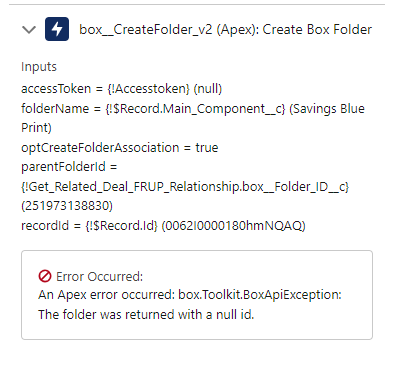
We are creating a folder via a flow, when we debug, we get the following error: An Apex error occurred: box.Toolkit.BoxApiException: The folder was returned with a null id. When we debug, it appears the folder id exists to be passed. Any advice?
Hi,We are trying to add a custom UI using the Box Content Explorer javascript library from the UI Elements SDK. The Box Content Explorer requires an auth token to authenticate. This must be the Salesforce user rather than a service account in our case so security and access is respected.There does not appear to be a method to retrieve a user's auth token from the Salesforce toolkit. Looking outside the toolkit to the Salesforce SDK, there isn't an implementation of the OAuth user flow (this must be implemented by the application) and my understanding is that this would be an additional log in to the Box for Salesforce login.I'm currently looking into using the toolkit to query a Box managed user's Id using the username from Salesforce and then getting a user token through a Client Credentials custom app. What is the best way to seamlessly integrate the Box for Salesforce toolkit with the Box UI Elements SDK so that there is a single authentication process? Thanks
Description: I created a new OAuth 2.0 app in Box with the exact same scope and permissions as a previously functioning app. However, when I try to download files using the new app, I receive the error: "access_denied_insufficient_permissions". The previous app worked perfectly with no issues.Steps to Reproduce:Created a new OAuth 2.0 app in Box with the same scope and permissions as the original app. User grants permissions to the app. Attempt to download a file via API call.Expected Behavior: Files should download successfully, just like they did with the original app.Actual Behavior:Download attempts fail. The following error is returned: "access_denied_insufficient_permissions".Additional Information:The permissions and scope for the new app are identical to the old app, which is still working correctly. The issue began after switching to the new app. I have verified that the OAuth tokens are correct and have the appropriate permissions.Please advise on how to resolve this issue a
◆BackgroundWe provide a service that displays a list of folders in Box and uploads files specified by the customer. We received an inquiry from a customer regarding the following issue:On 8/21, 8/26, and 8/29, the service was temporarily unavailable due to an error. It was restored over time and became usable again. What could be the cause of this?◆Our Investigation ResultsUpon investigating our application logs, all incidents were due to the following error:HTTP Status: 403Response: "error":{"code":"AccessDenied","debugMessage":"{\"error\":\"service_blocked\",\"error_description\":\"The application is blocked by your administrator\"}"◆Executed APIPOST https://api.box.com/oauth2/tokenThe error occurred during the refresh of the access token.◆Questions1. Under what circumstances would an administrator temporarily block access?2. Are there any specific settings in the customer's Box administrator configuration that we should check?◆Additional InformationIf a Box administrator had prohibi
Checkout the final video in the Box AI Platform API YouTube series between Box developer advocate Alex Novotny and VP of developer relations Laurie Voss.
Hello Box Community,I'm currently working on integrating with the Box API. I'm using a free Box account and have successfully obtained an access token using the /oauth2/token endpoint with the following parameters:grant_type: client_credentials client_id: <my_client_id> client_secret: <my_client_secret>My custom app is configured with OAuth2 authentication, and the access token is returned successfully with these 3 parameters. However, when I try to use this token for most API calls, I receive a 404 Not Found error.The only API call that has worked for me so far is:GET /collaborations?status=pending For other endpoints (e.g., retrieving files, folders), I consistently get 404 errors.Has anyone faced a similar issue when using the client credentials grant type, especially with a free account? Do I need to enable specific permissions for my app or use a different authentication approach for certain endpoints? Any guidance on resolving this would be greatly appreciated!Thank y
Hello,The application is attempting to delete the exiting file’s metadata and create new metadata instance for the same file. This periodically results in WinError 10054: An existing connection was forcibly closed by the remote host. try: client.file(file_id=cloud_file.id).metadata().delete()except: passapplied_metadata = client.file(file_id=cloud_file.id).metadata().create(file['metadata'])Question is, what could be causing this error, is this a server configuration issue, API call timing, etc.
Hi , I am getting below error when I do parsing using gson lib for BoxEvent.event is of type BoxEvent.gson.toJson(event)Class com.box.sdk.BoxUser$Info declares multiple JSON fields named 'login'; conflict is caused by fields com.box.sdk.BoxUser$Info#login and com.box.sdk.BoxCollaborator$Info#login Basically I want to create Valid Json of whole BoxEvent without any “\”” String escape. Please suggest suitable solution
I am getting below error while trying to access the existing templates of Box Sign API.{ "type": "error", "code": "insufficient_scope", "status": 403, "message": "The request requires higher privileges than provided by the access token.", "help_url": "https://developer.box.com/guides/api-calls/permissions-and-errors/common-errors/", "request_id": "0a16c0b7baab4b0e5c0650bd171d679c7"}I am using a developer account with client id: jmhjt9o71zlh3k3crqycqcr9c4tsav9m and using client credentials for authorization.I have checked all the application scope options available but still getting this error while trying invoke the Box Sign API’s.Also, while trying to get the access token, if I give the box type as enterprise, I am able to generate the token but If i give the box type as user, I am getting “invalid_grant” error.PS: I am a beginner, therefore it would be of great help if you give explain with proper details.
Hi, I want to call api to change ownership of file but I saw only editor and viewer option, suppose I assign someone as editor using api and then i delete file from my folder then it will delete from others account too. Is there any other way to tackle this situation
Our company creates a Workspace folder for each user that is owned by a central service account. I’m trying to build a script with Box CLI and PowerShell to delete a user’s Workspace folder after we delete their account to free up a license. Every time I try to get the folder details or delete the folder, I’m greeted with a d_ prefix on the item and it can’t find the folder. If I try to just get the folder, folders:get still attempts to add a d_ prefix and folders:items is probably incorrect. I’m signed into CLI as our global admin account which owns this content, so it shouldn’t be a permissions problem. If I do a folders:items 0 as the given user, I see the workspace folder and ID. The code imports a CSV of folders that I’ve pulled already. I’m still new to the CLI so obviously I’m doing something wrong but I don’t know why it’s adding a d_ prefix to the content. I’ve tried to add a Trim() to the folder ID, but the folder ID shows correct in the text output before the actual dele
Hi,I’m trying to use the python API to download files from a collaborator shared folder. I’m using a free developer account. I made an app and it was authorized (by myself). It was working fine in March 2024 and stopped working when I tried today (Sept 13 2024).```auth = CCGAuth(client_id='xxx',client_secret='xxx',user='xxx')client = Client(auth)user = client.user().get()"POST https://api.box.com/oauth2/token" 400 77{'date': 'Fri, 13 Sep 2024 17:49:32 GMT', 'content-type': 'application/json', 'strict-transport-security': 'max-age=31536000', 'set-cookie': 'box_visitor_id=66e478e2429fb8.44475236; expires=Sat, 13-Sep-2025 17:49:32 GMT; Max-Age=31536000; path=/; domain=.box.com; secure; SameSite=None, bv=PARTNERS-28114; expires=Fri, 20-Sep-2024 17:49:32 GMT; Max-Age=604800; path=/; domain=.app.box.com; secure, cn=33; expires=Sat, 13-Sep-2025 17:49:32 GMT; Max-Age=31536000; path=/; domain=.app.box.com; secure, site_preference=desktop; path=/; domain=.box.com; secure', 'cache-control': 'no-
As I understand it, the Enterprise plan includes a limit of 100,000 API calls per month. Upon reviewing the Admin Console, I noticed there are "Chargeable" and "Non-Chargeable" API calls. Could you please clarify if "Non-Chargeable" API calls are also counted toward the 100,000 API calls per month limit?
good morning, I would like some help, I'm trying to change my wife's account password but the email isn't arriving.
Already have an account? Login
No account yet? Create an account
Enter your E-mail address. We'll send you an e-mail with instructions to reset your password.