All things API and SDK related
Recently active
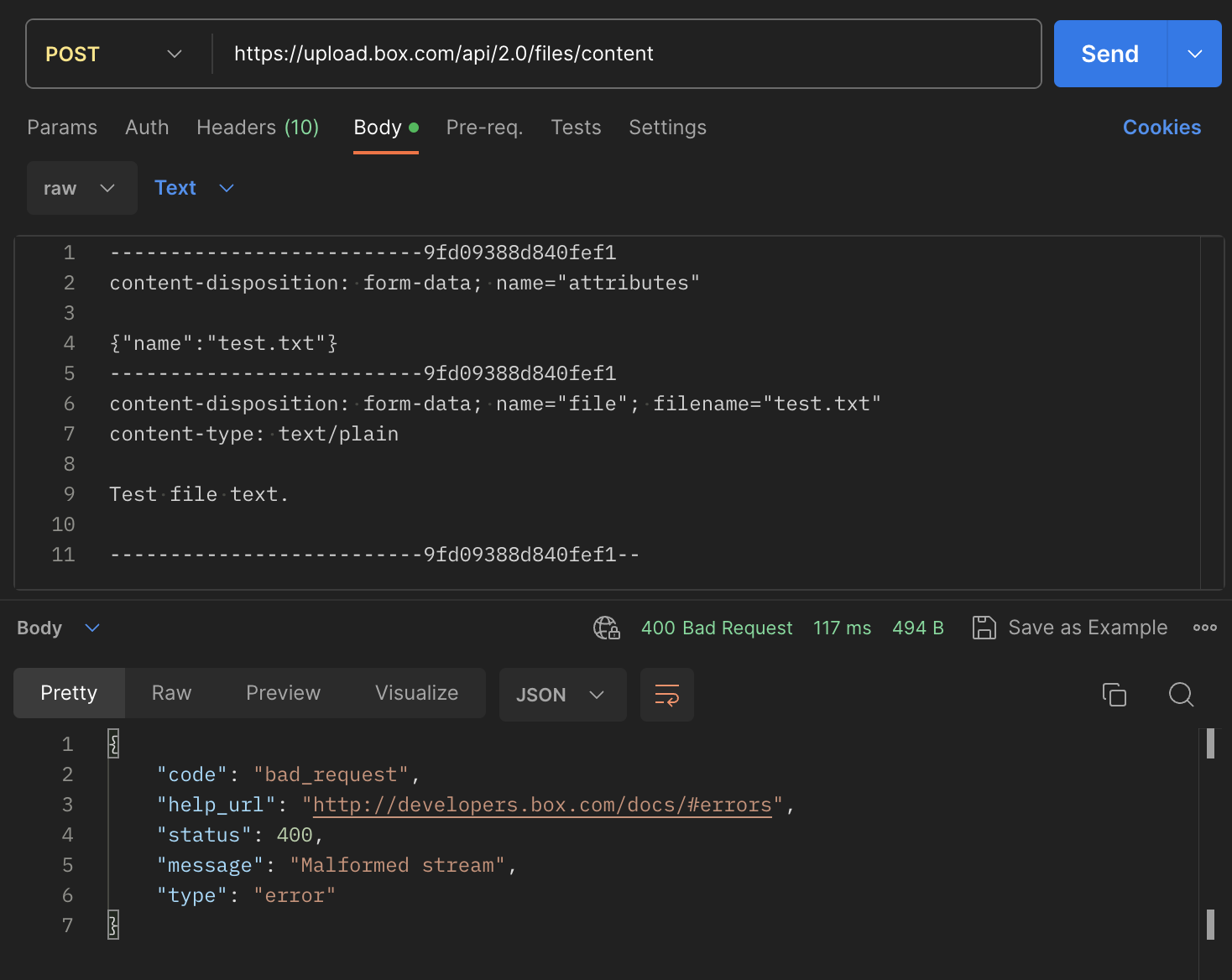
Get HTTP 400 error when invoking upload file API (https://upload.box.com/api/2.0/files/content). The message says “Malformed stream”, but gives no additional information. Tried the exact payload as specified in this box documentation page (https://developer.box.com/guides/uploads/direct/file/) and run it in Postman and still get the same error. Request Payload: POST /api/2.0/files/content HTTP/1.1 Host: upload.box.com Authorization: Bearer [ACCESS_TOKEN] content-length: 343 content-type: multipart/form-data; boundary=------------------------9fd09388d840fef1 --------------------------9fd09388d840fef1 content-disposition: form-data; name="attributes" {"name":"test.txt", "parent":{"id":"0"}} --------------------------9fd09388d840fef1 content-disposition: form-data; name="file"; filename="test.txt" content-type: text/plain Test file text. --------------------------9fd09388d840fef1-- Error Response: { "code": "bad_request", "help_url": "http://developers.box.com/docs/#errors"
Here is my code: public uploadFiles = async (folderName: string, files: Blob[]) => { const folderId: string = await this.getFolderId(folderName); for (const file of files) { const stream: Readable = await blobToReadable(file); const attributes: UploadFileRequestBodyAttributesField = { name: file.name, parent: { id: folderId } } await this.boxClient.uploads.uploadFile({ attributes, file: stream }); } } const blobToReadable = async (blob: Blob): Promise<Readable> => { const buffer: Buffer = Buffer.from(await blob.arrayBuffer()); const stream = Readable.from(buffer); return stream; } I am using Bun.js instead of node. folderId is correct and the file is converted correctly from Blob to Readable
I wanted to connect Box and DataSpider (currently mitocoX), so I created a custom app from the development console, downloaded a JSON file, and tried to set it in DataSpider. However, I get an error and can’t connect. If you are an expert, please tell me if I should use a file other than a JSON file, and if so, where can I download a file other than a JSON file? I’m a newcomer, so there are a lot of things I don’t understand, but , thank you.
Hello, I am trying to access my Box app with Python code, that is using JWT to authenticate. Here is my code: from boxsdk import JWTAuth from boxsdk import Client from cryptography.hazmat.primitives.serialization import load_pem_private_key import json import base64 private_key_fpath = "/path/to/PrivatKey.pem" #Settings below generated by the Box Developer Console settings_fpath = "/path/to/1234__config.json" with open(private_key_fpath, "rb") as key_file: priv_rsakey = load_pem_private_key(key_file.read(), password=None) with open(settings_fpath, "r") as f: settings = json.loads(f.read()) settings['boxAppSettings']['appAuth']["privateKey"] = priv_rsakey auth = JWTAuth.from_settings_dictionary( settings ) access_token = auth.authenticate_instance() I get the following error BoxOAuthException: Message: "kid" invalid, unable to lookup correct key Status: 400 URL: https://api.box.com/oauth2/token Method: POST Headers: {'Date': 'Mon, 22 Apr 2024 20:27:23 GMT', 'Content-Type':
Hello Box Community, I am currently using Box Drive and monitoring file events with its Webhooks. I’m curious to know if it’s possible to retrieve the version history of files using Box Drive Webhooks. Specifically, I’d like to retrieve the version history related to changes made to a file, and I’m particularly interested in detecting if a file version has been reverted. If anyone in the Box community knows how to retrieve file version history using Box Drive Webhooks, I would greatly appreciate any insights you can provide. Thank you very much.
Hello, I’m fairly new to box and want to download a publicly available repo which is fairly large in size (>1 TB). How can I parse through the whole repo and download all the files? Right now, the only way to do this is by manually download each file, and the repo has >7,000 files. This is quite frustrating and impractical. Are there any obvious solutions to this that I might have missed? Thanks
Hello Getting exception “Request timed out” since Friday 4/12 through today on downloads using Box C# client var stream = await client.FilesManager.DownloadAsync(BoxID); On Saturday could not download any files Now it seems after program start, 1 or 2 downloads in a row work fine and then it hits a wall, restarting program over and over is the short term fix. Integration has been in place since 2020 Program has not changed lately Can access Box.com UI fine and download files too. Thank You!
Hello, I am trying to build a Blazor web app that uses Box’s API, and I’m struggling to implement OAuth2 authentication. I followed the instructions/documentation listed here: https://developer.box.com/guides/authentication/oauth2/with-sdk/ , but I’m having issues with obtaining the authorization code once I’m redirected to my app. Below is the code I have so far; it works as expected until I reach that final step. Any help will be greatly appreciated. -Code- private async Task OAuth2() { string authorizationUrl = "https://account.box.com/api/oauth2/authorize?client_id=" + clientID + "&response_type=code"; // Configure SDK var config = new BoxConfig(clientID, clientSecret, new Uri(redirectUrl)); var sdk = new BoxClient(config); //Redirect user RedirectToAuthUrl(authorizationUrl); // Exchange code - TODO: Get auth code to exchange for access token; check after redirect. var session = await sdk.Auth.AuthenticateAsync("[CODE]"); var client = new BoxClient(config, session)
Hi! I have a client who wants me to back up ALL the files on an old Ubuntu 14.04.6 LTS system to box.com. It’s a headless server (no gui) and they need every single file. There’s about 850 GB across 1,948,569 files in there. The largest file is only 2.4 GB. There are a few directories with a large number of files in them. The biggest count is 457,703 files in a single directory. They say they have unlimited box.com space and do not want to setup storage with another provider. I’m not sure I can run the box cli on this version of linux, and from what I’ve read, it doesn’t seem like it would be appropriate for something this big. I feel like FTPS would be the right thing (for box), but I can’t login to it from my personal account. Any suggestions would be appreciated. Thanks!
Hi Team, We are trying to set the unshared_at value to update the publicly shared folder to be accessible for 10 minutes only, with this endpoint, https://developer.box.com/reference/put-folders-id/#param-shared_link-unshared_at We do have a paid account However we are getting the below response : { "reason": "invalid_parameter", "name": "unshared_at", "message": "Invalid value '1712055223'." } Could anyone help with this error
I have a business enterprise web application that I built in PHP and it is hosted on BlueHost. I have an entity named Attachment that is a many to one to a separate entity called Ticket. The Attachment entity represents a file attachment for a Ticket. The way it currently works to upload it is: I give the file a unique name (random GUID + extension) I upload the file to the file system I save a new instance of the record referencing the filename in the database Then to download it I: Get the Attachment record by its Id Search the file system by the filename defined in the record Return the file by its filename This worked fine, but I ran into an issue where I was running out of memory on the server, so I talked with the client and convinced them to a cloud based storage solution and we settled on Box. Now I’m attempting to migrate from using the file system to using Box. I have already created two directories (one for production and one for staging) and uploaded the files from the
Need advice on how to pull from salesforce to box without file size limitation
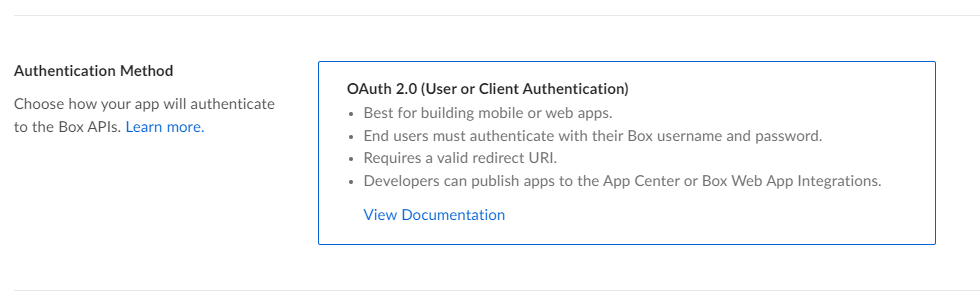
Hi, The app that I have created is ‘Authenticated’ using: OAuth 2.0 (User or Client Authentication) I have a free developer account and I am trying to upload a file using boxsdk. However, I am getting the below error: boxsdk.exception.BoxAPIException: Message: Not Found Status: 404 Code: not_found Request ID: 5g33vbho4p64txku Headers: {'Server': 'nginx', 'Date': 'Tue, 26 Mar 2024 13:05:47 GMT', 'Content-Type': 'application/json', 'Content-Length': '324', 'cache-control': 'no-cache, no-store', 'x-envoy-upstream-service-time': '505', 'strict-transport-security': 'max-age=31536000', 'X-Box-Original-Ingress-ADC-Host': 'prod-b-traffic-manager-0q2f', 'Via': '1.1 google', 'Alt-Svc': 'h3=":443"; ma=2592000,h3-29=":443"; ma=2592000'} URL: https://upload.box.com/api/2.0/files/content Method: POST Context Info: {'errors': [{'reason': 'invalid_parameter', 'name': 'parent', 'message': "Invalid value 'd_254434451261'. 'parent' with value 'd_254434451261' not found"}]} I have ensured the my folder_
In implementing a flow within the OAuth authentication process that always prompts users to select an account, is my understanding correct that there are currently no parameters available for this purpose? developer.box.com Authorize user - API Reference - Box Developer Documentation Explore the Box APIs and SDKs to use for app development, API documentation, developer support resources, and access the Box Developer Console
Box and Salesforce integration using Box for Salesforce. When you create a record in Salesforce using Box for Salesforce, a folder is created on the Box side. If you do not reference the Salesforce record at this time, the user will not be granted privileges to the Box folder. Therefore, even if a folder is created, most users will have to go to Salesforce to see the corresponding record in order to access the folder. Is there a better way to grant privileges without access to the records? I tried Box tool kit createCollaboration and https://api.box.com/2.0/collaborations, but this one did not create a FRUP record and the Box for Salesforce delete batch did not work properly.
I am scratching my head here. Box Embed offers a ‘view’ parameter to allow you to set list or grid view, however I need programatically set Content Explorer to default to grid view when loading (it is for a content portal of photographs, so thumbnails are much easier to view than generic file icons). Any ideas here anyone?
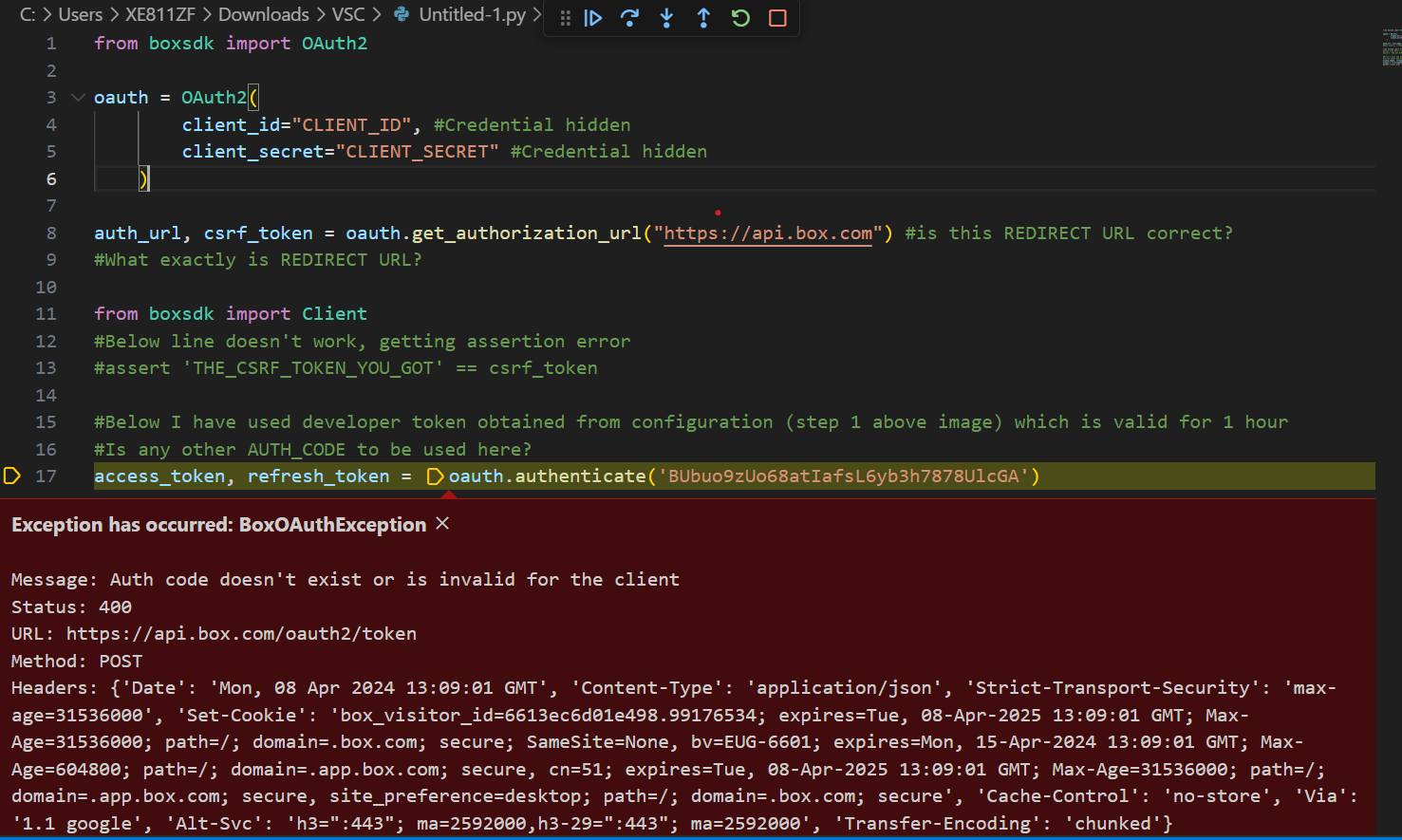
Hi, I am very new to using python. I tried to follow documentation of python SDK. I want to use GET / POST requests on box via python. I am using OAUTH, is it alright? (Or should I use basic auth / JWT - I am unaware of these methods but willing to learn) Here is the process I followed : a) Created a new app in Box Developers with Oauth. I am able to use this clientID & clientSECRET in postman app to fire all API commands. I have generated “Developer Token” as well on this page. b) Downloaded boxsdk to use it in python environment Please tell me what I am doing wrong. What should I use as Auth Code, if not the developer token? How to generate this auth code? Is my redirect URL Correct? PLEASE HELP!!!
I am trying to query files based on their metadata template that contain an ampersand ex: “A/7-8&9/389-399” using node box sdk metadata query method but it does not return values. It matches other values that do not have ampersand. Is there a way to handle special characters when trying to query them. I notice it works only if the query is setup as shown below var from = 'enterprise_someid.somekey', ancestorFolderId = 'somefolderid', options = { query : "DocumentId ILIKE :arg1 OR bookAndPageNumber = :arg2", query_params: { arg1: '%' + params + '%', arg2: params }, limit: 10 }; type or paste code here If i include the pattern matching operation it does not work var from = 'enterprise_someid.somekey', ancestorFolderId = 'somefolderid', options = { query : "DocumentId ILIKE :arg1 OR bookAndPageNumber ILIKE :arg2", query_param
Hello, I am looking to create a Python script that can read from and write to Box. I followed the Box Dev instructions and created an App, so that I can use the generated Client ID and Client Secret to authenticate with JWT. Am I able to restrict the scope of the Client ID and Client Secret to certain directories? I would like my app to have read/write access for a subset of Box directories, and to be restricted from read/write permissions to all others. Thanks, Alex
Using the API, is there any way to get download/preview counts when you create a shared link for a folder? I can see counts on the files in the folder through the web interface, but files returned by the api don’t have shared link data which is where the counts would show if the individual files had a shared link. The shared link data related to the folder returned by the api exists, but the download/preview counts are always 0. I wasn’t really expecting them to be anything else, but those are the only counts I can find that have any value at all. I suppose I can create a shared link of each individual file in addition to the folder, but I was hoping to avoid that. Thanks!
I was trying to create the webhook but i encounter this error while creating it Anyone know what was the reason of it?
I am trying to create a shared link from a not root box folder by Java SDK using an enterprise account credential. log.info("Start createSharedLink. id: {}, canDownload: {}, canPreview: {}", id, canDownload, canPreview); BoxFolder folder = new BoxFolder(boxProvider.getConnect(), id); BoxSharedLinkRequest boxSharedLinkRequest = new BoxSharedLinkRequest() .permissions(canDownload, canPreview) .access(BoxSharedLink.Access.COLLABORATORS) .unsharedDate(Date.valueOf(LocalDate.now().plusDays(3))); BoxSharedLink sharedLink = folder.createSharedLink(boxSharedLinkRequest); log.info("End createSharedLink. Created Url is: [{}]", sharedLink.getURL()); This request can work when I use either of following" BoxSharedLink.Access.COMPANY BoxSharedLink.Access.DEFAULT BoxSharedLink.Access.OPEN But only when I use COLLABORATORS, it will return me a 400 error com.box.sdk.BoxAPIResponseException: The API returned an erro
I’ve created a Box free account and trying to access the box APIs using Postman. I have used Auth 2.0 flow and successfully authenticated to generate an access token. While I’m able to perform GET API callouts, I’m encountering issues with POST callouts for actions such as creating files or folders. These attempts result in a 403-error status code. Could someone please suggest a solution for accessing Box APIs with a free account? Do I need to purchase a plan or are there any prerequisites or configurations that I might be missing?
I need develop help to move 850 files from a source path ID to a new folder that I have identified. I do not have the developer skills to do myself. Let me know if you can help! Happy to pay for this assistance.
Hello everyone, I’ve been encountering an intermittent issue when trying to use the Box API to preview Excel Online files. Sometimes the files load successfully, but at other times, I receive an error stating that the Excel Online Previewer encountered an error and suggests refreshing the page. Here’s a snippet of the code I’m using: var preview = new Box.Preview(); preview.enableViewers('Office'); preview.show(fileId, accessToken, { container: "#preview-container", showDownload: true, }); The access token is obtained on the server side using JWT authentication. I am using the following URL version of JS via CDN: https://cdn01.boxcdn.net/platform/preview/2.93.0/en-US/preview.js Error Words: Excel Online failed to load. There was an error previewing your file with the Excel Online Previewer. Please refresh the page to try again. The error resolves temporarily when I log out and then log back into Box, but it reappears if I log out again. This leads me to wonder if the issue m
Already have an account? Login
No account yet? Create an account
Enter your E-mail address. We'll send you an e-mail with instructions to reset your password.