















A community space to collaborate on Box APIs, explore SDKs, and build powerful applications
Recently active
Box Workshops are a great way to get yourself familiarized with the Box Platform or event explore some feature you haven’t used before. These workshops have been designed to be hands on and self paced, so you can explore them on your own terms. Feel free to post feedback and comments.
trying to request token from c#.net using grant type: authorization_code, I’m getting the error “The grant type is unauthorized for this client_id” I don’t know where to set the redirect url, I have set CORS Domains as http://0.0.0.0 Add information about the configuration settings of your app. : Custom Authentication Method : OAuth 2.0 with JSON Web Tokens (Server Authentication) (pre populated.) Please help. Thanks. Prasanna.
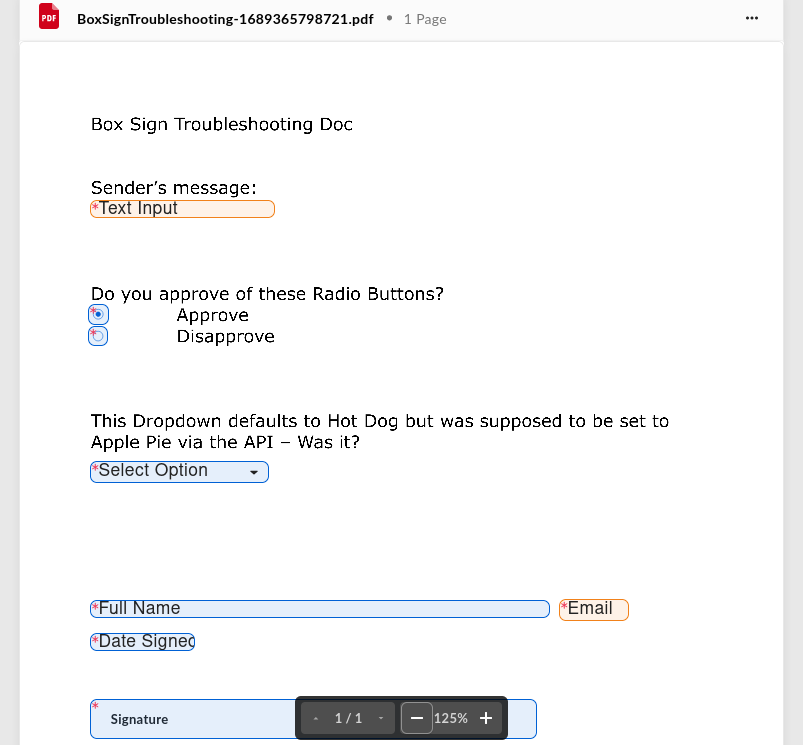
Update: The Good, the Bad, and the Ugly… I made a fresh test template for this stuff and setting the Dropdown text via the API worked, so I’m happy about that. I ran into something which I don’t remember being the case before, which was that Sender fields did not even appear to the Signer/Recipient. –I would assume that they’d just be non-modifiable but visible. –Is there some setting I forgot about? Regarding the Radio buttons I tried on Brave browser where they were better performing than Firefox, but not perfect I still see this as a Radio Button conceptual problem, as they aren’t fully taken as a group As the issue seems to be the Arrow indicator can get out of sync with the button-click Meaning that if an entire Radio Button group was considered one item, there’d be no issue Regarding the Text field “Ownership Change” What starts out as a Sender field seems to turn into a Signer field upon text change via API Even if I’m not doing something right, this seems like a bad behavi
Hi there folks. Version 0.4.0-alpha of rusty-box has been released. Rusty-Box 0.4.0-alpha This version now supports the following authentication types: Developer Token Client Credentials Grant (CCG) OAuth 2.0 Check it out in crates.io or take a look at the repo: GitHub GitHub - barduinor/rusty-box Contribute to barduinor/rusty-box development by creating an account on GitHub. Cheers
Can I use the SDK with JWT authentication on the free plan? If not, what plans allow me to use the SDK with JWT authentication? Currently, I’m not very familiar with BOX’s pricing plans…
Welcome to the first Box Developer Community Spotlight! The community itself is focused on supporting developers working with our technical solutions to bring the power of Box to their systems. It’s also about sharing experiences and tips and tricks on how to maximize the Box Platform. This is a companion discussion topic for the original entry at https://medium.com/box-developer-blog/box-developer-community-spotlight-with-mark-reynolds-a9dbe4181aaf?source=rss----a995c24848a3---4
Hi! I have a question about Box’s OAuth2. How many refresh tokens can be obtained simultaneously per client ID for Box? For instance, GOOGLE allows up to 100 refresh tokens to be obtained for one Client ID. There is currently a limit of 100 refresh tokens per Google Account per OAuth 2.0 client ID. If the limit is reached, creating a new refresh token automatically invalidates the oldest refresh token without warning. This limit does not apply to service accounts Google for Developers Using OAuth 2.0 to Access Google APIs | Authorization...
If I have an id but I don’t know is it a file or folder id, what is the easiest way to find it out? In another words, how to get type (file or folder) by object id?
When requesting a the information about a File using GET /files/:id?fields=representations each entry is supposed to contain a content property that has the url_template. Is that incorrect? If so, why would that not be included?
I wanted to register for a developer account from the Box page (Creating Your Developer Account – Box Support), so I clicked on the Developer Sign Up Page (https://account.box.com/signup/developer) linked on that page. On the page after clicking, I couldn’t find the section that would allow me to become a Developer, and instead, the usual sign-up page for a regular account was displayed. I would like to develop and test Box applications, but it seems I cannot do that with a Personal account. Could you please provide guidance on how I can proceed with development? best.
Hi, I am attempting to integrate an application in box with IBM App connect designer. In app connect, I need to provide the following authentication data: Access token Refresh token Client ID Client Secret I have already found the client ID and client secret, however the only token I was able to find was called a developer token. Can anyone help me understand how I could aqcuire the access and refresh tokens for my application? kind regards
When using the endpoint to list items in a folder is there any way to include representations in the nested items?
I have been testing Create Box Sign Request API using my free Developer Account, and it has been working fine until July 3rd, 2023. developer.box.com Create sign request - API Reference - Box Developer Documentation Explore the Box APIs and SDKs to use for app development, API documentation, developer support resources, and access the Box Developer Console However, when I tried the same request today (July 31st, 2023), the API request itself succeeded but the created Sign Request resulted in Error On Convert status. When I created Sign Request via WebUI, the created Sign Request successfully proceeded to In Progress status. Has there been any changes in the Box Sign API, or on its usage restriction for free Developer Accounts?
[First post – please bear with me.] Box recently sent me a notice about deprecating some SSL protocols. Legacy SSL Ciphers Deprecation The suggestion is to use “api-test(.)box(.)com” instead of the normal “api(.)box(.)com” to test whether you need to make security changes to your app. The problem I’m facing is I use the BOX SDK v.2 (with C#) which has “api(.)box(.)com” hardcoded in the library so I can’t change it to use the testing URL. [The (.) is to get around the new user 1 link only restrictions.] Any suggestions? Please let me know if you need more info. thanks, randy
Hi, I am trying to find the best way to display images stored in Box on an ASP.NET web app. I have read about “Box View” but it looks like Box View files can only be displayed using an iFrame. I would prefer to directly display the images, rather than dealing with the clunkiness of an iFrame. In addition, using Box View requires uploading the files to an App Token application. I have hundreds of images, and unless I can upload them simply or automatically, I’d prefer to avoid an extra step like this. I tried to look through the other APIs and their capabilities, and couldn’t find anything that simply allows me to display an image stored in Box. I could be mistaken though. For context, I am trying to display multiple images pertaining to physical items. The other data for the items is stored in Azure, but the images are in Box. I would also like to display a pdf (stored in Box) for each of these items but figured I would tackle images first. I am a fairly new developer so I may be lacki
We are excited to introduce a new embedded signing experience, enabling developers to leverage the power of Box Sign within custom applications! Developers and users can now embed the Box Sign signing experience into their own custom applications without the need to navigate to Box Sign and back into their custom application to complete the signature process. To integrate Box Sign experience within your own website, you need the iframeable_embed_url parameter that is specifically designed to allow signing documents within the HTML iframe tag. A sample iframable_embed_url looks as follows: https://app.box.com/embed/sign/document/f14d7098-a331-494b-808b-79bc7f3992a3/f14d7098-a331-494b-808b-79bc7f3992a4 To get the iframeable_embed_url pass the embed_url_external_user_id parameter for each signer when calling the create sign request endpoint. The returned response will contain a unique iframeable_embed_url for that signer. To embed Sign features and make them available to the users, use
I am getting the following error while previewing a file. The error message says, The document may be protected, but I am able to preview the same if i use a new downscoped token. Form network tab, It seems when we click on preview, it tries to download the resource, but the resource is not found. When I tried hitting the same API in postman. I got the following response. This happens when I try to preview a documents after some interval of 10-15 minutes. Is there a solution available to explain the underlying cause of this behavior?
前回の記事では、OAuth 2.0を使用したBox Node.jsの認証について説明しました。今回は、JWTを使用したもう1つの方法であるサーバー側の認証を見てみましょう。これは、Box APIで認証するための最も一般的な方法です。 This is a companion discussion topic for the original entry at https://medium.com/box-developer-blog/jwt%E3%82%92%E4%BD%BF%E7%94%A8%E3%81%97%E3%81%9Fbox-node-js-sdk%E3%81%AE%E8%AA%8D%E8%A8%BC-e3496d610f59?source=rss----a995c24848a3---4
Hello, I have a box application that runs somewhere in Kubernetes cluster. It needs to read a box file that belongs to a physical box user, The application onboarded with JWT authentication and box created a server account: AutomationUser@boxdevedition.com. I shared the file with this server account and it can see it when listing files. However when trying to get the file content or downloading the file I get 403 authorization error. The organization does not allow " App + Enterprise Access" configuration nor “Generate user token” access. seems strange that even when the file owner added the service user as a collaborator it still cannot read the content. Is there a way around this ?
Hi folks, We’ve created a Box UI Elements Workshop to help developers get started with these components. It is a hands on, self paced collection of exercises using a pure Javascript approach. We believe that this way the workshops are useful to a broader set of stacks, rather than limiting the examples to node, python or any specific client framework such as angular, react or vue. However do drop us a line with any type of feedback, and let us know in the comments if this idea of self paced workshops should be applied to other areas of the box platform. You can find the work shop at GitHub - box-community/box-workshop-UIElements-pure-js: Workshop on how to use the Box UI Elements in a pure HTML Javascript environment Above all, have fun!
Enterprise events provide an event stream that your application can subscribe, related to any user or content within an enterprise Box instance. This is a companion discussion topic for the original entry at https://medium.com/box-developer-blog/box-enterprise-events-api-python-5d912f379099?source=rss----a995c24848a3---4
Is there a way to find files which are tagged with custom metadata (not template version) using the Box UI?
I am trying to preview an uploaded document in Content Explorer but using RequireJS in my project. When I remove the RequireJS library the preview works fine moreover when I load RequireJS the preview shows below error: Cannot read properties of undefined (reading ‘GlobalWorkerOptions’) Can we preview an uploaded document with RequireJS loaded on the same page?
Does Content Explorer include any mechanisms to stop the uploading of files that are infected with viruses? Is there any indication of an error in Content Explorer when attempting to preview a file that contains a virus? Is it possible for Content Explorer to hide/remove the download choice for a file containing a virus, despite the download permission granted by the downscoped token used in Content Explorer?
Hi I’m currently developing an application for my research group that pulls our images from box and applies certain operations on those images to generate training data for our CV models. We want to make this application public through a repository, and we want users to be able to access our image data using JWT authentication (config file for authentication will be provided in the repository). However, we don’t want users to be able to write to the folders and change their image content. I thought of giving ReadOnly permissions, however, box developer console says write permissions are required to allow users to download the content. Below is the code that pulls the content of the image by img_id (image id). def download_image_from_box(self, img_id): """ Downloads image from Box storage """ # Get file and read image data into memory cache file = self.box_client.file(img_id) file_data = file.content() # Decode image src =
Already have an account? Login
No account yet? Create an account
Enter your E-mail address. We'll send you an e-mail with instructions to reset your password.