













A community space to collaborate on Box APIs, explore SDKs, and build powerful applications
Recently active
Hi Team, We are trying to set the unshared_at value to update the publicly shared folder to be accessible for 10 minutes only, with this endpoint, https://developer.box.com/reference/put-folders-id/#param-shared_link-unshared_at We do have a paid account However we are getting the below response : { "reason": "invalid_parameter", "name": "unshared_at", "message": "Invalid value '1712055223'." } Could anyone help with this error
I have a business enterprise web application that I built in PHP and it is hosted on BlueHost. I have an entity named Attachment that is a many to one to a separate entity called Ticket. The Attachment entity represents a file attachment for a Ticket. The way it currently works to upload it is: I give the file a unique name (random GUID + extension) I upload the file to the file system I save a new instance of the record referencing the filename in the database Then to download it I: Get the Attachment record by its Id Search the file system by the filename defined in the record Return the file by its filename This worked fine, but I ran into an issue where I was running out of memory on the server, so I talked with the client and convinced them to a cloud based storage solution and we settled on Box. Now I’m attempting to migrate from using the file system to using Box. I have already created two directories (one for production and one for staging) and uploaded the files from the
Need advice on how to pull from salesforce to box without file size limitation
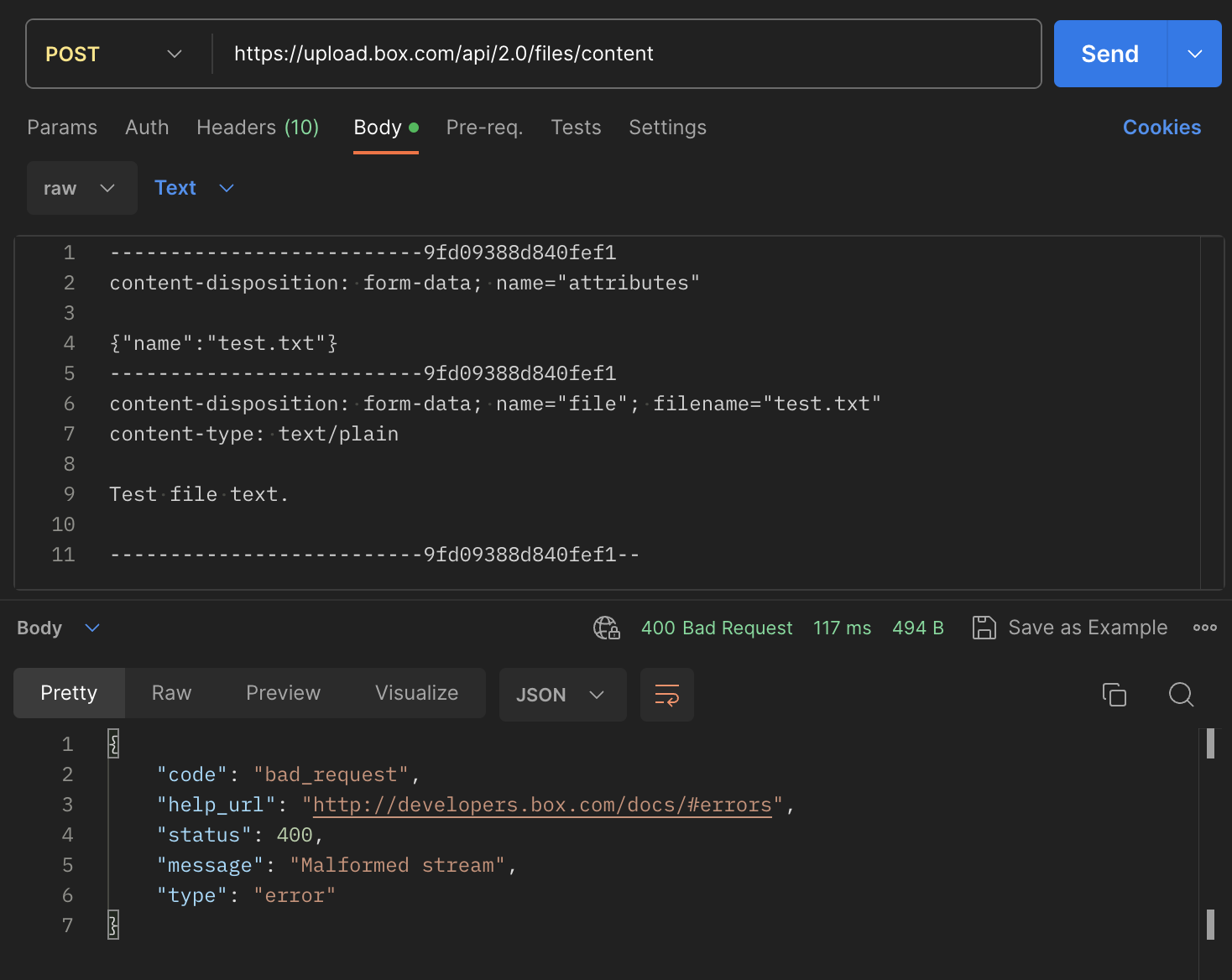
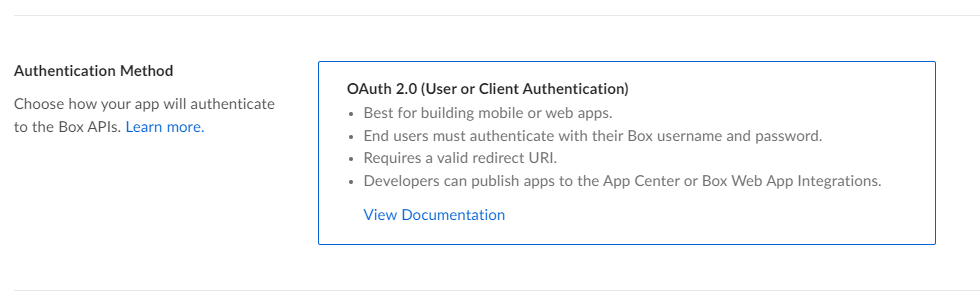
Hi, The app that I have created is ‘Authenticated’ using: OAuth 2.0 (User or Client Authentication) I have a free developer account and I am trying to upload a file using boxsdk. However, I am getting the below error: boxsdk.exception.BoxAPIException: Message: Not Found Status: 404 Code: not_found Request ID: 5g33vbho4p64txku Headers: {'Server': 'nginx', 'Date': 'Tue, 26 Mar 2024 13:05:47 GMT', 'Content-Type': 'application/json', 'Content-Length': '324', 'cache-control': 'no-cache, no-store', 'x-envoy-upstream-service-time': '505', 'strict-transport-security': 'max-age=31536000', 'X-Box-Original-Ingress-ADC-Host': 'prod-b-traffic-manager-0q2f', 'Via': '1.1 google', 'Alt-Svc': 'h3=":443"; ma=2592000,h3-29=":443"; ma=2592000'} URL: https://upload.box.com/api/2.0/files/content Method: POST Context Info: {'errors': [{'reason': 'invalid_parameter', 'name': 'parent', 'message': "Invalid value 'd_254434451261'. 'parent' with value 'd_254434451261' not found"}]} I have ensured the my folder_
In implementing a flow within the OAuth authentication process that always prompts users to select an account, is my understanding correct that there are currently no parameters available for this purpose? developer.box.com Authorize user - API Reference - Box Developer Documentation Explore the Box APIs and SDKs to use for app development, API documentation, developer support resources, and access the Box Developer Console
Box and Salesforce integration using Box for Salesforce. When you create a record in Salesforce using Box for Salesforce, a folder is created on the Box side. If you do not reference the Salesforce record at this time, the user will not be granted privileges to the Box folder. Therefore, even if a folder is created, most users will have to go to Salesforce to see the corresponding record in order to access the folder. Is there a better way to grant privileges without access to the records? I tried Box tool kit createCollaboration and https://api.box.com/2.0/collaborations, but this one did not create a FRUP record and the Box for Salesforce delete batch did not work properly.
I am scratching my head here. Box Embed offers a ‘view’ parameter to allow you to set list or grid view, however I need programatically set Content Explorer to default to grid view when loading (it is for a content portal of photographs, so thumbnails are much easier to view than generic file icons). Any ideas here anyone?
Hi, I am very new to using python. I tried to follow documentation of python SDK. I want to use GET / POST requests on box via python. I am using OAUTH, is it alright? (Or should I use basic auth / JWT - I am unaware of these methods but willing to learn) Here is the process I followed : a) Created a new app in Box Developers with Oauth. I am able to use this clientID & clientSECRET in postman app to fire all API commands. I have generated “Developer Token” as well on this page. b) Downloaded boxsdk to use it in python environment Please tell me what I am doing wrong. What should I use as Auth Code, if not the developer token? How to generate this auth code? Is my redirect URL Correct? PLEASE HELP!!!
I am trying to query files based on their metadata template that contain an ampersand ex: “A/7-8&9/389-399” using node box sdk metadata query method but it does not return values. It matches other values that do not have ampersand. Is there a way to handle special characters when trying to query them. I notice it works only if the query is setup as shown below var from = 'enterprise_someid.somekey', ancestorFolderId = 'somefolderid', options = { query : "DocumentId ILIKE :arg1 OR bookAndPageNumber = :arg2", query_params: { arg1: '%' + params + '%', arg2: params }, limit: 10 }; type or paste code here If i include the pattern matching operation it does not work var from = 'enterprise_someid.somekey', ancestorFolderId = 'somefolderid', options = { query : "DocumentId ILIKE :arg1 OR bookAndPageNumber ILIKE :arg2", query_param
Hello, I am looking to create a Python script that can read from and write to Box. I followed the Box Dev instructions and created an App, so that I can use the generated Client ID and Client Secret to authenticate with JWT. Am I able to restrict the scope of the Client ID and Client Secret to certain directories? I would like my app to have read/write access for a subset of Box directories, and to be restricted from read/write permissions to all others. Thanks, Alex
Using the API, is there any way to get download/preview counts when you create a shared link for a folder? I can see counts on the files in the folder through the web interface, but files returned by the api don’t have shared link data which is where the counts would show if the individual files had a shared link. The shared link data related to the folder returned by the api exists, but the download/preview counts are always 0. I wasn’t really expecting them to be anything else, but those are the only counts I can find that have any value at all. I suppose I can create a shared link of each individual file in addition to the folder, but I was hoping to avoid that. Thanks!
I was trying to create the webhook but i encounter this error while creating it Anyone know what was the reason of it?
I am trying to create a shared link from a not root box folder by Java SDK using an enterprise account credential. log.info("Start createSharedLink. id: {}, canDownload: {}, canPreview: {}", id, canDownload, canPreview); BoxFolder folder = new BoxFolder(boxProvider.getConnect(), id); BoxSharedLinkRequest boxSharedLinkRequest = new BoxSharedLinkRequest() .permissions(canDownload, canPreview) .access(BoxSharedLink.Access.COLLABORATORS) .unsharedDate(Date.valueOf(LocalDate.now().plusDays(3))); BoxSharedLink sharedLink = folder.createSharedLink(boxSharedLinkRequest); log.info("End createSharedLink. Created Url is: [{}]", sharedLink.getURL()); This request can work when I use either of following" BoxSharedLink.Access.COMPANY BoxSharedLink.Access.DEFAULT BoxSharedLink.Access.OPEN But only when I use COLLABORATORS, it will return me a 400 error com.box.sdk.BoxAPIResponseException: The API returned an erro
I’ve created a Box free account and trying to access the box APIs using Postman. I have used Auth 2.0 flow and successfully authenticated to generate an access token. While I’m able to perform GET API callouts, I’m encountering issues with POST callouts for actions such as creating files or folders. These attempts result in a 403-error status code. Could someone please suggest a solution for accessing Box APIs with a free account? Do I need to purchase a plan or are there any prerequisites or configurations that I might be missing?
I need develop help to move 850 files from a source path ID to a new folder that I have identified. I do not have the developer skills to do myself. Let me know if you can help! Happy to pay for this assistance.
Hello everyone, I’ve been encountering an intermittent issue when trying to use the Box API to preview Excel Online files. Sometimes the files load successfully, but at other times, I receive an error stating that the Excel Online Previewer encountered an error and suggests refreshing the page. Here’s a snippet of the code I’m using: var preview = new Box.Preview(); preview.enableViewers('Office'); preview.show(fileId, accessToken, { container: "#preview-container", showDownload: true, }); The access token is obtained on the server side using JWT authentication. I am using the following URL version of JS via CDN: https://cdn01.boxcdn.net/platform/preview/2.93.0/en-US/preview.js Error Words: Excel Online failed to load. There was an error previewing your file with the Excel Online Previewer. Please refresh the page to try again. The error resolves temporarily when I log out and then log back into Box, but it reappears if I log out again. This leads me to wonder if the issue m
I am using trial version of Enterprise Box and I have created Box Custom application (authorized by Box admin). Then I generated a private key PK for that Box application and I use this PK to connect to Box App from AWS Kendra. I use Kendra Developer Edition in this test. This method used to work, however today I received the below connection error after providing new PK to Kendra. PK is passed to Kendra using Secrets Manager. Error connecting to customer repository: Error parsing PKCS private key for Box Developer Edition. I made sure the PK is copied properly to Kendra. I also tested connectivity using the same PK and Box SDK and I can connect successfully to Box App programmatically using Python, however the connection from AWS Console fails. What can cause this error? This is private key format generated from BOX Application. It contains “\n” character as text. I normally copy “privateKey” into secret in Secrets Manager Kendra uses and this used to work. { "boxAppSettings": {
var sdkConfig = require(‘…/…/config/0_l3tozglf_config.json’); var sdk = BoxSDK.getPreconfiguredInstance(sdkConfig); // var client = sdk.getAppAuthClient('enterprise'); var client = sdk.getAppAuthClient('user', '32656874023'); const parentFolderID = '0'; const folderName = 'New Folder'; let create_folder = await client.folders.create(parentFolderID, folderName)
We are planning shared folders (app folders) for about 50 applications. The folder structure could be as simple as AppA/FolderX and AppB/FolderX. Users can be authorized for several apps. Let’s say we want to authorize a user to edit files in each FolderX. We can share both folders and users see “FolderX” twice in their box. I guess via API it would be possible, to address both folders individually, but we want to make the apps available via box web interface, too. What we really want is to show users the full AppA and AppB folder structure in the web interface without any files that are stored in other folders than FolderX. What we can do is to additionally authorize users to view AppA and AppB. The full directory structure is then visible in the user interface so he users can see if the displayed FolderX belong to AppA and AppB. But users will also be allowed to view files outside FolderX. If we could share AppA with the privilege to “only view folders”, then that would help. I am pr
Hello, I am currently building an integration that downloads & uploads files from Box using the Box Python SDK. I am having issues using the upload_stream function (https://github.com/box/box-python-sdk/blob/main/docs/usage/files.md#upload-a-file) with an IOBase stream. I am doing the below (taken from the docs): new_file = parent_folder.upload_stream(object_bytes, file_name) The error I get it is: TypeError: unsupported operand type(s) for -: 'NoneType' and 'int' File "upload_to_box", line 174, in upload_small_file new_file = parent_folder.upload_stream(object_bytes, file_name) File "/usr/local/lib/python3.10/site-packages/boxsdk/util/api_call_decorator.py", line 63, in call return method(*args, **kwargs) File "/usr/local/lib/python3.10/site-packages/boxsdk/object/folder.py", line 322, in upload_stream file_response = self._session.post( File "/usr/local/lib/python3.10/site-packages/boxsdk/session/session.py", line 100, in post return self.request('POST', ur
Are there any Drupal (10.x+) modules for uploading files from Drupal forms to BoxAPI? I see a few of Drupal 7 modules, but nothing solid and nothing upgrade to the latest Drupal. I am looking for a form (or webform) element. I’ve used the API before to upload and download. But I’d prefer to not have to write this. And I’m very surprised not to see an existing module or suite of modules that integrate well.
I have abandoned using Box with PHP because the support is abysmal. Since this is an internal only application anyways, I’m using JavaScript. I can successfully download a file by searching for it using the /search?query=filename.ext&type=file endpoint. In the response, there are several entries, but I can find the specific file I’m looking for by using JavaScript’s find method checking the entry’s name and parent.id. When I try to upload a file using the /files/content endpoint, I am getting a 404 from the response using this function: async uploadFile(filename, rawFiles) { if (!this.#accessToken) { const errorMessage = 'Access Token is not set. Please authenticate first.' console.error(errorMessage); throw new Error(error); } const uploadUrl = 'https://api.box.com/2.0/files/content'; const parentFolderId = '-redacted-'; if (rawFiles?.length === 0) { const errorMessage = 'Please select a file.' console.error(errorMessage); throw new Error(error); } const file
Goal: Iterate through folder and get list of files. Upload files to box folder, and if successful, remove the file. Service running as a scheduled task in Windows Server 2022 to run Powershell script nightly. I cannot get a response from box files:upload when its successful. Any Suggestions?
Hi, We are using jenkins tool to upload files on box folder but due to the below mentioned error box uploads are failing: Please check the ‘exp’ claim. The ‘exp’ value exceeds the maximum value of 60 seconds beyond the issue time Please suggest. Shailendra Jetpuria
In today’s data-rich landscape, extracting meaningful insights from unstructured documents is crucial. With the Box AI API, you get a powerful toolkit to help your teams to tap into the value of their content, deliver summaries, and engage in conversational AI. This is a companion discussion topic for the original entry at https://medium.com/box-developer-blog/python-workshop-box-ai-api-e405f6912ead?source=rss----a995c24848a3---4
Already have an account? Login
No account yet? Create an account
Enter your E-mail address. We'll send you an e-mail with instructions to reset your password.