












A community space to collaborate on Box APIs, explore SDKs, and build powerful applications
Recently active
Checkout the final video in the Box AI Platform API YouTube series between Box developer advocate Alex Novotny and VP of developer relations Laurie Voss.
Hello Box Community,I'm currently working on integrating with the Box API. I'm using a free Box account and have successfully obtained an access token using the /oauth2/token endpoint with the following parameters:grant_type: client_credentials client_id: <my_client_id> client_secret: <my_client_secret>My custom app is configured with OAuth2 authentication, and the access token is returned successfully with these 3 parameters. However, when I try to use this token for most API calls, I receive a 404 Not Found error.The only API call that has worked for me so far is:GET /collaborations?status=pending For other endpoints (e.g., retrieving files, folders), I consistently get 404 errors.Has anyone faced a similar issue when using the client credentials grant type, especially with a free account? Do I need to enable specific permissions for my app or use a different authentication approach for certain endpoints? Any guidance on resolving this would be greatly appreciated!Thank y
Hello,The application is attempting to delete the exiting file’s metadata and create new metadata instance for the same file. This periodically results in WinError 10054: An existing connection was forcibly closed by the remote host. try: client.file(file_id=cloud_file.id).metadata().delete()except: passapplied_metadata = client.file(file_id=cloud_file.id).metadata().create(file['metadata'])Question is, what could be causing this error, is this a server configuration issue, API call timing, etc.
Hi , I am getting below error when I do parsing using gson lib for BoxEvent.event is of type BoxEvent.gson.toJson(event)Class com.box.sdk.BoxUser$Info declares multiple JSON fields named 'login'; conflict is caused by fields com.box.sdk.BoxUser$Info#login and com.box.sdk.BoxCollaborator$Info#login Basically I want to create Valid Json of whole BoxEvent without any “\”” String escape. Please suggest suitable solution
I am getting below error while trying to access the existing templates of Box Sign API.{ "type": "error", "code": "insufficient_scope", "status": 403, "message": "The request requires higher privileges than provided by the access token.", "help_url": "https://developer.box.com/guides/api-calls/permissions-and-errors/common-errors/", "request_id": "0a16c0b7baab4b0e5c0650bd171d679c7"}I am using a developer account with client id: jmhjt9o71zlh3k3crqycqcr9c4tsav9m and using client credentials for authorization.I have checked all the application scope options available but still getting this error while trying invoke the Box Sign API’s.Also, while trying to get the access token, if I give the box type as enterprise, I am able to generate the token but If i give the box type as user, I am getting “invalid_grant” error.PS: I am a beginner, therefore it would be of great help if you give explain with proper details.
Hi, I want to call api to change ownership of file but I saw only editor and viewer option, suppose I assign someone as editor using api and then i delete file from my folder then it will delete from others account too. Is there any other way to tackle this situation
Our company creates a Workspace folder for each user that is owned by a central service account. I’m trying to build a script with Box CLI and PowerShell to delete a user’s Workspace folder after we delete their account to free up a license. Every time I try to get the folder details or delete the folder, I’m greeted with a d_ prefix on the item and it can’t find the folder. If I try to just get the folder, folders:get still attempts to add a d_ prefix and folders:items is probably incorrect. I’m signed into CLI as our global admin account which owns this content, so it shouldn’t be a permissions problem. If I do a folders:items 0 as the given user, I see the workspace folder and ID. The code imports a CSV of folders that I’ve pulled already. I’m still new to the CLI so obviously I’m doing something wrong but I don’t know why it’s adding a d_ prefix to the content. I’ve tried to add a Trim() to the folder ID, but the folder ID shows correct in the text output before the actual dele
Hi,I’m trying to use the python API to download files from a collaborator shared folder. I’m using a free developer account. I made an app and it was authorized (by myself). It was working fine in March 2024 and stopped working when I tried today (Sept 13 2024).```auth = CCGAuth(client_id='xxx',client_secret='xxx',user='xxx')client = Client(auth)user = client.user().get()"POST https://api.box.com/oauth2/token" 400 77{'date': 'Fri, 13 Sep 2024 17:49:32 GMT', 'content-type': 'application/json', 'strict-transport-security': 'max-age=31536000', 'set-cookie': 'box_visitor_id=66e478e2429fb8.44475236; expires=Sat, 13-Sep-2025 17:49:32 GMT; Max-Age=31536000; path=/; domain=.box.com; secure; SameSite=None, bv=PARTNERS-28114; expires=Fri, 20-Sep-2024 17:49:32 GMT; Max-Age=604800; path=/; domain=.app.box.com; secure, cn=33; expires=Sat, 13-Sep-2025 17:49:32 GMT; Max-Age=31536000; path=/; domain=.app.box.com; secure, site_preference=desktop; path=/; domain=.box.com; secure', 'cache-control': 'no-
As I understand it, the Enterprise plan includes a limit of 100,000 API calls per month. Upon reviewing the Admin Console, I noticed there are "Chargeable" and "Non-Chargeable" API calls. Could you please clarify if "Non-Chargeable" API calls are also counted toward the 100,000 API calls per month limit?
good morning, I would like some help, I'm trying to change my wife's account password but the email isn't arriving.
Goal : Try to fetch the retention policy on a file if there is one.When creating the App I enabled manage_data_retention scope and I am sure that there are files under retention policies.Even though File information in UI is giving retention policy information, GET Get file information This APi is not returning any retention policy information I tried to fetch all the files under retention policies and use query like file_id to narrow down the retention policy on file.GET List file version retentions But the response I am getting is: { "entries": [], "limit": 100, "order": [ { "by": "file_version_id", "direction": "ASC" } ] } I tried to fetch file_versions under retention policy assignment but that is giving API used : GET Get files under retention {"type": "error","status": 403,"code": "access_denied_insufficient_permissions","help_url": "http://developers.box.com/docs/#errors","message": "Access denied - insufficient permission","request_id": "---"} IN the scopes documentatio
It is possible to make API calls and create custom apps with a free account (Individual), but could you please answer the following questions?What are the API call limitations? What are the differences between free and paid accounts in terms of what can be done with custom apps created?
i have a customer that want me to download his files 100M how can i know my throughput , on how many request per min / per day , is it per client or per application.how can i know the maximum requests i can make per day ?
I have a question regarding rate limiting for license-based APIs. developer.box.com Rate Limits - Box Developer Documentation Explore the Box APIs and SDKs to use for app development, API documentation, developer support resources, and access the Box Developer Console Is the license-based API rate limit after publishing a custom app related to the plan that the party issuing OAuth (i.e., the developer of the custom app) has signed up for, which increases the count when making API calls from the app? Or does the contracted plan of the user of the app affect the API call limit?
Lots happening in this space, checkout our recent roundtable recording on Box AI APIs with @shurrey Box which also touches on AI developer roadmap and a Reference Architecture which is being developed. 0 mins - Introduction1 mins 30 secs - Overview of Box AI5 mins - Box AI use cases7 mins 14 secs - Intro to Box AI Platform API14 mins 07 secs - Introduction to Box for AI18 mins - customer Q&A23 mins 15 secs - Overview of Box for AI - LangChain and Llama-Index26 mins - Box AI developer roadmap33 mins 30 secs - Customer Roundtable and Q&A48 mins 26 secs - Wrap up 👉🏽 You can also follow our Developer Blog here, to keep track of future updates.
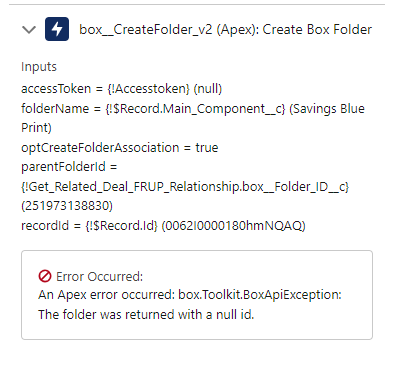
I’m using OAuth 2.0 and I have verified that the program is making the API call with the correct folder ID beforehand. This program was working for me yesterday, so nothing has changed on my end. I am just a one admin user business account, so I’m pretty sure I have all the correct permissions. Any help would be amazing, thanks.
As the company uploads more zip files to help with document containment, it makes it harder to find individual files. Is there a way for Box to index file names within the archive folder? I know that if we click on an archive, it will preview the contents of the file, but that isn’t going to work long term as the number of archive files grow. I am only looking to index file names, not the content at this point.
Hey Everyone! Please checkout our YouTube playlist on all things Box AI Platform API, including demos, overviews, and interviews! Alex
Hi,i am getting below error after entering client ID and key using BOX CLI commands, Could you please confirm if i am missing any prerequisites?
By using node sdk , file is uploaded and then after uploading file , I would like to get that uploaded file id. File is uploaded successfully response code s200. Althought I try out , I cannot get that uploaded file id. I cannot understand how can I get data from return Promise<Object> data type.Therefore, could you support and find out solution for that issue. My code snippest is as below. // Initialize the Box SDK var sdk = new BoxSDK({ clientID: sdkConfig.clientID, clientSecret: sdkConfig.clientSecret, appAuth: { keyID: sdkConfig.appAuth.keyID, privateKey: sdkConfig.appAuth.privateKey, passphrase: sdkConfig.appAuth.passphrase } }); var appUserClient = sdk.getAppAuthClient('user',userId); var stream =fs.createReadStream(newPath); // upload file’s path var parentFolderId = parentFolderId
I would like to preview content of file when searching, like actual box search screen.can anyone tell me how can I do this?
Hi!I would know how the throttling/rate limit on a user basis (1000 API calls per minute) is applied when you use a JWT application (service account) to act on behalf of another user by leveraging the as-user header.The limit is applied to...The service account itself Or the impersonated user (as-user)And if I create another service account, the user based limit is reset for this new account (1000 API calls per minute)?
I’ve seen the example of how to use an app token for a limited access app in the original .NET SDK but have yet to figure it out for the .NET GEN SDK. Basically, I’ve got a Client ID and an App Token that need to create a BoxClient but none of the methods I’ve tried work. Both CcgConfig and JwtConfig objects want clientSecrets or other information. What am I missing?
I'm looking for a way to optimize my current Box folder scanning function to reduce the number of API calls made to Box.Currently, I have a desktop application that scans specific Box folders within my organization. Below is the scanning function in Java:private static BoxItem getBoxItemRec(BoxFolder initialFolder, Path locations, int index) throws NotFoundException { Path currentPath = locations.subpath(0, index + 1); String location = locations.getName(index).toString(); for (BoxItem.Info info : initialFolder.getChildren()) { if (info.getName().equalsIgnoreCase(location)) { if (locations.getNameCount() == index + 1) return (BoxItem) info.getResource(); else return getBoxItemRec((BoxFolder) info.getResource(), locations, index + 1); } } throw new NotFoundException(currentPath + " not exist!");} Is there a way to retrieve only the new files that were added within the last X days without scanning the entire Box folder? Ideally, instead
Is there a more efficient way to retrieve a BoxItem (either a Folder or File) directly by its path in Box?Currently, my approach involves starting at the root folder and recursively scanning through the items, matching each part of the path until I reach the desired item.For example, with the path "Logs/Ben", I start at the root, iterate through its children until I find the "Logs" folder, then iterate through its children until I find the "Ben" folder.This method works, but it involves multiple API calls, which I believe could be optimized.Is there a way to directly access a BoxItem using its full path, thereby reducing the number of API calls my application needs to make?Any guidance or alternative approaches would be greatly appreciated.
Already have an account? Login
No account yet? Create an account
Enter your E-mail address. We'll send you an e-mail with instructions to reset your password.