








-
Recently active
Join us live tomorrow with Kyle Adams, Senior Staff Partner Architect at Box, who will be available to answer your questions. Getting Started with Box and Salesforce Experience Cloud Events
Hi, @ajankowski @lsocha, @rbarbosa I use a client credentials grant for accessing my enterprise account. I successfully called the enterprise user API using the boxsdk for python. But now when I try to call any box API using the client I get the following error. DEBUG 2023-11-24 04:13:25,474 oauth2 Refreshing tokens. (oauth2.py:214) INFO 2023-11-24 04:13:52,500 default_network e[36mPOST https://api.box.com/oauth2/token {'data': {'box_subject_id': '30187662834', 'box_subject_type': 'user', 'client_id': '---9or2', 'client_secret': '---nKID', 'grant_type': 'client_credentials'}, 'headers': {'User-Agent': 'box-python-sdk-3.9.2', 'X-Box-UA': 'agent=box-python-sdk/3.9.2; env=python/3.10.12', 'content-type': 'application/x-www-form-urlencoded'}}e[0m (default_network.py:79) I debugged and found that the refresh call is made inside the oauth2.py file in the boxsdk. right when this code is called under the refresh() access_tok
I created an Embedded widget and included it into a page. The shared link that is used for the widget is restricted to users with access. When I need to sign in, it opens a new tab, I sign in and it refreshes the original widget. However, when it refreshes, it still asks to sign in. This issue only happens in Firefox. I have cleared my cache and cookies, tried using a different Box environment for the shared link, used Firefox on a server (separate from my local machine) and tried rebooting. None of these have worked. However, I do believe that it was working at some point and then within the widget, I tried to sign out of my account. Ever since then it hasn’t worked. However, I don’t know if this is a cause/coincidence or mis-remembering how it was working before. It doesn’t seem like logging out within the widget would cause it to break for different Box environments and different servers. I have included a screenshot of the view I see before and after it refreshes
Hello, I have a question about the box API when OAuth 2.0 is used. My end goal is to upload a file to box using a bot. The first part of my test is to set up the API and do this manually for now. With this goal in mind, I created a personal box account (my organization suggested doing this) to do testing. Then, I created an application and followed the instructions from box to authenticate using Python and SDK. The problem that I’m facing is that I cannot view my root folder. I get a message saying <Box Folder - 0 (All Files)>. I can create folders, search for files, and upload file to box root folder. I read some of the posts on the forum and I already discarded the possibility that I am using a service account because when I look at my client.user() i see my user ID and email. Also, I’m using a developer token and to my understanding, a developer token is associated with the user who’s logged into the developer console. The code that I’m using is below, thank you! from boxsdk
Hi, When I use the metadata-query command and try to add more options to query more data about the file creation date using the Fields option or the Extra-Fields option, no results show up, only file name and file id Here is the command box metadata-query enterprise_******.department 1736501103 --fields=created_at ----- File 1342427526557 ----- Type: file ID: ‘1342427526557’ Also need to know the list of options that I can use under Fields and Extra-Fields as the Box CLI is not showing any help or examples for it. Thanks
Hi, I have created a folder inside my enterprise account and shared the content with an individual user outside my organisation. The user created a free account to access the content, and he trying to automate that content download using SDK. While trying to create an app with limited access to download the content the user can’t generate “Primary Access Token” Is the free account have any limitations to create an app to download contents?. Thanks, Aneesh
Hi, We’ve been using the Python SDK to run a nightly job that gives us a list of all the files (and some metadata) in our account. That job historically took about 30 minutes to complete, recursively going through all the directories, etc. As of a few days ago (11/5), though, it suddenly doubled in length, even though the number of files/folders in our account hadn’t changed. So two questions: Has anyone else noticed anything similar over the last few days? Is there a better/different way to get to that data? Our current function looks something like this: def get_recursive_files(settings, client, folder_id, path_prefix=None): file_list = [] folder = client.folder(folder_id).get() for item in folder.get_items(): if item.type == 'folder': file_list += get_recursive_files(settings, client, item.id, path_prefix) else: file = item.get(fields=['id', 'name', 'created_by', 'created_at', 'modified_by', 'modified_at', 'path_collection', 'ver
We plan to develop a Box app using .Net. But apparently, .Net seems to be not a popular option based on the traffic here. Are there any reasons for that?
Do I need paid account to utilize the file upload feature using .NET SDK? Also where to find authorization code for my app in the interface? Please let me know and I am stuck on this
I have a Box enterprise account, and I want to create a client object that can perform various operations on behalf of enterprise users. My goal is to access and manage files and folders. To achieve this, I’ve explored two authentication methods: developer tokens and JWT authentication. Is it true that developer tokens should not be used for production? If yes then I am left with JWT Authentication. JWT Authentication: I’ve looked into JWT authentication, which appears to be suitable for server-to-server communication. However, I’m unsure about how to set up the following JWT authentication parameters: jwt_key_id rsa_private_key_file_sys_path rsa_private_key_passphrase Additionally, I would like to know how to create a client object using JWT authentication to access enterprise users’ data and perform operations as the Service Account or individual App Users.
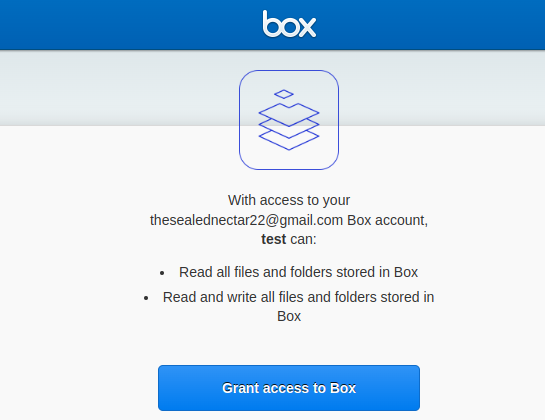
Hi, the grant page shown below appears everytime the user wants to use box. Is this the expected behaviour or is it my incorrect setup?
Hello! I created app as “OAuth 2.0 with Client Credentials Grant (Server Authentication)” and used below python code to get the access token and get a folder info. Im able to get the access token but when I try to get the folder information i get this error {‘type’: ‘error’, ‘status’: 404, ‘code’: ‘not_found’, ‘context_info’: {‘errors’: [{‘reason’: ‘invalid_parameter’, ‘name’: ‘folder’, ‘message’: “Invalid value ‘d_232374452899’. ‘folder’ with value ‘d_232374452899’ not found”}]}, ‘help_url’: ‘http://developers.box.com/docs/#errors’, ‘message’: ‘Not Found’, ‘request_id’: ‘5el5t3hj87nd3i9z’} can any one please help me resolve this error? here is my python code
https://api.box.com/2.0/folders , using this api I passed the access token (bearer) unable to create a folder Json body : { "name": "New Folder", "parent": { "id": "0" } } Response: { "type": "error", "status": 404, "code": "not_found", "context_info": { "errors": [ { "reason": "invalid_parameter", "name": "parent", "message": "Invalid value '0'. 'parent' with value '0' not found" } ] }, "help_url": "http://developers.box.com/docs/#errors", "message": "Not Found", "request_id": "lg7h2vhj99q0o3yb" }
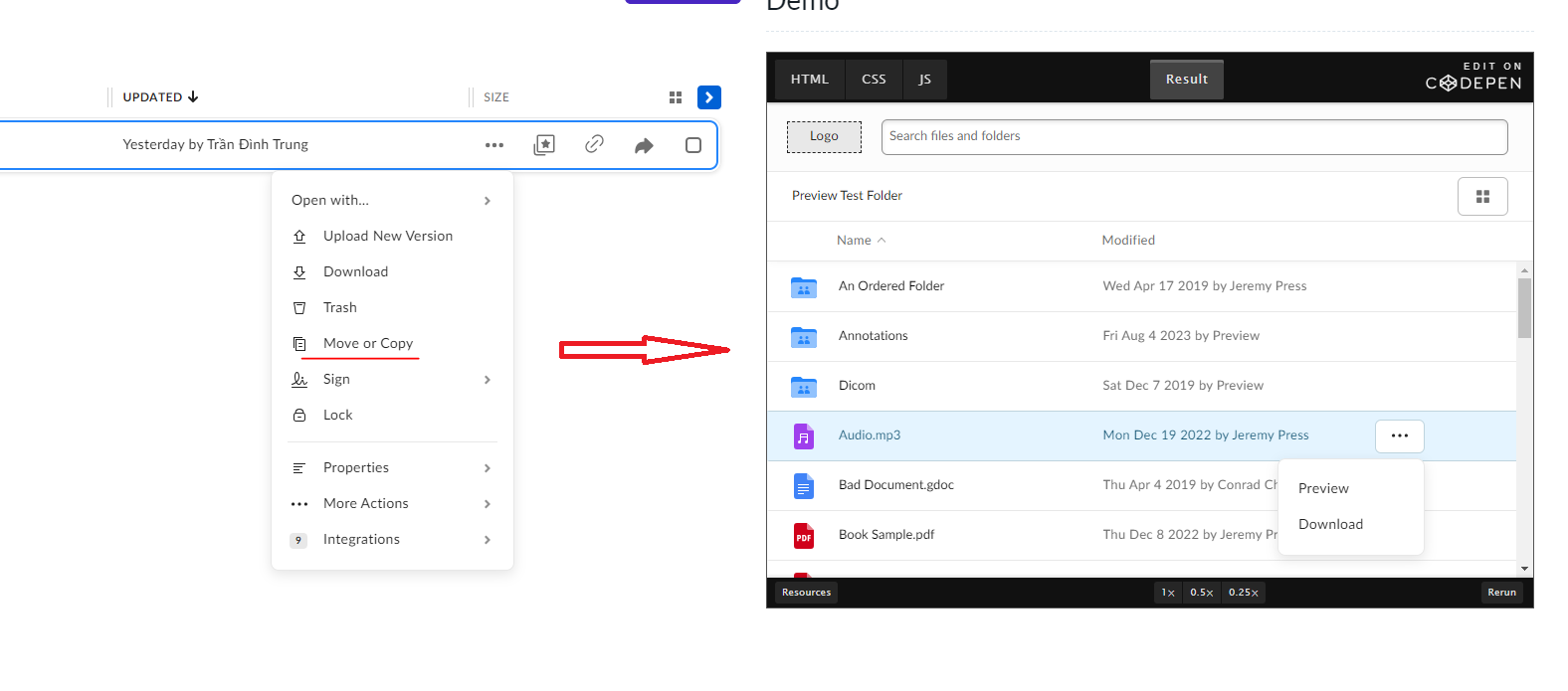
Hi everybody. I am integrating the box into my website. The integration has been completed. I searched the documentation to add the function to copy or move files to another folder but there was none. Do I have any solution for this problem? Thank you very much! I need copy or move function like app.box.com
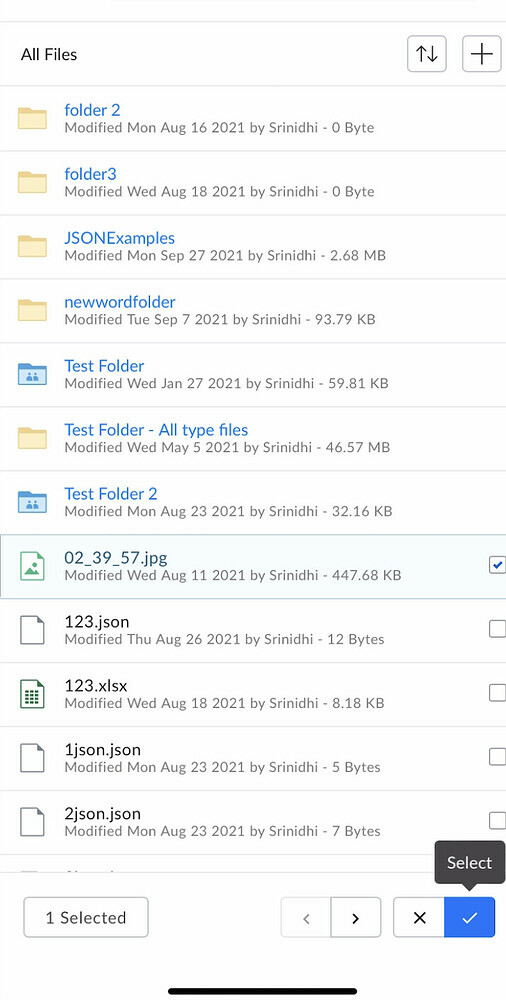
Hi All, We are facing an issue w.r.t. box file picker on iOS devices. We have integrated file picker as per documentation but while sharing the files and after selection of files, we need to press select button twice to complete the operation and dismissing the file picker.
I am working on an application that requires the ability to retrieve the entire folder tree in a user’s Box repository. I am aware that Box’s API typically requires navigating the folder structure step by step. However, I wanted to check if there have been any updates or new features introduced in the Box API that may allow for more efficient retrieval of the folder tree. Is there a specific API endpoint or method that can help me achieve this ? Thank you
I am creating a Custom Portal ( Box Application ) using OAuth for authentication (NextAuth). The Box environment is configured with SSO via Azure. I’m seeking clarification if this is possible. I recall skimming through the developer site that this isn’t. I’m not able to find that reference.
Hello Box developer community, I hope you are all doing well. I have a query regarding the download of text representations for files, specifically for files that are quite large, for instance, around 5GB in size. I understand that Box provides the ability to download files using their API, and I’ve been successfully using it for smaller files. However, I’d like to know if there are any limitations or best practices when it comes to downloading the text representation of large files, especially when they are significantly larger, like the 5GB example. Specifically, I’m interested in knowing: Size Limitations: Are there any size limitations when it comes to downloading the text representation of a file? Is there a maximum file size that should be considered when requesting text content? API Rate Limit: Does Box have any rate limits or throttling in place for downloading large files? Are there any guidelines on how to handle rate limits, especially for large downloads? Optimizations: Ar
Hi Everyone, I am configuring the Box App and setting up the BOX CLI. After executing the login command and entering the client ID and client secret,and granting access,I am redirected,and the following message appears: (node:7544) UnhandledPromiseRejectionWarning: BoxCLIError: Error: Unexpected API Response [403 Forbidden] at C:\Program Files (x86)@boxcli\client\src\commands\login.js:122:11 (Use node --trace-warnings ... to show where the warning was created) (node:7544) UnhandledPromiseRejectionWarning: Unhandled promise rejection. This error originated either by throwing inside of an async function without a catch block, or by rejecting a promise which was not handled with .catch(). To terminate the node process on unhandled promise rejection, use the CLI flag --unhandled-rejections=strict (see Command-line API | Node.js v21.2.0 Documentation). (rejection id: 1) (node:7544) [DEP0018] DeprecationWarning: Unhandled promise rejections are deprecated. In the future, promise rejections
Hi, When “Restrict content creation” is enabled in the Enterprise settings, the following CLI command produces a 403 error. $FolderID = 1234567890 $OwnerPre = 1234567891 $OwnerAft = 1234567892 $CollaborationID = box folders:collaborations:add $FolderID --as-user=$OwnerPre --role co-owner --user-id $OwnerAft --id-only box folders:collaborations:update $CollaborationID --as-user=$OwnerPre --role owner If I uncheck the “Restrict content creation” box, it succeeds, but is there any way to succeed with the box checked? Sincerely,
Hi folks, We’ve announced the Box Advanced Collection for Postman. You can read about it via our Medium article: Medium – 5 Oct 23 Box Postman advanced collection In this article we'll explore how we've converted the pre-request script to handle any type of Box application authentication, giving… Reading time: 6 min read But most important you can try it out. Click this link to fork the collection to your Postman workspace. Keep the feedback flowing! Enjoy
Hi, We are using the open-source tool grouper for managing the groups in BOX. The grouper uses the Box SDK to query the users or groups, manage the groups, and manage the group membership. The Box API throws a 503 error randomly while querying users or groups. Please review the error message and let me know if you need anything. type: consumer, finalLog: false, state: init, consumerName: provisioner_incremental_boxProvisioner, totalCount: 147, currentSequenceNumber: null, publisherClass: edu.internet2.middleware.grouper.app.provisioning.ProvisioningConsumer, runId: vuk1k5nv, exception: java.lang.RuntimeException: provisionerClass: GrouperBoxProvisioner, configId: boxProvisioner, provisioningType: incrementalProvisionChangeLog, state: retrieveIncrementalTargetData, changeLogRawCount: 147, changeLogItemsApplicableByType: 106, recalcEventsDuringFullSync: 0, checkErrors: all, syncGroupsToQuery: 20, syncGroupsFound: 1, retrieveSyncGroupsMillis: 1, syncGroupCount: 1, filterByNotProvisionable
Writing your first Box app is sort of magical, in a couple of hours you can go from having nothing to integrating with a bulletproof cloud filesystem Wondering how I did it? Well, strap in because we’re about to take a magical tour through the Box SDK and navigate through the ocean that is its first developer experience. What we’re trying to do? I will show you how to overcome the most common issues with the Box Node.js SDK, when building something for the first time. By the end of this article, you’ll be a certified Box ninja, able to effortlessly chop, kick, and grab data from Box with Javascript. The Box SDK provides a sweet wrapper around the Box API, making incorporating fancy file features into your node apps simple. Like most beautiful things in life, however, there are some gotchas when getting started that you will learn by reading this article, and you will be glad that you did. By the way, I used Dashcam to take video clips of the flow and bugs discussed below! Issue #1: Mis
I have a tiny Python utility that checks for the existence of Autocad .dwl files every 20 seconds in about a hundred folders on my computer. Several co-workers use the same app on their computers. The problem is the time lag between the creation of that file on one co-worker’s computer and its arrival at my computer (and those of the other guys too). One of them suggested I could use the Box API to maybe reduce the time lag. I’m hoping one of you might be willing to help me make the first steps if this is possible. Thanks.
Hi Team, I have some box folders on https://gehealthcare.box.com and I am trying to upload files on the same using python scripts which are executed via jenkins. I am currently using JWT without SDK approach and I am able to get the token but when I pass that token to my box URL where the files needs to get uploaded I am getting below error message: upload_response.text: {“type”:“error”,“status”:404,“code”:“not_found”,“context_info”:{“errors”:[{“reason”:“invalid_parameter”,“name”:“parent”,“message”:“Invalid value ‘d_139168108673’. ‘parent’ with value ‘d_139168108673’ not found”}]} Here 139168108673 is my folder id where the file needs to get uploaded. Kindly help as it is quite urgent. Looking forward to hear from you. Thanks, Shailendra Jetpuria
Already have an account? Login
No account yet? Create an account
Enter your E-mail address. We'll send you an e-mail with instructions to reset your password.