






-
Recently active
Hi, when creating group with this Box API: developer.box.com Create group - API Reference - Box Developer Documentation Explore the Box APIs and SDKs to use for app development, API documentation, developer support resources, and access the Box Developer Console There are 3 options to choose from for member_viewability_level: admins_only - the enterprise admin, co-admins, group’s group admin admins_and_members - all admins and group members all_managed_users - all managed users in the enterprise Also in admin UI there is Permission Setting on group page with also 3 options, but they don’t match. When creating group with API, this is how chosen options are reflected in UI: admins_only → Admins only admins_and_members → Admins only all_managed_users → Company But I can’t figure out they way to set Permission Setting to “Group members” no matter what options I pass through API, how can I do this?
Hi, I am a dev for a research project. Each month a dataset is collected and uploaded to a particular Box folder to be shared with research partners. I am not the owner of the target Box folder, just a dev assigned to automate the upload process. I have looked at the docs but have confused myself. The Owner of the upload folder needs to create an API key/token or otherwise grant access for an automated process to upload a file. I am not sure though what level/type of access to ask the folder Owner to grant. The code I write will run unattended once a month. It should not run “as me” as I will be reassigned to a different project after this uploader is running. Is a “Service Account” all that is needed? I will need to educate the Owner on what to enable and I am not sure what to tell him at this time. Thank you in advance
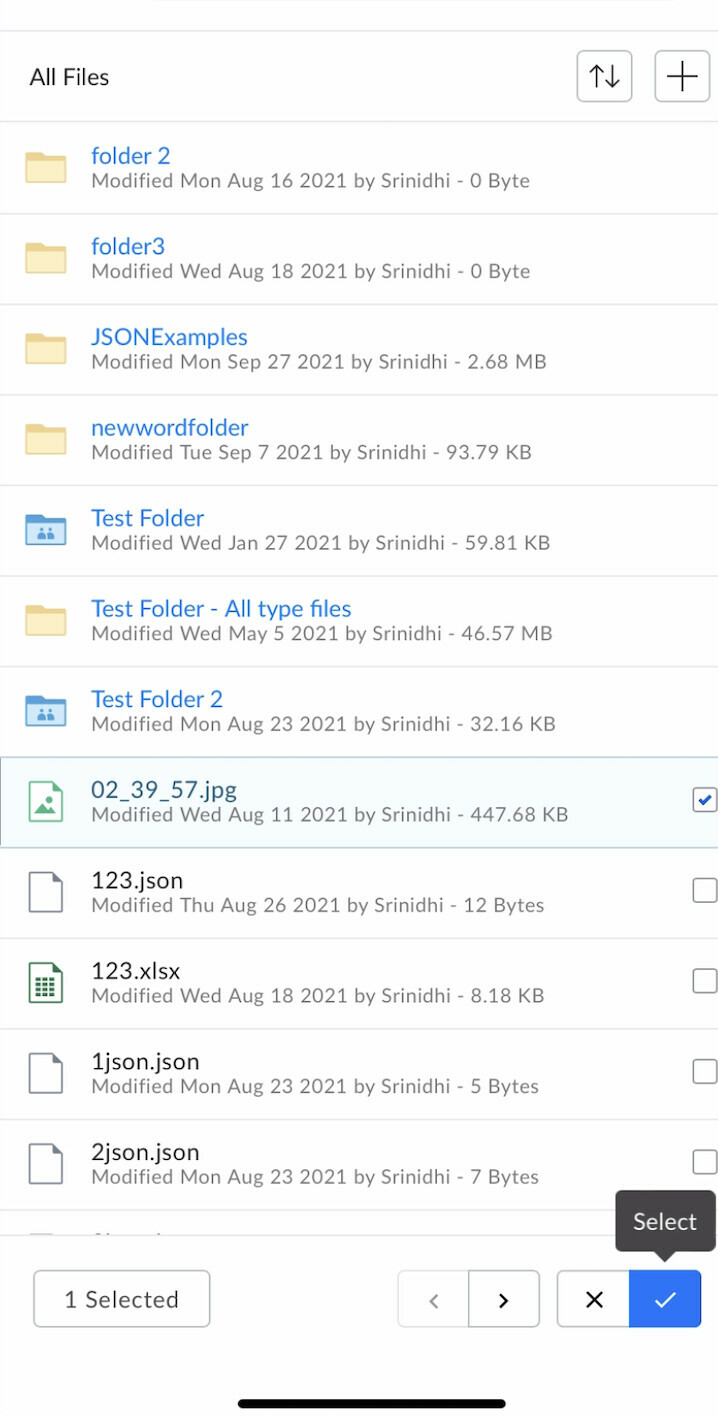
Hi All, We are facing an issue w.r.t. box file picker on iOS devices. We have integrated file picker as per documentation but while sharing the files and after selection of files, we need to press select button twice to complete the operation and dismissing the file picker. Thanks.
Box Workshops are a great way to get yourself familiarized with the Box Platform or event explore some feature you haven’t used before. These workshops have been designed to be hands on and self paced, so you can explore them on your own terms. Feel free to post feedback and comments.
Can I use the SDK with JWT authentication on the free plan? If not, what plans allow me to use the SDK with JWT authentication? Currently, I’m not very familiar with BOX’s pricing plans…
Hi! I have a question about Box’s OAuth2. How many refresh tokens can be obtained simultaneously per client ID for Box? For instance, GOOGLE allows up to 100 refresh tokens to be obtained for one Client ID. There is currently a limit of 100 refresh tokens per Google Account per OAuth 2.0 client ID. If the limit is reached, creating a new refresh token automatically invalidates the oldest refresh token without warning. This limit does not apply to service accounts Google for Developers Using OAuth 2.0 to Access Google APIs | Authorization...
If I have an id but I don’t know is it a file or folder id, what is the easiest way to find it out? In another words, how to get type (file or folder) by object id?
When requesting a the information about a File using GET /files/:id?fields=representations each entry is supposed to contain a content property that has the url_template. Is that incorrect? If so, why would that not be included?
I wanted to register for a developer account from the Box page (Creating Your Developer Account – Box Support), so I clicked on the Developer Sign Up Page (https://account.box.com/signup/developer) linked on that page. On the page after clicking, I couldn’t find the section that would allow me to become a Developer, and instead, the usual sign-up page for a regular account was displayed. I would like to develop and test Box applications, but it seems I cannot do that with a Personal account. Could you please provide guidance on how I can proceed with development? best.
Hi, I am attempting to integrate an application in box with IBM App connect designer. In app connect, I need to provide the following authentication data: Access token Refresh token Client ID Client Secret I have already found the client ID and client secret, however the only token I was able to find was called a developer token. Can anyone help me understand how I could aqcuire the access and refresh tokens for my application? kind regards
When using the endpoint to list items in a folder is there any way to include representations in the nested items?
I have been testing Create Box Sign Request API using my free Developer Account, and it has been working fine until July 3rd, 2023. developer.box.com Create sign request - API Reference - Box Developer Documentation Explore the Box APIs and SDKs to use for app development, API documentation, developer support resources, and access the Box Developer Console However, when I tried the same request today (July 31st, 2023), the API request itself succeeded but the created Sign Request resulted in Error On Convert status. When I created Sign Request via WebUI, the created Sign Request successfully proceeded to In Progress status. Has there been any changes in the Box Sign API, or on its usage restriction for free Developer Accounts?
Hi, I am trying to find the best way to display images stored in Box on an ASP.NET web app. I have read about “Box View” but it looks like Box View files can only be displayed using an iFrame. I would prefer to directly display the images, rather than dealing with the clunkiness of an iFrame. In addition, using Box View requires uploading the files to an App Token application. I have hundreds of images, and unless I can upload them simply or automatically, I’d prefer to avoid an extra step like this. I tried to look through the other APIs and their capabilities, and couldn’t find anything that simply allows me to display an image stored in Box. I could be mistaken though. For context, I am trying to display multiple images pertaining to physical items. The other data for the items is stored in Azure, but the images are in Box. I would also like to display a pdf (stored in Box) for each of these items but figured I would tackle images first. I am a fairly new developer so I may be lacki
Hi folks, We’ve created a Box UI Elements Workshop to help developers get started with these components. It is a hands on, self paced collection of exercises using a pure Javascript approach. We believe that this way the workshops are useful to a broader set of stacks, rather than limiting the examples to node, python or any specific client framework such as angular, react or vue. However do drop us a line with any type of feedback, and let us know in the comments if this idea of self paced workshops should be applied to other areas of the box platform. You can find the work shop at GitHub - box-community/box-workshop-UIElements-pure-js: Workshop on how to use the Box UI Elements in a pure HTML Javascript environment Above all, have fun!
Is there a way to find files which are tagged with custom metadata (not template version) using the Box UI?
Hello, 2-step authentication causes the OAuth 2 flow to fail. There’s also a 404 error. This problem is completely new and was reported to me yesterday.
Hi there, Sorry for the very basic question, but I was wondering if somebody could guide me on how to generate a “Bearer Access Token” for usage with Box’s API? I’m trying to authorize the Preflight check before upload API call which requires a Bearer Access Token, but I can’t figure out where I can generate this token. I was reading through Box’s API documentation, but I couldn’t find definitive steps on how to do this. Thanks! 🙂 Scott
Hi there, We’re facing a weird issue for a few days now. When trying to add an existing (app) user to an existing group, the API throws an error: curl https://api.box.com/2.0/group_memberships \ -H "Content-Type: application/json" \ -H 'Authorization: Bearer <token>' \ -d '{"user":{"id":"aaa59478bbb"},"group":{"id":"yyy2197xxx"},"role":"admin"}' { "type": "error", "status": 404, "code": "not_found", "context_info": { "errors": [ { "reason": "invalid_parameter", "name": "group_tag", "message": "Invalid value 'g_yyy2197xxx'. 'group_tag' with value 'g_yyy2197xxx' not found" } ] }, "help_url": "http://developers.box.com/docs/#errors", "message": "Not Found", "request_id": "awo09uhgm4qzv4ww" } First I though this is a permission related issue, but this has been working just fine for years and nothing has been changed recently on our end. Interesti
Box and Bubble.io are linked to call mp4 in Box from Bubble using video tags. I can’t play mp4 files over 50Mbyte via Bubble.io, but I can play 45MByte. Is there a capacity limit or other setting?
I am creating a custom application and would like to integrate Box Sign as part of the application. At the moment, I have a box developer account with two users. I used one user to create the application (in the developer console), and another user will be used to test Box Sign API. I don’t have any issues creating folders or uploading files using the API, but whenever I try to access the Box Sign Endpoint (https://api.box.com/2.0/sign_requests), it returns a 404 “not found” error. This link [ https://developer.box.com/guides/box-sign/ ] explains that the Box Sign API is only available for the following account types: Business, Business Plus, Enterprise, Enterprise Suites, and Enterprise Plus. This might explain why I am getting the 404 error, as I do not have a paid box account, only a developer account. Can someone confirm if the developer account can access the Box Sign Endpoint? I thought the developer account would allow me to complete my development work without restriction befo
When a new file or folder is added to Box it can take “up to 10 minutes” for the new content to be returned by searching (either via the UI or Search API). Is there an API call that will show if the file/folder has been indexed yet?
So I have been trying to authenticate the Box app with the Python SDK using JWT, but I am getting an error. “BoxOAuthException: Message: Please check the ‘sub’ claim. The ‘sub’ specified is invalid. Status: 400 URL: https://api.box.com/oauth2/token Method: POST” I have crossed checked the “enterprise_id” value which is specified in the config file (the box account which I am currently using is a personal one, so the enterprise in this case was showing as ‘0’). Also providing the python code which was written for this use-case: from boxsdk import JWTAuth, Client auth = JWTAuth.from_settings_file(‘/Users/pratyush/Downloads/0_pvp4byup_config.json’) client = Client(auth) service_account = client.user().get() print(f’Service User Account id is {service_account.id}')
I am using Laravel to query the Box Api endpoints. I am specifically getting an error on the Box File upload api. Here is the piece of code that I am using: Http::asForm() ->withToken($this->accessToken) ->post($this->uploadUrl, $attributes); Here is curl equivalent of the same: curl -H 'Content-Type: multipart/form-data' \ -H 'Authorization: Bearer {Token}' -d 'attributes%5Bname%5D=test.pdf&attributes%5Bparent%5D%5Bid%5D=12345&file=test.pdf' -X 'POST' 'https://upload.box.com/api/2.0/files/content' Please help.
Hello, I am working on a Python integration that requests Box API. My goal is as follows: to set up an automation that invites one or more individuals to collaborate on a file/folder. Once the invitation is accepted, an approval task is created on the file (or on each file within a folder) and assigned to the same person. However, how can I invite a user who does not have a Box account? The request to create a collaboration requires an object of type ‘User (Collaborations)’. Yet, I only have the email address and not a user ID. Thank you in advance for helping me through my issue. Antoine
Hey guys, I am new to box development eco system, I am following the basic tutorial present in the documentation. When I am importing the Postman collection to my Postman, the collection is imported but it shows 0 APIs are present in the collection. Can any one help me with this
Already have an account? Login
No account yet? Create an account
Enter your E-mail address. We'll send you an e-mail with instructions to reset your password.