New Participant
Jun 9, 2025 4:58 PM UTC
Solved

Missing Files

I am missing multiple files, files that I have created and others that were shared via box. Need help to either restore or regain access to these as they are very sensitive.

    Rona Box
    Rona BoxAnswer
    Community Manager
    Jun 11, 2025 6:16 PM UTC

    Hi ​@Nate H, 

    Welcome to Box Community and we’d gladly help find your missing files. 


    You should start by locating your missing files, as we begin I have a few reminders:  

    • When items are deleted from a collaboration folder, both the owner and the person who deleted the item can recover the items from the Trash. 
    • If you are removed as a collaborator from a file or folder that you've deleted, you no longer see that item in Trash. To see the item in Trash, you must be again added as a collaborator to that item.

    You need to determine if your missing files are owned or shared folders. If it’s the latter, please reach out to the owner. 


    Meanwhile, for the deleted files present in your trash please follow the steps below: 

    The steps below apply whether you’re selecting from search results or from all Trash items.

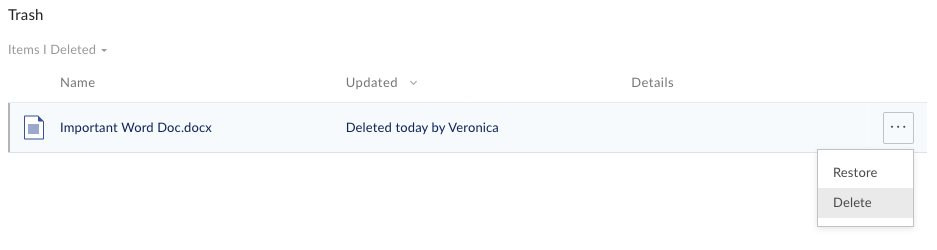
    1. Hover to highlight the row of the item you want. The More Options ellipsis (…) displays.
    2. Click the ellipsis (...).  Then: 
      • To return the item to its original location in Box, click Restore.
      • To delete the item permanently, click Delete.
    1. At the prompt, click Okay.

    RestoreDelete.png


    For more details, please see this article.


    Hope it helps! Please let us know if you need additional assistance. 

    43 replies

    New Member
    May 29, 2026 10:42 PM UTC

    Our most important folder containing all of our organization’s financial data has disappeared. 

    Box always notifies me by email when someone deletes files or folders, but I have received no such emails.

    What do I do?

    Does Box even have a dedicated professional staff that can help, or do just rely on community volunteers?

    Translate
    Rona Box
    Community Manager
    May 30, 2026 12:33 AM UTC

    Hi ​@Fred D, welcome to Box Community! We moved your post to this related topic, and feel free to use this thread and join the discussion. 


    We do understand that you need help in locating an important folder. And here are the things you need to check in restoring a missing folder. 


    First, you should start by identifying if the missing folder is owned or just collaborated folder. If you are the owner, please head over to Box.com and in your trash. 


    The steps below apply whether you’re selecting from search results or from all Trash items.

    1. Hover to highlight the row of the item you want. The More Options ellipsis (…) displays.
    2. Click the ellipsis (...).  Then: 
      • To return the item to its original location in Box, click Restore.
      • To delete the item permanently, click Delete.
    1. At the prompt, click Okay.

    RestoreDelete.png

    For more details, please see this article.


    If you do not own this folder, please reach out to the folder owner. 


    We hope that this reply would be helpful in restoring your missing folder. Otherwise, feel free to reply back. 

    Translate
    New Participant
    Jun 20, 2026 5:52 PM UTC

    Dear Box Team
    Good Morning. my box file all trash . but this my personal file. i want to recovery my all file. plase help me sir. my request you accapted 
     

    Translate
    Rona Box
    Community Manager
    Jun 24, 2026 9:20 PM UTC

    Hi ​@md shid, welcome to Box Community! 

    We moved your post to this related topic, and feel free to join our discussion. 


    We have questions regarding your missing files: 

    1. Does the missing files appear in your Trash? 
    2. If not, kindly reach out to the folder owner to have it restored. 


    Note: For anyone who can access their deleted files through Trash. Here’s how you can recover it: 

    • Hover to highlight the row of the item you want. The More Options ellipsis (…) displays.
    • Click the ellipsis (...).  Then: 
      • To return the item to its original location in Box, click Restore.
      • To delete the item permanently, click Delete.
    • At the prompt, click Okay.

    RestoreDelete.pngFor more details, please see this article.


    Let us know if you need additional assistance. 

    Translate
    New Member
    Jun 25, 2026 6:06 PM UTC

    I have been using my account successfully for a number of years, when I logged in last week I found that every file/folder is gone.  The only file is on titled “My Box Notes” and there is nothing in that.   I NEED to recover those files.  They are not in trash.  Searching for past folders did not work.  Doe snayone know what could be happening and how I can find those files/folders?


    Translate
    Rona Box
    Community Manager
    Jun 25, 2026 8:02 PM UTC

    Hi ​@jseregny, welcome to Box Community! We moved your post this related topic and we’re here to assist in locating your missing files. 


    With your current Box plan, we can’t create a report to give us the details that caused your files to disappear.  Instead, do you remember creating your own folder or uploading an owned file? Is it a shared file you’re looking for?


    If it’s the latter, your access might’ve been removed or expired and it’s best to reach out to the file owner to restore your access. Meanwhile, for your owned contents that was deleted - they can only stay in your Trash in the next 30 days. 


    Hope it helps! Let us know if you have additional questions. 

    Translate
    New Member
    Jun 29, 2026 2:51 PM UTC

    I logged into Box and suddenly I am missing dozens of folders and files. 

    Translate
    Rona Box
    Community Manager
    Jun 29, 2026 11:51 PM UTC

    Hi ​@KellyMurray89, welcome to Box Community! 

    We moved your post this related topic hoping you could find this thread helpful in locating your missing files. 


    And to further assist, 

    • Don’t forget to check if the missing folder is your own or collaborated folder. 
    • Note that owner, could either restore your Box access if removed or recover the folder if its deleted. 
    • For your own contents, you should review your Trash in Box.com. 


    Meanwhile, here are the steps to recover missing files: 

    • Hover to highlight the row of the item you want. The More Options ellipsis (…) displays.
    • Click the ellipsis (...).  Then: 
      • To return the item to its original location in Box, click Restore.
      • To delete the item permanently, click Delete.
    • At the prompt, click Okay.

    RestoreDelete.pngFor more details, please see this article.


    Hope it helps! Let us know if you have additional questions. 

    Translate
    New Participant
    Jul 5, 2026 1:50 PM UTC

    hello sir or madam my box file all mising delete all ready 2/3 month now what can do place help me this file my urgent file 

    Translate
    New Member
    Jul 27, 2026 11:18 PM UTC

    I am searching for ways to notify Box that my files are missing… There is no way of reaching someone to talk to!


    Can anyone assist with find and restore missing files? They are not in my bin/trash

    Translate