New Participant
Jun 9, 2025 4:58 PM UTC
Solved

Missing Files

I am missing multiple files, files that I have created and others that were shared via box. Need help to either restore or regain access to these as they are very sensitive.

    Rona Box
    Rona BoxAnswer
    Community Manager
    Jun 11, 2025 6:16 PM UTC

    Hi ​@Nate H, 

    Welcome to Box Community and we’d gladly help find your missing files. 


    You should start by locating your missing files, as we begin I have a few reminders:  

    • When items are deleted from a collaboration folder, both the owner and the person who deleted the item can recover the items from the Trash. 
    • If you are removed as a collaborator from a file or folder that you've deleted, you no longer see that item in Trash. To see the item in Trash, you must be again added as a collaborator to that item.

    You need to determine if your missing files are owned or shared folders. If it’s the latter, please reach out to the owner. 


    Meanwhile, for the deleted files present in your trash please follow the steps below: 

    The steps below apply whether you’re selecting from search results or from all Trash items.

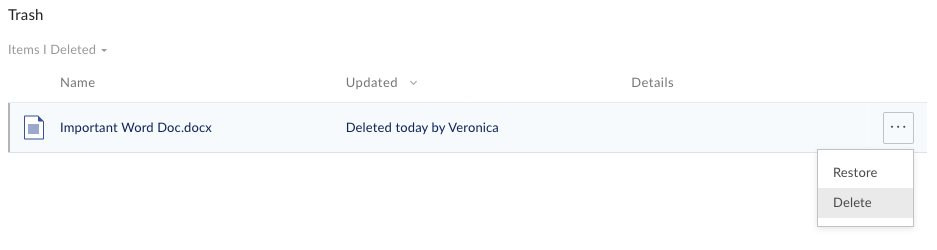
    1. Hover to highlight the row of the item you want. The More Options ellipsis (…) displays.
    2. Click the ellipsis (...).  Then: 
      • To return the item to its original location in Box, click Restore.
      • To delete the item permanently, click Delete.
    1. At the prompt, click Okay.

    RestoreDelete.png


    For more details, please see this article.


    Hope it helps! Please let us know if you need additional assistance. 

    43 replies

    Rona Box
    Rona BoxAnswer
    Community Manager
    Jun 11, 2025 6:16 PM UTC

    Hi ​@Nate H, 

    Welcome to Box Community and we’d gladly help find your missing files. 


    You should start by locating your missing files, as we begin I have a few reminders:  

    • When items are deleted from a collaboration folder, both the owner and the person who deleted the item can recover the items from the Trash. 
    • If you are removed as a collaborator from a file or folder that you've deleted, you no longer see that item in Trash. To see the item in Trash, you must be again added as a collaborator to that item.

    You need to determine if your missing files are owned or shared folders. If it’s the latter, please reach out to the owner. 


    Meanwhile, for the deleted files present in your trash please follow the steps below: 

    The steps below apply whether you’re selecting from search results or from all Trash items.

    1. Hover to highlight the row of the item you want. The More Options ellipsis (…) displays.
    2. Click the ellipsis (...).  Then: 
      • To return the item to its original location in Box, click Restore.
      • To delete the item permanently, click Delete.
    1. At the prompt, click Okay.

    RestoreDelete.png


    For more details, please see this article.


    Hope it helps! Please let us know if you need additional assistance. 

    Translate
    New Member
    Jun 12, 2025 11:47 AM UTC

    I am missing 2 folders that i used less than 30 days ago.  these folders are not in the trash under either items i deleted, or items i own.  can you help me recover them?

    Translate
    Rona Box
    Community Manager
    Jun 12, 2025 8:56 PM UTC

    Hi ​@Jimmyb, 

    Welcome to Box Community and I moved your post to this related topic. 

    And in addition to the details above, if the missing folders are not visible in your trash, the missing folder may be a shared folder. 


    In this case, your collaboration access may have expired or removed. We highly suggest reaching out to the owner or the end user who invited you to the folder. 


    Hope it helps! 

    Translate
    Nate HAuthor
    New Participant
    Jun 12, 2025 10:49 PM UTC

    In my experience the admin/owner of the parent folder had to check in their history and found out that another user who had access to the shared box folder had accidentally deleted the file/folder. That particular user had to restore the deleted folder from trash (as it didn’t appear in my or the admin/owner’s trash.) Fortunately the files were restored 

    Translate
    Rona Box
    Community Manager
    Jun 13, 2025 12:32 PM UTC

    Hi ​@Nate H, 

    Thank you for the update, and glad to know that your missing files have been restored!

    Translate
    New Member
    Jun 13, 2025 12:55 PM UTC

    Thank you for the replies.

    They are achive folders I created, and therefore I am the owner.  I am sharing them with 3 other people, all say they did not delete the folders.  Is there no archive or back up copy of anything I can retrieve them from?  In the older version of box on my mac, box drive I believe it was called before you discontinued it, I had a copy of everything I could restore from.

    Do you back up my online data?

    Translate
    New Member
    Jun 17, 2025 5:54 PM UTC

    I just logged in to my Box account and all the files that I had created are gone (many, many files). Those that were shared with me are still accessible, but my own files are not. Where can I find these?

    Translate
    Rona Box
    Community Manager
    Jun 17, 2025 8:46 PM UTC

    Hi ​@Jimmyb, 

    Good day! 

    In order to further investigate with your missing files let me create a new ticket. Please keep an eye out and we’ll be in touch. 


    Thanks for working with the Community and a member from Box Product Support team will stay in touch. 

    Translate
    Rona Box
    Community Manager
    Jun 17, 2025 8:51 PM UTC

    Hi ​@cwhite_80 , 

    Welcome to Box Community! I moved your post to this related topic to help assist with your missing contents. 


    You should start by locating your missing files, as we begin I have a few reminders:  

    • When items are deleted from a collaboration folder, both the owner and the person who deleted the item can recover the items from the Trash. 
    • If you are removed as a collaborator from a file or folder that you've deleted, you no longer see that item in Trash. To see the item in Trash, you must be again added as a collaborator to that item.

    You need to determine if the missing files are owned or shared folders. If it’s the latter, please reach out to the owner. 


    Meanwhile, for the deleted files present in your trash please follow the steps below: 

    The steps below apply whether you’re selecting from search results or from all Trash items.

    1. Hover to highlight the row of the item you want. The More Options ellipsis (…) displays.
    2. Click the ellipsis (...).  Then: 
      • To return the item to its original location in Box, click Restore.
      • To delete the item permanently, click Delete.
    1. At the prompt, click Okay.

    RestoreDelete.png


    For more details, please see this article.


    Hope it helps! Please let us know if you need additional assistance. 


    Hope this helps! 

    Translate
    New Member
    Jun 25, 2025 2:27 PM UTC

    As of this morning all of my files are completely gone and the files do not show up in the deleted folder either. Please help. Everything had been functioning fine as of last night.

    Translate