

Question

Cannot create app user for web application

  • May 21, 2025
  • 3 replies
  • 3 views

Forum|alt.badge.img

Hi,


I have set up my web application to authenticate to Box using JWT, and I'd like to add an app user. However, whenever I try to do this from my code, I receive errors of invalid parameters. 


My request (in python) looks like this:

# jwt_header = {
# 'authorization': "Bearer " + token
# }
# url ="https://api.box.com/2.0/users"
# data = dumps({'name': 'My User', 'is_platform_access_only': True})
# response = requests.request(method="POST", url=url, data=data, headers=jwt_header)

What is wrong with the formatting of this request? 


However, when I do the same request from Postman, inputting 

{'name': 'My User', 'is_platform_access_only': True}

as "raw" into the Body, I receive an error "The request requires higher privileges than provided by the access token." I am a co-admin in my enterprise, what specific permissions do I need to create an app user?


To be clear, the application is under my account (within the enterprise).


Thank you!
3 replies

Forum|alt.badge.img

 This might be a settings errors.


Under the Scopes section in the Admin console, can you please confirm if you checked the "Manage app users" permission? Can you also please confirm in the User Access section that the button is checked either to "App Users" or "All Users"?


Forum|alt.badge.img


Hi, yes I checked both of those settings and I have it set to All Users and Manage app users is also checked off. Do you think this could be coming from an enterprise admin level based on the permissions I was given personally as a co-admin?


Thank you


Forum|alt.badge.img

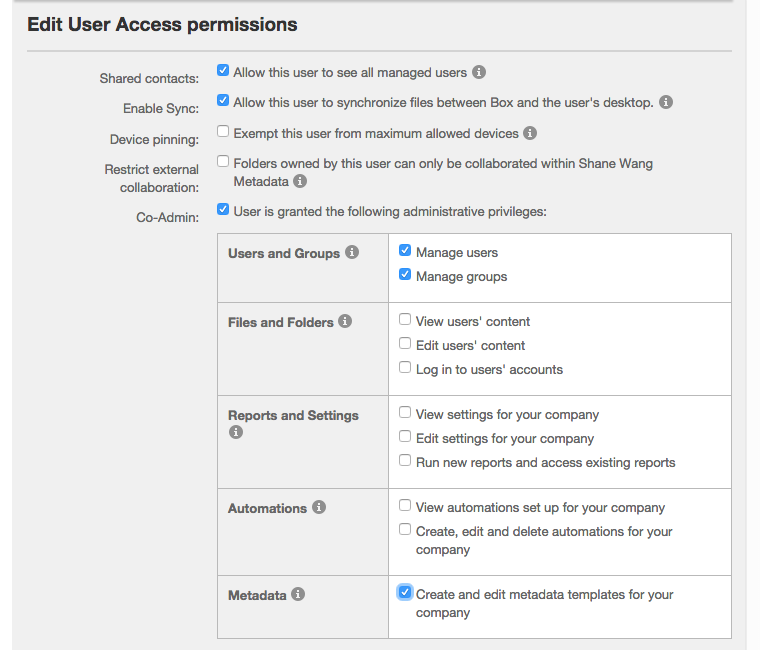
 Definitely possible. As the co-admin, your accounts needs the "Manage users" permission enabled on it. Check out the screenshot below.


The Admin of your Box instance would need to enable this permission for your account. Here is a help article that describes the steps to do this.


BOX_qf1eyb2en5rzpnpowwwgnd4fjv8kep6v.png