Question

Syntax to delete or update expiration on a shared link

  • May 21, 2025
  • 7 replies
  • 15 views

Forum|alt.badge.img

I have all of 1 day of experience using curl and perusing Box's APIs! :), so forgive me for such a novice question.  The following curl syntax works in retrieving the shared link info. for a given file in my environment:


curl -H "Authorization: Bearer TOKEN ENTERED HERE" -X GET https://api.box.com/2.0/files/ ID>?fields=shared_link


But this syntax does not remove the shared link as I thought it should according to https://developer.box.com/v2.0/reference#shared-link-object

curl -H "Authorization: Bearer TOKEN ENTERED HERE" -X PUT https://api.box.com/2.0/files/ ID>?fields=shared_link=null


Also, this syntax does not update the expiration date of the shared link to June 17 of this year:

curl -H "Authorization: Bearer TOKEN ENTERED HERE" -X PUT https://api.box.com/2.0/files/ ID>?fields=shared_link.unshared_at=2017-06-17


Any insight would be greatly appreciated!!
7 replies

Forum|alt.badge.img

Hello ,


to be sincere it took me some tests to find the right way to do it 🙂


You were on the good direction but not applied as should be.


This is what you've tried.


curl -H "Authorization: Bearer TOKEN ENTERED HERE" -X PUT https://api.box.com/2.0/files/?fields=shared_link=null


And actually you should do:


curl -H "Authorization: Bearer TOKEN ENTERED HERE" -X PUT https://api.box.com/2.0/files/?fields=shared_link -d '{"shared_link": null}'


Look that you have to append a json body to the message and not only the parameters on the URL. 


Hope this helps 😉


Forum|alt.badge.img

Thank you LoCortes, I do appreciate your time very much!  I tried your syntax along with several variances of it all shown below.  Each one generates the same error message that reads,

{"type":"error","status":400,"code":"bad_request","context_info":{"errors":[{"re
ason":"invalid_parameter","name":"entity-body","message":"Invalid value '{shared
_link: null}'. Entity body should be a correctly nested resource attribute name\
/value pair"}]},"help_url":"http:\/\/developers.box.com\/docs\/#errors","message
":"Bad Request","request_id":"***number removed for privacy***594283bd2cdd2"}


Here are all the commands I attempted.  Same error on each one.  You can see I tried combinations of:

1. removing the space between the colon and the word null

2. use double-quotes instead of single-quotes on the -d option

3. moving the -d parameter before instead of after the url

4. with and without the ?fields=shared_link on the end of the url


curl -H "Authorization: Bearer TOKEN HERE" -X PUT https://api.box.com/2.0/files/ ID>?fields=shared_link -d '{"shared_link": null}'
curl -H "Authorization: Bearer TOKEN HERE" -X PUT
https://api.box.com/2.0/files/ ID>?fields=shared_link -d '{"shared_link":null}'

curl -H "Authorization: Bearer TOKEN HERE" -X PUT https://api.box.com/2.0/files/<file ID>?fields=shared_link -d "{"shared_link": null}"

curl -H "Authorization: Bearer TOKEN HERE" -d '{"shared_link": null}' -X PUT https://api.box.com/2.0/files/ ID>?fields=shared_link

curl -H "Authorization: Bearer TOKEN HERE" -d '{"shared_link":null}' -X PUT https://api.box.com/2.0/files/ ID>?fields=shared_link

curl -H "Authorization: Bearer TOKEN HERE" -d "{"shared_link": null}" -X PUT https://api.box.com/2.0/files/ ID>?fields=shared_link

curl -H "Authorization: Bearer TOKEN HERE" -d "{"shared_link":null}" -X PUT https://api.box.com/2.0/files/ ID>?fields=shared_link

curl -H "Authorization: Bearer TOKEN HERE" -d '{"shared_link": null}' -X PUT https://api.box.com/2.0/files/ ID>

curl -H "Authorization: Bearer TOKEN HERE" -d '{"shared_link":null}' -X PUT https://api.box.com/2.0/files/ ID>

curl -H "Authorization: Bearer TOKEN HERE" -d "{"shared_link": null}" -X PUT https://api.box.com/2.0/files/ ID>

curl -H "Authorization: Bearer TOKEN HERE" -d "{"shared_link":null}" -X PUT https://api.box.com/2.0/files/ ID>


Are you able to successfully remove a shared link from a file in your environment using any of the above commands?


Thank you again!!!


Forum|alt.badge.img

Quick update.. I actually get this error message when I used your syntax:


{"type":"error","status":400,"code":"bad_request","context_info":{"errors":[{"re
ason":"invalid_parameter","name":"entity-body","message":"Invalid value ''{share
d_link:'. Entity body should be a correctly nested resource attribute name\/valu
e pair"}]},"help_url":"http:\/\/developers.box.com\/docs\/#errors","message":"Ba
d Request","request_id":"***number removed for privacy***"}curl: (3) [globbing] unmatched
close brace/bracket in column 5


Forum|alt.badge.img

Hello ,


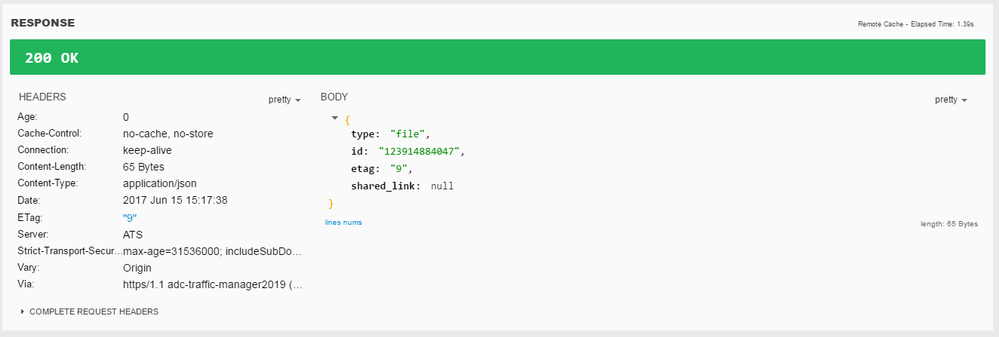
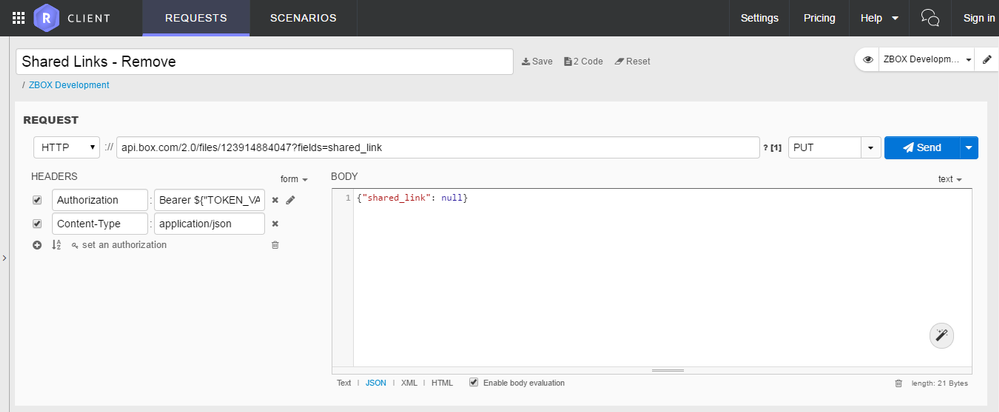
yes, I was able to remove a link 🙂 to be sincere, I have not done it through CURL but through Restlet (a UI for REST calls). Please, find a screenshot of the call.


BOX_xaqifoay8zl2dsjwb4rwuneomp5mt93w.png


This worked as expected:

BOX_jpgwakhsg2mr2op88dmznfd5igyw48qk.png


This tool also generates a curl piece of code that also I have enclosed here:

curl -i -X PUT \
   -H "Authorization:Bearer TOKEN" \
   -H "Content-Type:application/json" \
   -d \
'{"shared_link": null}' \
 'http://api.box.com/2.0/files/123914884047?fields=shared_link'

I hope this helps!


Thanks


Ps.- Probably the content type json piece has to be added 😉 that I see you are not adding that


Forum|alt.badge.img

Thanks again for your time!  I thought I'd share what I finally figured out - hopefully, it helps someone else as well.


I am still not able to execute the curl command with all options desired successfully from the command line.  HOWEVER, if I put the options in a config file and run the curl command with the --config option to read the options from the file, it works!  Very odd.  So, as an example:


These do NOT work:

curl -H "Authorization:Bearer TOKEN HERE" -X PUT  -d {"shared_link":null} https://api.box.com/2.0/files/?fields=shared_link

 or

curl -H "Authorization:Bearer TOKEN HERE" -X PUT  -d '{"shared_link":null}' https://api.box.com/2.0/files/?fields=shared_link


But, this DOES work:

curl --config myconfig.txt


The contents of myconfig.txt read as follows:

-H "Authorization:Bearer TOKEN HERE"
-X PUT
-d {"shared_link":null}
url="https://api.box.com/2.0/files/?fields=shared_link"


The only real difference is that the config file syntax requirements specify the use of "url=" in front of the path whereas the command line does not want anything in front of the path.  I have a ticket open with Box on the matter.  Thanks again!


Forum|alt.badge.img

I had this problem too and I think this might help others...


I just wanted to test an upload of a file "test.txt" to a sub folder in my Box.com account. The following command was constructed from the examples in the Box.com reference guide:

curl https://upload.box.com/api/2.0/files/content -H "Authorization: Bearer MY_TOKEN" -X GET -F attributes='{"name":"test.txt", "parent":{"id":"MY_FOLDER_ID"}}' -F file=@test.txt

However this was turned down by the server with "{"type":"error","status":400,"code":"bad_request", bla bla bla... [globbing] unmatched close brace/bracket in column 23" Great!

So I just starred and tried all sorts of stuff to this command including storing it in a curl file, but with no luck.

Then I saw a guy presenting the curl API (showing an old version of the reference guide and he was showing the contents of a folder) and he wrote the his command a bit different separating the attributes, like this:

curl https://upload.box.com/api/2.0/files/content -H "Authorization: Bearer MY_TOKEN" -X POST -F name="test.txt" -F parent_id="MY_FOLDER_ID" -F file=@test.txt

... and bingo this actually works! (for my curl installation, Windows 10, curl 7.58.0 (x86_64-pc-win32))

Hope this helps someone.


Forum|alt.badge.img