Question

BOXにあるフォルダ削除してしまった。ごみ箱にもない場合の復元方法 (I deleted a folder in my BOX. How to restore it if it's not in the trash bin)

  • April 25, 2025
  • 7 replies
  • 630 views

BOXにあるフォルダを削除してしまった。ゴミ箱にもない場合の復元方法

7 replies

Jey Bueno Box
  • Community Manager
  • April 25, 2025

👋 Hi ​@YUI9600, welcome to the Box Community! For the time being, we’re only able to provide support in English. Thank you.


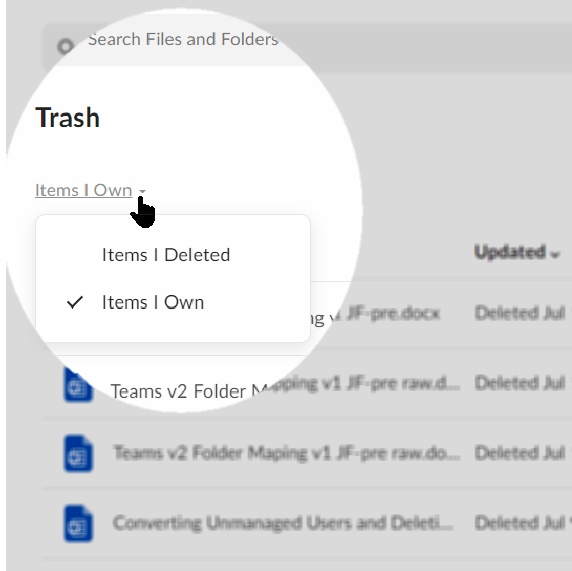
In the trash folder, there are two options: 'Items I own' and 'Items I deleted.' If you're the owner, 'Items I own' will display all deleted items you own, regardless of who deleted them.
 

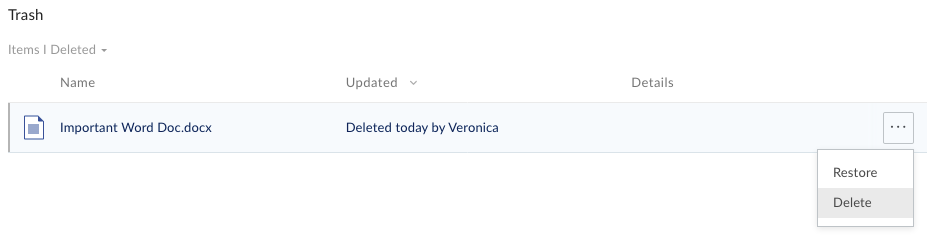
If you're a collaborator on a folder that was recently deleted, it should appear under 'Items I deleted.' Could you please check that option and let us know if you're able to see the folder you need to recover?


📝 Note: When items are deleted from a collaboration folder, both the owner and the person who deleted the item can recover them from the Trash. You can also ask the owner to check the ‘Items I own’ section to see if the folder is still available to be restored.

To restore an item:

  1. Hover over the row of the item you want to recover—this will highlight it.

  2. Click the More Options ellipsis () that appears.

  3. Select Restore to return the item to its original location in Box.

  4. At the prompt, click Okay.

Contact Box Product Support immediately if the content you deleted is no longer in your Box Trash.


Please check out Managing Trash article to learn more.


Looking forward to having this sorted out. 💙


Deleted (shared) folders off of Box Drive and they erased from Box.com and are not in Trash. Need to restore.


Jey Bueno Box
  • Community Manager
  • April 29, 2025

👋 Hi ​@SammyO1976Detroit, welcome to the Box Community! I moved your post to this related topic.


Regarding the deleted shared folders, have you already checked the “Items I Deleted” from your trash folder?

📝 Note: When items are deleted from a collaboration folder, both the owner and the person who deleted the item can recover them from the Trash. You can also ask the owner to check the ‘Items I own’ section to see if the folder is still available to be restored.


If the folders are missing from the bin, please submit a support ticket to our Product Support team immediately. As a reminder, when Box purges your trashed content there is still a 14-day grace period for paying customers, during which Product Support can recover your content.


Hope to have this resolved as soon as possible! 💙


  • New Member
  • May 18, 2025

I want to restore my deleted files that no longer in the trash 


Jey Bueno Box
  • Community Manager
  • May 19, 2025

👋 Hi ​@Shada7788, welcome to the Box Community! I’ve moved your post to this related topic.


When Box purges your trashed content, there is still a 14-day grace period for paying customers, during which Product Support can recover your content. Beyond this 14-day grace period, however, files or folders purged from your Box trash may not be recoverable and may be lost forever. Please submit a support ticket to our Product Support team for assistance.

Please note that this recovery grace period does not apply to Free accounts. We are unable to support file recovery for our Free Individual plan.


On the other hand, if you deleted items from a collaboration folder, you can check the ‘Items I Deleted’ or reach out to the owner to recover it from trash (if applicable).


Check out Managing Trash article to learn more. 😊


  • New Member
  • August 29, 2025

Hi. I deleted an important work folder by accident. When I went to restore it, my trash is empty. There are no files in my trash and nothing to restore. Can you please help. How do I locate the folder? Do I require admin? I have followed everyone I’ve read on Box help and nothing works. Thanks.


Jey Bueno Box
  • Community Manager
  • August 29, 2025

👋 Hello ​@aliciaT, welcome to the Box Community! I’ve moved your post to this related topic.


As stated above:

In the trash folder, there are two options: 'Items I own' and 'Items I deleted.'

  • If you're the owner, 'Items I own' will display all deleted items you own, regardless of who deleted them.
  • If you're a collaborator on a folder that was recently deleted, it should appear under 'Items I deleted.'


📝 Note: When items are deleted from a collaboration folder, both the owner and the person who deleted the item can recover them from the Trash. You can also ask the owner to check their ‘Items I own’ section to see if the folder is still available to be restored.


Check out Managing Trash article to learn more. Thank you! 😊