Question

Update File Info API not working

  • May 21, 2025
  • 13 replies
  • 56 views

Forum|alt.badge.img

Hello,


I am looking to update the description of a file.


I am testing the following command  (via PostMan):

https://api.box.com/2.0/files/FileId?name=FileName&access_token=AccessToken&description=TestDescription


The status is 200 Ok but the display is not showing any change in the description. It looks like the command is not updating the description field.


Can you plase suggest.


Thanks, ZZ
13 replies

Forum|alt.badge.img

Hello ,


to update the description you have to use the PUT method not GET that I think is what you are using. Please look at here https://docs.box.com/v2.0/reference#update-a-files-information exactly how to do it.


You need to call a PUT method and send a json with the values.


Thanks


Forum|alt.badge.img

Hello,


Sorry it was indicated in my initial message.


Actually I am using a PUT method but it is not working (no update is executed).


Thanks, AEB


Forum|alt.badge.img

In addition, my first step is just to test the API with a ReST client. The code is 200 but there is no update on the "record".


Thanks, AEB


Forum|alt.badge.img

Hello!


could you enclose a screenshot please? I said the PUT thing because I see that the URL you shared is built as if it was a GET 🙂


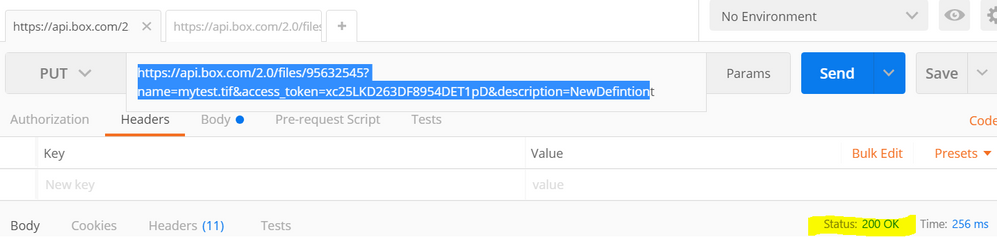
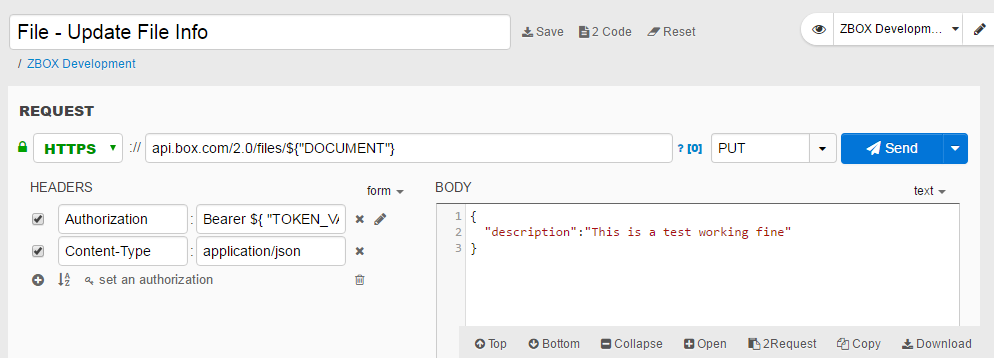
I have done a test with Restlet Client that is similar to POSTMAN and works fine for me. See the screenshot. 


You should have something similar.


Thanks


BOX_vamtoj7k6aso9qdmoj5gu11puhpooxnu.png


Forum|alt.badge.img


Hello,


Please find the screenshot. My first step was a simple test to see/check the update. But no update is processed.


BOX_s448w5gzxutast8nj9tpsp9x75rm0exe.png


Thanks.


Forum|alt.badge.img

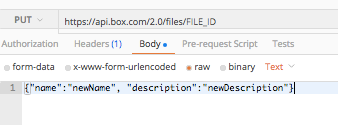
 In your request, you have to send the updated values of name and description as body parameters. You also have to send the access token as a header in your request.


Here is a cURL example for this request:


curl https://api.box.com/2.0/files/FILE_ID \
-H "Authorization: Bearer ACCESS_TOKEN" \
-d '{"name":"newName", "description":"newDescription"}' \
-X PUT


Here is an example of this same request in Postman:

BOX_9mr1ce4rr5uh7n74v43x5q8o39pv1pwm.png

BOX_hqa9c4t5ikzmjvgfvoh44sh5jju86uul.png


Since you are using Postman, I would suggest checking out our Postman collection that has most of the Box API calls already setup. 


Forum|alt.badge.img

Thank you. I will change my Postman query.


Forum|alt.badge.img

hello,


exactly. Probably I did not express myself clear enough, apologies.


But,  you are doing the query as if the request was a GET one. As my screenshot shows the body is there.


If you do not pass anything on the body you have an OK because nothing has changed so the update is succesful.


Regards


Forum|alt.badge.img

Thanks for the update.


I tried the cURL example you provided but I see no update when I execute it.  The current record is displayed with no updates on the name and decription columns.


Below the command I tried:

curl https://api.box.com/2.0/files/FILE_ID  -H "Authorization: Bearer ACCESS-TOKEN" \

-D {"name":"NewName", "description":"NewDescription"} \

-X PUT -k


Any explanation would be appreciated. Thanks.


Forum|alt.badge.img

Hello ,


could you add a screenshot of your call using postmann please? Maybe then we can point exactly what is wrong.


Thanks


Forum|alt.badge.img

Hello @LoCortes,


Actually I was trying to understand explanation and the cURL example:

curl https://api.box.com/2.0/files/FILE_ID \
-H "Authorization: Bearer ACCESS_TOKEN" \
-d '{"name":"newName", "description":"newDescription"}' \
-X PUT


I tried it and it didn't work.


I opened a separate discussion.


Thanks. 


Forum|alt.badge.img

Hello,


I would try to finish the postman approach you were doing as it is easier 🙂


It does not work but could you share some screenshot or message or something? it will be easier to help you.


By the way, are you executing that exactly message that Murtza gave you? I guess you've changed the File_ID to some specific one and using your developer token, aren't you?


Thanks


Forum|alt.badge.img

@LoCorest, 


Yes, I have changed the File_ID and developer token with correct values but it is not working.


Thanks