Question

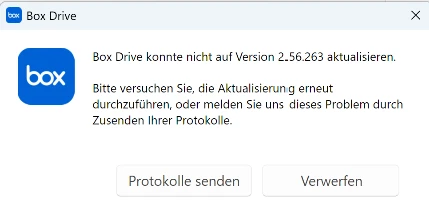
Unsuccessful update to version 2.56.263

  • Oct 30, 2026 11:50 PM UTC
  • 6 replies
  • 66 views
  • Translate All

Box is working for about 5 or 6 years now. About two years ago I updated to Win11 from Win10, but this has been no problem for the functionality of Box. But now, starting three days ago, I receive the error message of an unsuccessful update to the new version, when firing up my computer. I have not made any changes to the system, that I would be aware of.

Even starting the freshly downloaded  msi file does not work. When I click it, only a message appears “Please wait while Windows configures Box.” But then it closes and nothing further happens.

Are there already any ideas, what can be the reason? 

Since I’m a free account user, it seems, I’m not able to open an official ticket for the issue.

Any help appreciated! Thanks!

6 replies

Rona Box
  • Community Manager
  • Oct 31, 2026 12:50 AM UTC

Hi ​@antineff, 

Welcome to Box Community, and we’re going to help with your update!


Since your update for your Box desktop application has failed. Did you attempt to uninstall and reinstall it? If you do, did you get the same error still?


In addition, please attach a screenshot of your error and the version of your Box application. 

We wait for your reply!


Translate

  • Author
  • New Participant
  • Nov 1, 2026 10:25 PM UTC

Hi Rona,

Thanks for your quick reply! Sorry if I ask any rookie questions like that one:

If I’m going to unistall and reinstall Box from and to my computer, am I going to loose the data, if I don’t have a backup?

Currently, I’m using Box version 2.55.145, trying to update to 2.56.253.

Very sorry, but I’m susing the German version! 😉

Translate

Rona Box
  • Community Manager
  • Nov 2, 2026 11:44 PM UTC

Hi ​@antineff, good question!


Any unsync files in your local Box folder will be permanently deleted during the uninstall process. It’s important that you check out your files before proceeding. 

To make sure your files are fully uploaded in Box.com, in your desktop go to C:\users\[USERNAME]\AppData\Local\Box\Box\unsyncedFiles. 


If you have questions for me, feel free to reply!

Translate

  • Author
  • New Participant
  • Nov 3, 2026 10:20 PM UTC

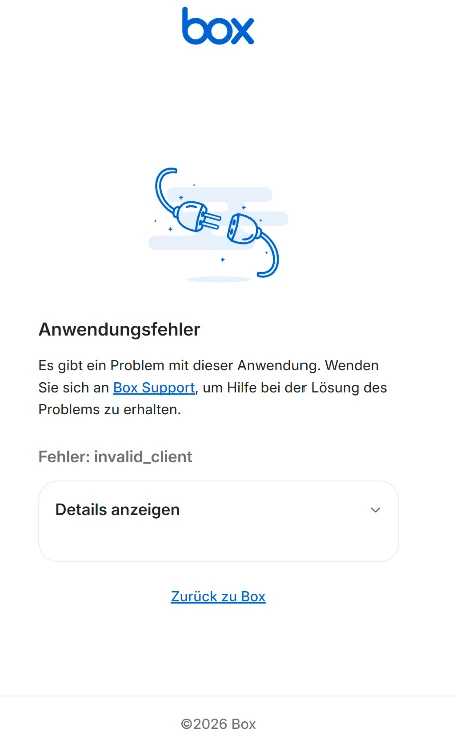
First, I had trouble deinstalling Box. The “windows is configurein Box” just froze on the screen. I had to close everything I found from Box by using the Task Manager. Then deinstallation then worked. I restarted the computer und tried reinstalling by using the downloaded BoxDrive.msi file. Installation worked so far, but then immediately an info window appears in the lower right corner saying the Box is updating to the new version 2.56.253, resulting in the error window I already sent above. Also I received a page in the browser I pasted below after logging into Box, where I was prompted to. So, I have Box installed again, but still in the old version 2.55.145. Is it possible that deinstalling keeps information somewhere, that sets up the old version instead of directly installing the new one? Also, I’m asking myself, what should be invalid with the client (see message below)?


Translate

  • New Member
  • Nov 4, 2026 10:23 AM UTC

Box Drive 2.56.263 update fails with MSI error 1603 – Solved with a workaround (do it at your own risk)

I was running Box Drive 2.55.145, and the automatic update to 2.56.263 kept failing with MSI error 1603.

Also, the installer downloaded from the official Box website was still version 2.55.145, not 2.56.263.

Cause: The MSI log showed:

Refusing to use a hard link: C:\ProgramData\Box\Box\Installer\BoxInstallerHelper.exe

Solution that worked for me:

  1. Stopped BoxUpdateSvc.

  2. Renamed BoxInstallerHelper.exe to .bak.

  3. Replaced it with an independent copy of the same file (identical SHA256, but no hard link).

  4. Moved the .bak file outside the Installer folder, since the installer also rejected that hard link.

  5. Restarted BoxUpdateSvc and manually installed Box.2.56.263.msi from C:\ProgramData\Box\Box\Installer.

Result: MSI exit code 0, Box Drive successfully updated to 2.56.263.0.

This was an unofficial workaround involving protected updater files, so proceed with caution. Hopefully Box can fix both the hard-link issue and the outdated installer on its website.

Translate

  • Author
  • New Participant
  • Nov 4, 2026 9:08 PM UTC

OK, first I thought I need more rookie understandable instructions. Especially at point 3 I was out! But then I just moved BoxInstallerHelper.exe out of the directory C:\ProgramData\Box\Box\Installer and started Box.2.56.263.msi and it worked. 

Now I hope this new version is not as buggy as the installer, otherwise I will regret updating, and hopefully the next version works better.

Thanks ​@prenazol for leading on a helping track!

Translate