
Question

stupid question, but how do I upload a file to my existing box? There's no "upload" button!!!

  • July 8, 2026
  • 3 replies
  • 13 views

I have a box which I created and uploaded 5 files to a few months ago.

Now I just want to add one more pdf file--but I can’t figure out how !!!!!

Either I am stupid (definitely a possibility), or there is something wrong.

I can see the contents of my box, with all 5 file names.

But there is NO option anywhere on the screen to add or upload anything new.

What is wrong here? 

There is no icon, no link, NOTHING AT ALL ANYWHERE ON THE PAGE with ANY option to add a file!!.
3 replies

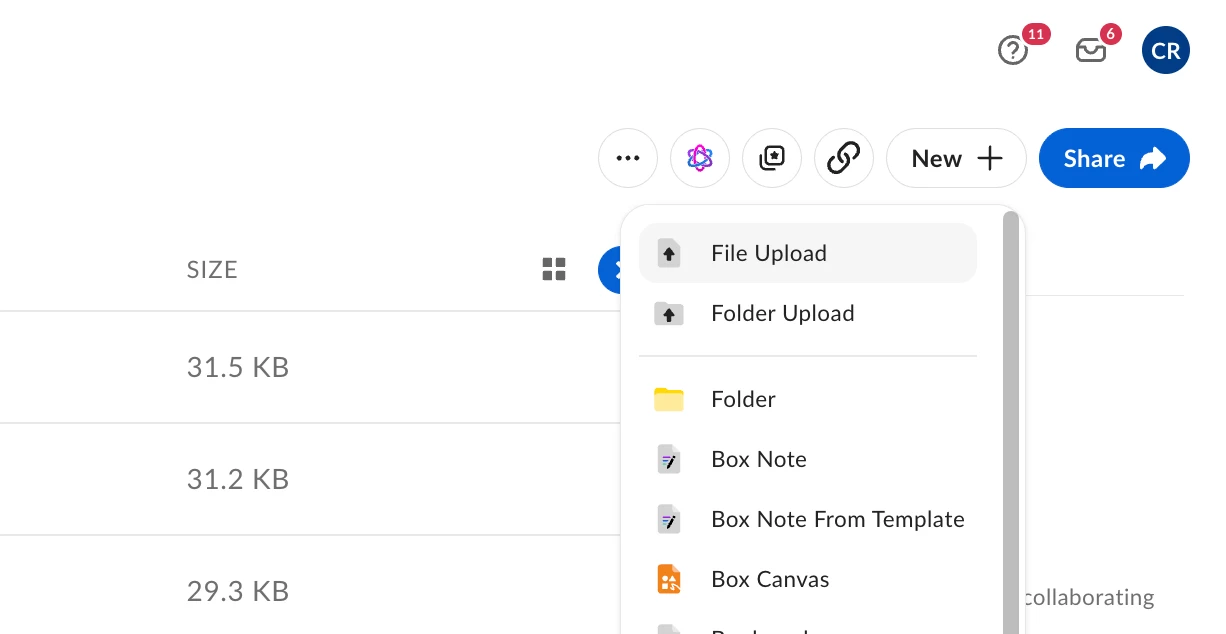
When you’re in the file/folder view and you have the proper access rights, it’s in the upper right:


Sorry, if it wasn’t clear, that pop-up menu appears when you click on “New +”.


  • Author
  • New Participant
  • July 8, 2026

Thanks. Like I said, I’m stupid.

But, gee whiz, why can’t things be intuitive and obvious? --the whole reason that Box. com exists is so that I can easily add files for others to see. . Why hide the  “add” function behind two unnecessary clicks?

[end of old man rant]  :)