Question

Service account can only "see" content it owns

  • May 21, 2025
  • 10 replies
  • 73 views

Forum|alt.badge.img

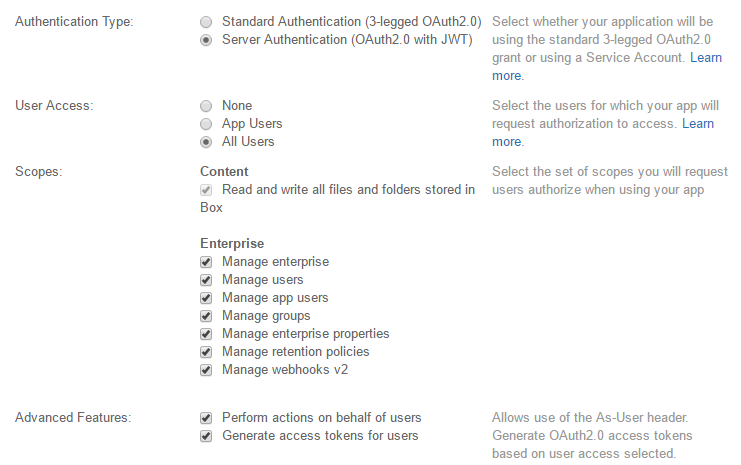
I'm creating an app that will perform some automated audit functions on collaborations in my Enterprise account.   In the developer console the app uses JWT authentication.  I've granted it all of the scopes, including "Read and write all files and folders stored in Box" and all the Enterprise scopes ("Manage Enterprise," "Manage Users," etc.) and of course authorized the app in my Enterprise settings.   The app name now shows up as a user in the "Content Manager" but nowhere else.  I can actually login to that user's account and create some folders.


Here's my problem:   when I call the API, the app only "sees" the folders it owns (or has permissions on), even though I've granted it all those scopes in the dev console.


Must I make this app a co-owner of the root folder or something?  How do I do that?


Thanks!!!
10 replies

Forum|alt.badge.img

I think I'm doing something similar. 


I have a node.js web app that I extended off the sample app.

It uses JWT and I had that app "as-user" enabled. 

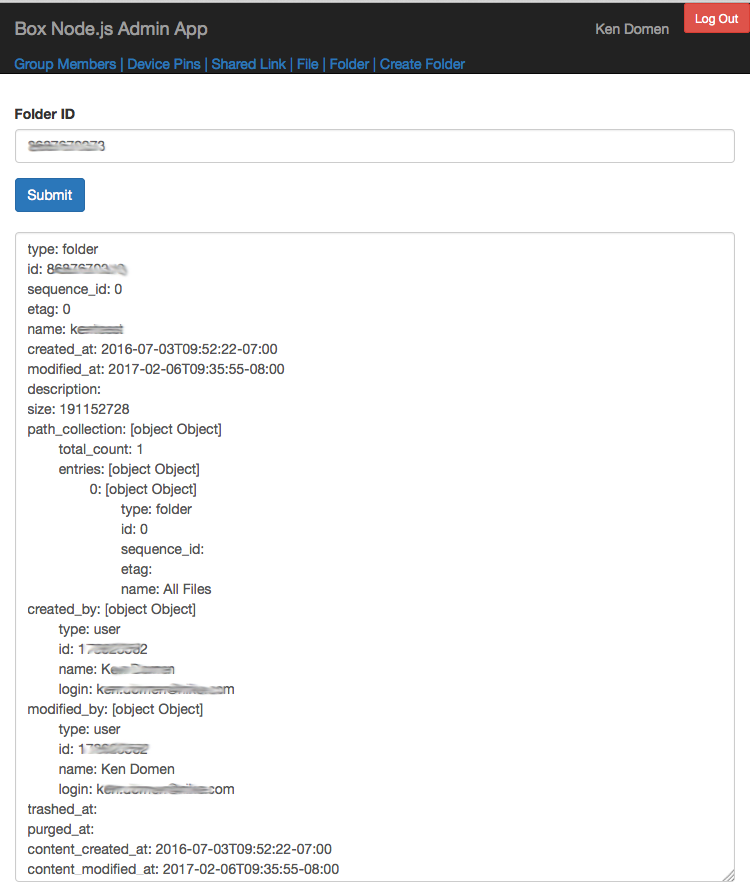
Then I get the folder as user with the id and get all the info.


BOX_exim41tb34nhtxfceqy993lnmjez5e23.png

app.post('/folder', ensureAuthenticated, function(req, res) {
	    
	    // this gets folders as the adminClient JWT
	    req.sdk.folders.get(req.body.info, null, function(err, data) {

		if (err) {
			res.render('folder', {
				error: 'An error occurred during login - ' + err.message,
				errorDetails: util.inspect(err)
			});
			return;
		}

		// get folder As-User
		var userid = data.owned_by.id;
		var userClient = sdk.getAppAuthClient('user', userid);
		userClient.folders.get(req.body.info, null, function(err, data) {
			res.render('folder', {
				error: err,
				errorDetails: util.inspect(err),
				info: data
			});
		});
	});
});

Forum|alt.badge.img

 hmm, can you collaborate the service account into all content, that way the service account will be able to access all content in the app and you'll be able to see all content just using the service account. 


Forum|alt.badge.img

Thanks so much for your replies!


From my enterprise admin account, I'm able to collaborate with the service account on folders that I own, and then the service account "sees" those.   But when I try to create a collaboration with the root folder (ID=0) I get an error:


{ "type": "error", "status": 403, "code": "access_denied_insufficient_permissions", "help_url": "http://developers.box.com/docs/#errors", "message": "Access denied - insufficient permission", "request_id": "***number removed for privacy***589cb7356b0d2" }


Not sure how to do that.  Even if I got permissions on all the folders in the root and collaborated those, the next time a user created a root folder it wouldn't see that.   The whole purpose of the app is to be able to audit every collaboration in the EID.  I thought that by checking all those permissions boxes in the app's "scope" that it would see everything, no?


BOX_gdk8d7cdrm71wxz1wvoaqzzg9j5lw1rt.png


Thanks!!!


John


Forum|alt.badge.img

>> "I thought that by checking all those permissions boxes in the app's "scope" that it would see everything, no? "


It does "see" everything, you just have to open your eyes 😉


Bad analogies apart (I'm sorry), the SA can access all content in an enterprise by 3 methods:

1) Getting a token on behalf of a user and making calls as that user

2) Using "As User" header and accessing content on behalf of the user or

3) By explicitly collaborating an SA into all content 


This is probably the most common issue we see on customer deployments. Does this explanation help? 


Forum|alt.badge.img

Thanks so much for your continued replies!


Follow-on questions:


>>> 1) Getting a token on behalf of a user and making calls as that user

>>> 2) Using "As User" header and accessing content on behalf of the user


Don't you need to know which user to "be?"  I guess you could impersonate every managed user in the enterprise and walk the root folder of each one, but that seems really inefficient.


>>> 3) By explicitly collaborating an SA into all content

Since users are constantly creating new content throughout the enterprise, often in root folders, how can I explicitly collaborate the SA into everything in an automated fashion?


Thanks again!!!


John


Forum|alt.badge.img


Sure, happy to help. 


>> Don't you need to know which user to "be?"  I guess you could impersonate every managed user in the enterprise and walk the root folder of each one, but that seems really inefficient.


Yes. It is kind of inefficient but unfortunately that's the best way to get around this. 


>> Since users are constantly creating new content throughout the enterprise, often in root folders, how can I explicitly collaborate the SA into everything in an automated fashion?


The ideal solution would be for the SA to own all content since it can't be collabed into the root folder. Unfortunately if the folder structure has already been defined, the best way to get around this is to write a script that cycles through all the first level folders from a root folder and collabs the SA into those folders. 


Hope this helps. 


Forum|alt.badge.img

That'll work -- background process that continually walks the users and folders and collabs the SA into everything using "as user."


Thanks again!


Forum|alt.badge.img

 Sure 🙂


Sorry if this is all a bit non intuitive. We're trying to provide helper functions that will help set this stuff up for you and hopefully that happens in the not too distant future. 


Thanks for building on Box and please reach out if we can help with anything. 


Forum|alt.badge.img

Thanks, that would be great.


So, what does the "Read and write all files and folders stored in Box" optino actually do then?  


If I'm going to grant the SA explicit collaboration permissions on each folder in the root, then do I even need this?   I don't want to grant unnecessary permissions to the app...


Thanks!


Forum|alt.badge.img

Not familiar with that perm. My advice would be to first test w/o that perm (with just the SA collaborations) and if that fails then do the grant.