Solved

Report Phish for external users

  • December 5, 2025
  • 2 replies
  • 42 views

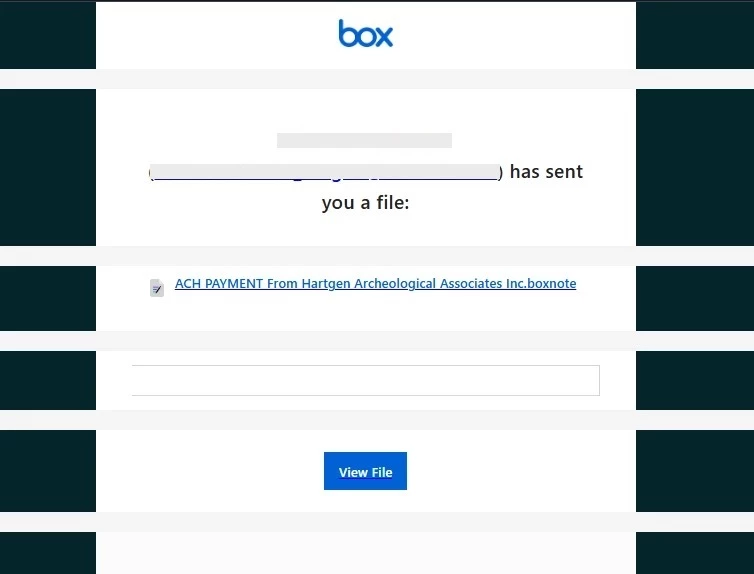
We have been receiving emails as shown below that includes a phishing links. How can we report this without needing to login? Can we report it via email?

 

Best answer by Rona Box

Hi ​@Danilo Melitante

Welcome to Box Community! Thank you for flagging this. You can take immediate practical steps to help protect your accounts from phishing:

  • Use authenticator apps or security keys instead of SMS-based MFA.
  • Never share credentials or sensitive data through email, text, or phone. Legitimate organizations never ask you to do so.
  • Create strong, unique passwords and store them securely in a password manager.
  • Keep your devices and apps updated to protect against known vulnerabilities.

In the future, you can report suspicious files to Box Security by:

  1. Login to your Box account.
  2. Preview the file.
  3. At the top of the Preview page, click the ellipsis (“”).
  4. Select Report Abuse.
  5. Box displays a prompt where you can provide additional context.

You can also forward it directly to abuse@box.com.


Kindly refer to Understanding Phishing and Social Engineering Attacks for more information regarding the above.


To learn more about what Box is doing to prevent phishing attempts sent through Box notifications and collaboration invites, please see Strengthening Protection Against Phishing and Malicious Invitations.


If you have additional questions, please open a support request so our agents can assist you directly.

2 replies

Rona Box
  • Community Manager
  • Answer
  • December 9, 2025

Hi ​@Danilo Melitante

Welcome to Box Community! Thank you for flagging this. You can take immediate practical steps to help protect your accounts from phishing:

  • Use authenticator apps or security keys instead of SMS-based MFA.
  • Never share credentials or sensitive data through email, text, or phone. Legitimate organizations never ask you to do so.
  • Create strong, unique passwords and store them securely in a password manager.
  • Keep your devices and apps updated to protect against known vulnerabilities.

In the future, you can report suspicious files to Box Security by:

  1. Login to your Box account.
  2. Preview the file.
  3. At the top of the Preview page, click the ellipsis (“”).
  4. Select Report Abuse.
  5. Box displays a prompt where you can provide additional context.

You can also forward it directly to abuse@box.com.


Kindly refer to Understanding Phishing and Social Engineering Attacks for more information regarding the above.


To learn more about what Box is doing to prevent phishing attempts sent through Box notifications and collaboration invites, please see Strengthening Protection Against Phishing and Malicious Invitations.


If you have additional questions, please open a support request so our agents can assist you directly.


That was very helpful. Thanks for your assistance ​@Rona Box


