Question

Reoccuring Issue & No way to Contact Support

  • July 29, 2026
  • 7 replies
  • 74 views

Hi there,


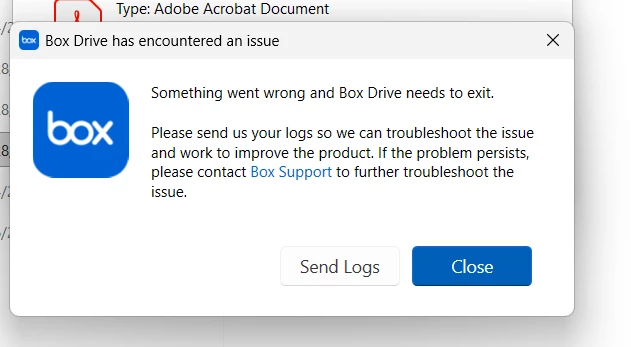
I keep getting a random vague error message saying that Box is experiencing issues and then requests I send logs.  When I attempt to do that, it prompts me to create a ticket.  I follow the steps and there are no specific instructions on how to contact support nor create a ticket. I have tried to reset and reinstall box, but the issue keeps happening.  I cannot work off the online version as I have a high quality of files to move and edit  I really need this resolved immediately.  It’s been three - four days of this and I’m beyond frustrated as it is prolonging my ability to work.

7 replies

Rona Box
  • Community Manager
  • July 29, 2026

Hi ​@AUDIE HAMON

Welcome to Box Community, and we’re here to help investigate on this issue that you’re encountering. 


Let’s begin with the following details, 

  • By any chance, were you able to capture a screenshot of this error? If yes, please attach a screenshot. 
  • What is the Operating System running in your machine? 
  • What is the current version of your Box for Desktop application? 
  • Has it ever worked before?
  • Is it your first attempt to use this Box for Desktop application in your machine? 


Thaks for posting, and we look forward to your reply! 


  • Author
  • New Participant
  • August 5, 2026

I have attempted to reach out to support for direct help - I attempted to post something, but it’s not showing up. I really need support to assist in reviewing why my box keeps shutting down, requesting to send logs and restarting.


Everytime it restarts, I can barely get any work done before it happens again. I have attempted to restart, reset and redownload box and none of these solutions are working.


Can someone from the support team please assist me!! This is really hindering my work


  • Author
  • New Participant
  • August 5, 2026

Hi there - this reply is just now showing up in my profile.  I have had a slew of issues with box. 


Here is the screen shot that keeps popping up when using Box Drive. I am using Windows 11, yes I have the current version of Box on my Desktop. (I have had to download and reinstall it several times)  Up until the last week - is when this error started happening.  I have been using Box since February of this year and it all of a sudden started doing this. it’s been absolutely fine.  This is not my first time using this application on this machine.  I have used it quite a bit in the past 


Rona Box
  • Community Manager
  • August 5, 2026

Hi ​@AUDIE HAMON, thank you for responding! 

To resolve this error, try resetting your Box Drive application: 

  1. Exit Box Drive (if it is running). If necessary, use Task Manager to end the Box.exe process.
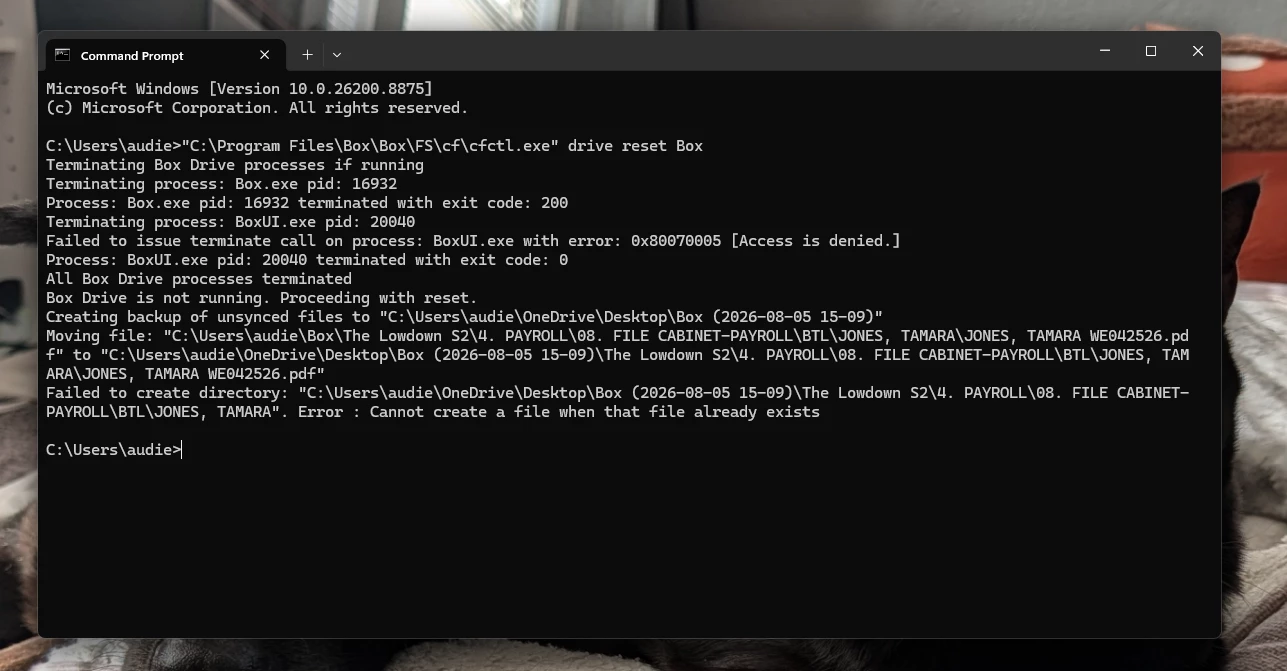
  2. Run command"C:\Program Files\Box\Box\FS\cf\cfctl.exe" drive reset Boxon command prompt. Files not uploaded to Box will be saved to the Desktop with a timestamp.
    1. The output should say “Box Drive reset completed successfully” at the end. If this is not so, then it may be that some files were still open and could not be deleted. Once everything is closed, a re-run of step 2 should be successful.
  3. From RegEdit, delete the registry entries under HKEY_CURRENT_USER/Software/Box/Box to clear Box preferences.
  4. Restart the Box Drive and follow the prompt to log back in.


Hope it works! Let us know should the issue persists. 


  • Author
  • New Participant
  • August 5, 2026

The issue is still presisting - I have attempted this once before and it did not work.

I just restarted my computer to attempt this one more time - this is what appeared.  Box was completely closed when running this command prompt as well.


  • Author
  • New Participant
  • August 5, 2026

I tried the reset one more time - the reset was successful, but the issue with the same message is still occurring 


Rona Box
  • Community Manager
  • August 5, 2026

Hi ​@AUDIE HAMON


At this rate, try to clean uninstall your Box Drive application using the steps below: 

Any content in your Box Drive desktop location that has not yet successfully been uploaded to Box is deleted from your machine during the uninstall process. Be certain all of your content is uploaded to Box before proceeding.

  1. Quit Box Drive
  2. Uninstall the application in the Control Panel.

Before removing all traces of Box Drive from your machine, first ensure that all hidden folders are visible.
To view hidden files and folders in Windows:

  1. In the Windows taskbar, open File Explorer.
  2. At the top of the File Explorer window, click View.
  3. In the View menubar, click Options and select Change folder and search options.
  4. At the top of tthe Folder Options window, click the View tab.
  5. In Advanced settings, check Show hidden files, folders, and drives.
  6. At the bottom of the window, click OK.

To remove all traces of the Box Drive application from your machine:

  1. Go to C:\ProgramData\Box and delete the Box subfolder.
  2. Open Registry Editor and delete HKEY_LOCAL_MACHINE\SOFTWARE\Box\Box.
  3. Go to C:\Users[USER]\AppData\Local\Box and delete the Box subfolder.
  4. Open Registry Editor and delete HKEY_CURRENT_USER\SOFTWARE\Box\Box.
  5. Go to C:\Program Files\Box and delete the Box subfolder.
  6. If the machine has multiple user accounts, login using each user account and repeat steps 3 and  4.

Once again reinstall the latest Box Drive version here

Hope it works! Feel free to reply should the error persists.