Solved

Removal of Multi-Factor Authentication

  • January 22, 2026
  • 25 replies
  • 320 views

We invited the user to create a Box account, but it appears they had previously registered with Box. They had set up two-factor authentication using SMS (mobile phone number), but since their phone number has changed, they are unable to receive the SMS and cannot log in.

According to the help documentation, in this case, Support needs to remove the multi-factor authentication.

Could you please assist with this request?
Target user: [removed by moderator]

Best answer by Rona Box

Hi ​@Yudai Watanabe

Welcome to Box Community and we’d love to assist! 

Since the user can no longer authenticate, we can help remove his/her MFA configuration. To do so, the affected user must reach out to the Box Product Support team directly.


For users without login access, they can submit a support case through this link


Thanks for posting, and we hope to help you sort this out very soon! 

25 replies

Rona Box
  • Community Manager
  • Answer
  • January 28, 2026

Hi ​@Yudai Watanabe

Welcome to Box Community and we’d love to assist! 

Since the user can no longer authenticate, we can help remove his/her MFA configuration. To do so, the affected user must reach out to the Box Product Support team directly.


For users without login access, they can submit a support case through this link


Thanks for posting, and we hope to help you sort this out very soon! 


  • New Member
  • February 9, 2026

I have a Box.com account that I use regularly with a NAS.
I need to access the website www.box.com. I entered my user ID and password, but when I am asked for the 6 digits from the Google Authenticator App, I enter the 6 numbers and get an error. In 2025, I was able to access the website www.box.com normally.
How can I access the website again?
The user ID I need to log in with is not the one I am using to ask this question, because I cannot even request support with my main user ID.
Thank you for your help.


  • New Member
  • February 10, 2026

Hi Box Support Team,


I am sending this message instead of my colleague Asami, who recently has a trouble when logging in.

Could you please send her a reply by Email? This is her address. 

<personal information removed>


I use Box to exchange data with multiple clients, but I have recently encountered an issue when trying to log in. A few days ago, after entering my email address and password, I started being prompted to enter a 6-digit two-factor authentication code from my authentication app.

However, I am not receiving any authentication notifications or codes in the app or email account associated with my Box login. Because of this, I am unable to complete the authentication process and cannot access my Box account.

Could you please advise me on how to resolve this issue or help disable/reset the two-factor authentication so I can log in again?

Thank you for your assistance.


Best regards, asami


  • New Member
  • February 10, 2026

Hi support

I try to access my account through the app and in two-factor authentication, once I receive the code, I enter it, click on send... and I don't receive anything. 

I've been in this situation for months and I can't access my Box account from the app.

I'm pretty tired of this. Please, can you help me? Also, I would like to disable two-factor authentication.

Thank you very much.


Rona Box
  • Community Manager
  • February 10, 2026

Hi ​@Fil73 and ​@Arvalo, welcome to Box Community! I moved your post to this related topic and we will help regain your Box access. 


Since you can’t login due to your MFA and for you to quickly access your important Box files, we can disable your MFA. To do so, please send in your request through this support link


Please be sure to only use your affected email address when creating a support case. 


Thanks for posting! 


I have invited an existing external Box account to a managed Enterprise account, but the user lost the phone which has Box MFA registered, so unable to sign-in. The account email address is <personal information removed> Could you please help. 


Thank you


  • New Member
  • February 12, 2026

My collegue doesnt have BOX on his authenticator app but box is looking for a code.


But he also cant log in to post on the forum thats why Im posting on his behalf.


Where is the box contact email?


Thank you


  • New Member
  • February 18, 2026

I need help resetting my two-factor authentication account from this other account: [removed by moderator]


Rona Box
  • Community Manager
  • February 18, 2026

Hi ​@Richmond Pharmacology, ​@Cillian, and ​@Jose Luis, welcome to Box Community! 

End Users unable to authenticate should create a support ticket through this link. 

Currently, log in issues like the one you reported can only be handled with the affected users. 


Thanks for posting! We look forward in resolving their login issue as soon as possible. 


  • New Member
  • February 20, 2026

My box account associated with my work email will allow me to sign in but then prompts 2 factor authentication. I have a new phone and cannot access a Box account on my authenticator app.


Rona Box
  • Community Manager
  • February 24, 2026

Hi ​@MeganBert, welcome to Box Community, and we merge your post to this related topic. 

For your MFA-related login query, please contact the  Box Product Support team by creating a support ticket. I understand that you won’t be able to log in the support page to create a ticket. 


In that case, please use this link instead. 

Thanks for posting, and we’d love to hear from you! 


  • New Member
  • March 3, 2026

I have an external user who is having problems with 2FA, which we require of everyone. She is using the same authenticator app she uses to access several other school’s Box environments successfully; however, the code it generates in the case of our Box instance results in an “invalid code” error. I’m thinking that a good first step would be to delete the account for our Box environment from the authenticator app and then re-add it, but I’m relatively new to Box and this is my first time dealing with this issue, so I’m not sure of the mechanics. Is there a way to re-generate the 2FA QR code for the external user? Or is there some more obvious fix I’m completely missing? Thanks in advance for any suggestions.


  • New Member
  • March 5, 2026

HI,

Good day,

We have Employee is using box but he cannot set up the 2-factor authenticator,  now if she open or using the box she need to input the OTP, but in previous she cannot set it up, how can we request to reset her account to set up her authenticator.


Thank you…


  • New Member
  • March 5, 2026

Hi,


I am asking on behalf of my colleague who is unable to log in to Box due to 2FA issue.


Appreciate you can contact me to address this issue.


Regards


I did not set up a two-step authentication for my work-related Box account and now I cannot access. What steps can I take?


I did not set up a two-step authentication for my work-related Box account and now I cannot access. What steps can I take?

I do not know how I can get into my account or what my options might be.


Rona Box
  • Community Manager
  • March 16, 2026

Hi ​@dawncelestecarr, welcome to Box Community, and please feel free to join the discussion to this related topic!


If you have any concern regarding your Box login, such the Multi-Factor Authentication in your Box account. Please reach out to the Box Product Support team by creating a support ticket by using this link


Thanks for posting! We hope to sort this out very soon. 


Hello,

I have an employee who has been unable to get into Box for awhile now. She changed phone numbers, so the system is asking for Two-Step Verification, but it is sending that request to her old number, so she has no way to log in.

What steps can be taken to get her back into her account, or set up with a new one?


  • Box Employee
  • April 6, 2026

Hi ​@michaelkaczmer


Welcome to Box Community and glad to assist! 

Could you please confirm if the affected user is a free individual account? If yes, for security purposes please advise the affected user to submit a new ticket for us to assist their 2fa concern.


Thanks for posting! 


  • New Member
  • April 15, 2026

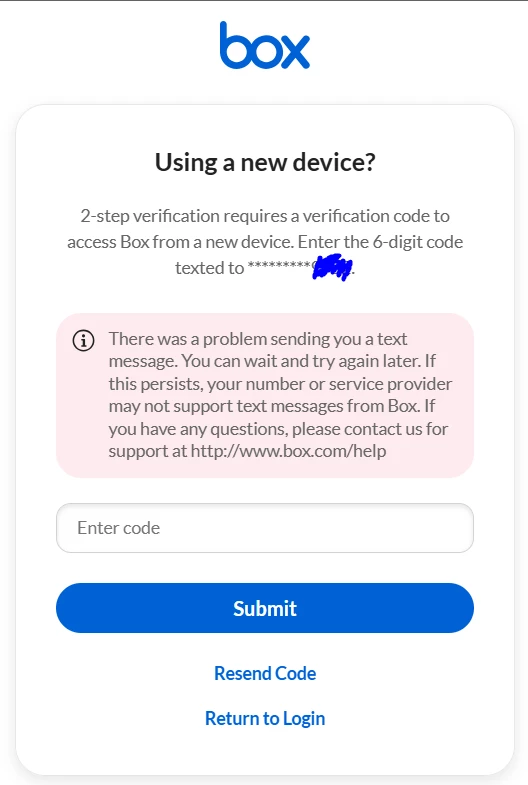
My colleague is having trouble logging into his account using SMS-based two-factor authentication. (Screenshot 1)


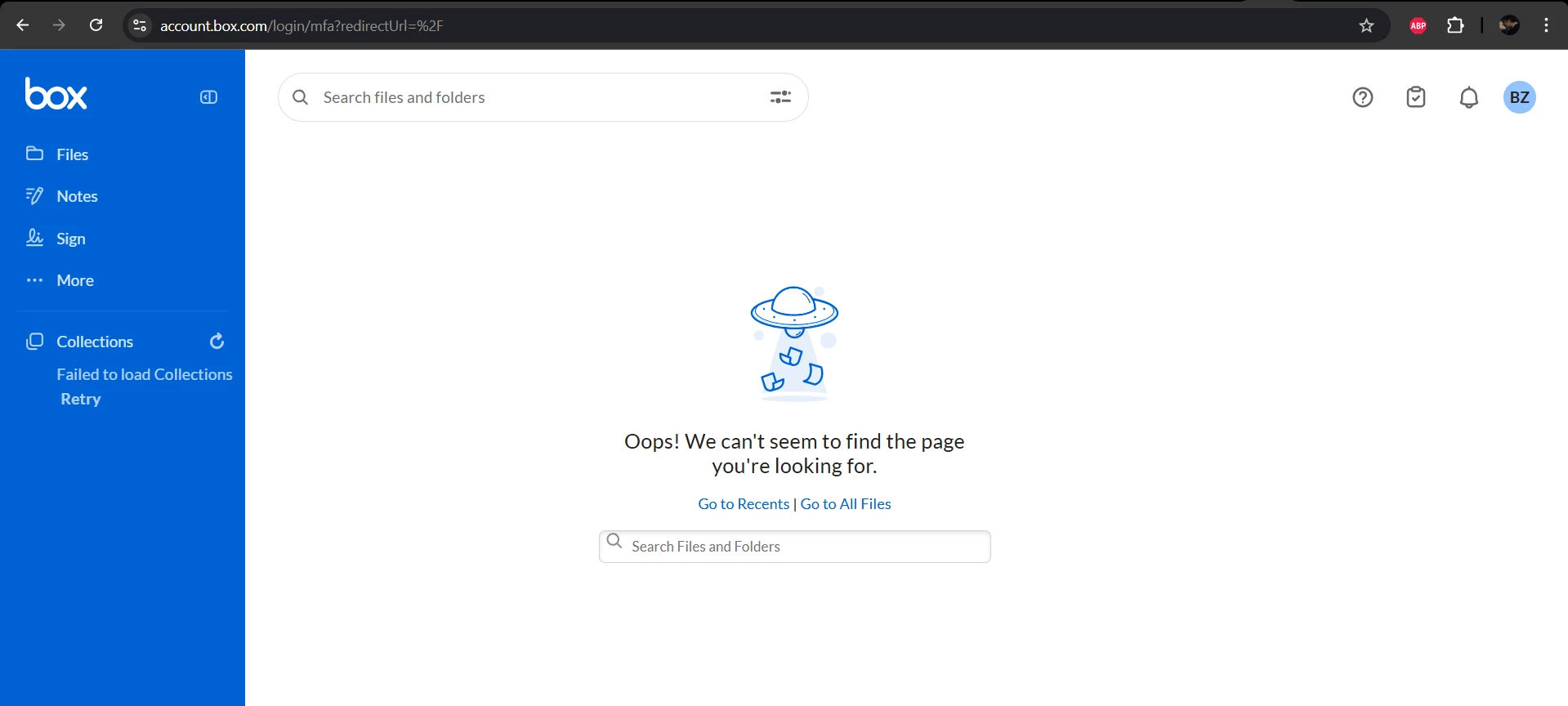
Sometimes two-factor authentication isn't required, but he can't access any of the folders that were previously available in his account. (Screenshot 2)


Account based in Ukraine, he’s used a Chrome browser.


Could you please advise?
Many thanks


Rona Box
  • Community Manager
  • April 15, 2026

Hi ​@Lera Kushnir, welcome to Box Community, and we moved your post to this related topic. 


Since it’s another Box user who’s having issue with his Multi-Factor Authentication.  We suggest on having this user to contact the Box Support team directly. 

Please share this link to your colleague to create a ticket and reach out to the Box Product Support team. 


Hope it helps! 


  • New Member
  • April 20, 2026

I recently reset my iPhone for battery replacement. I can no longer use my 2FA via the Authenticator app to access a shared folder on a client, and I cannot log in to my account. (


I need to request a reset of my 2FA so I can register it again in my Authenticator app. My client cannot reset it on their end since I am not part of their subscription.

I cannot post a question here nor create a ticket without logging in, so I use my personal email account.


Rona Box
  • Community Manager
  • April 21, 2026

Hi ​@AnnVolv, welcome to Box Community! To answer your query, we moved your post to this related topic. 


Since this situation has prevented you from logging in, we will be requiring account-specific information to disable your Multi-Factor Authentication (MFA). Please reach out to the Box Product Support team using the email address linked to your Box account. 


To submit a case without logging in, you can use this link.


Thanks for posting, and we hope to sort this out soon! 


  • New Member
  • April 22, 2026

I’m trying to support an employee with removing their authenticator as they aren’t able to log in. They don’t recall setting it up. If someone from the Box support team could reach out, that would be appreciated.


Rona Box
  • Community Manager
  • April 22, 2026

Hi ​@RyleeK, welcome to Box Community! I moved you post to this related topic and please don’t hesitate to join the discussion. 


We’d love to help remove your employee’s Multi-Factor Authentication (MFA). Please have the user to contact the  Box Product Support team and create a new ticket. 

For users without Box access, they can submit a new ticket here


Thanks for posting, and we are looking forward in resolving the user’s login!