

Question

Permission settings of box application

  • May 22, 2025
  • 8 replies
  • 57 views

Forum|alt.badge.img

I want to use BoxCLI to manage some files.

As a test, I tried "box folders:get [my folder] --as-user=[my userID]" 

Then it says "Unexpected API Response [403 Forbidden |---] access_denied_insufficient_permissions - Access denied - insufficient permission"

/* There was some letters at "---" in the error message. (it looked something like a key, so I hided it. If it's OK to open it, and it helps to solve this problem, please tell me) */


I'm trying to get information of "my folder" with "my account", so something should be wrong with "permission settings of box application"

But I couldn't get the information to solve this.

How can I solve this problem?


By the way, I can get what I need by using "-t=[developer's token]", but I think this is not a proper way.
8 replies

Forum|alt.badge.img

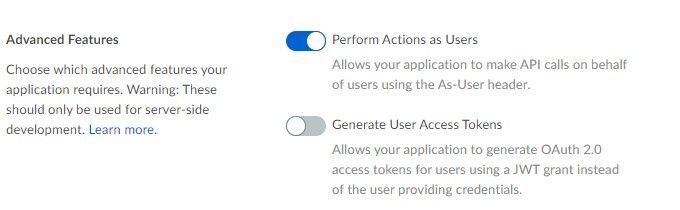
Hi , have you set the "Perform Actions as Users" in your app setting? only with this you can use the as-user header hence you might be able to call with developer token but not as-user


BOX_yjcgq1kikpkbvl4s8165tjmeoa18iilk.png


Forum|alt.badge.img

Hi.  , thank you for your reply.

I checked my app settings, but "Perform Actions as Users" was on.

I executed the same command, and it says the same error "Unexpected API Response [403 Forbidden | --] access_denied_insufficient_permissions - Access denied - insufficient permission"


Forum|alt.badge.img

Hi. It probably means that your application needs to be re-approved by the admin. In your app's configuration page, submit the app for approval. 


Forum|alt.badge.img

Hi.

Thank you for reply.

As you said, I submitted the app for approval, and I approved it.

But it didn't work. (Is it a proper way to submit an approval request and approve it with same developer account?)


Forum|alt.badge.img

If you are also the admin, then this should work.

When you go to your app in the developer console (e.g. https://[your_enterprise].app.box.com/developers/console/app/[app_id]) then on the General panel you should see something like this.


BOX_wJctsVZmjJhYxPvlSa1LWQ.png

Can you confirm that this says authorized, and that you have submitted it for authorization since adding the Perform actions as users setting?

If possible, just resubmit for review and approve it again, just to be sure.


Forum|alt.badge.img

Hi.
Thank you for replying, cbetta.
I'm going to show the screenshots of every step I took to reauthorize app.
1. Confirm settings.
BOX_7tkSwVZlU9UGWw2Y6I5m-A.png
2.Resubmit
BOX_vr07_lz_hNvI6vnV55zVSQ.png3. Reauthorize the app.
BOX_jRFnJ_mgcyXw3gJ_okzc8Q.png4. Confirm it's been reauthorized
BOX_UUeTe6I9wHs9UVfUOUlxUg.pngBut it didn't work. Is there anything wrong in settings?


Forum|alt.badge.img

That all seems right. Do you get a BOX_REQUEST_ID response in the error message? Could you share this with me?


Forum|alt.badge.img

Here's the error message.
Unexpected API Response [403 Forbidden | p2f7gmgihtq4db86.03dc06ac5fc06a5abe73bf6d3fe3812bd] access_denied_insufficient_permissions - Access denied - insufficient permission

I'm not sure about "BOX_REQUEST_ID". Is that the letters starting with "p2f7" in the error messsage?