
Hello!
I have used Box for many years on both a desktop and laptop. I mainly work with the folders and files locally on my desktop.
I work with shared folders and files with my business partner and also with a client.
Just yesterday I had a brand new laptop get completely set up so had Box added to it so I could access my folders and files locally there. I used a local IT company, but they are not terribly familiar with Box unfortunately.
Today I noticed that my laptop seems to be synching correctly with my business partner, but my desktop now does not sync with him…. though it does seem to sync with my new laptop.
In an attempt to fix the issue, I tried to uninstall Box from my desktop. Now, when I try to reinstall it, I get a message the below message:
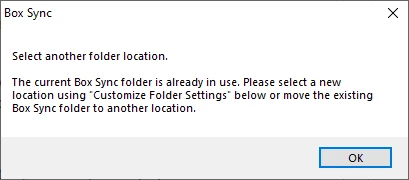
So, I believe that I now have 2 issues:
- How do I reinstall Box on my desktop in light of the above message?
- How do I resolve my original issue of my desktop now not synching with my business partner?
I should also add, that the original owner of this Box account was me with this O*****@*****.com. Years ago, I lost access to that email address so added my new email address N*****@*****.com as an editor. I was worried that I wouldnt get any sort of notices from Box since I no longer could access O*****@*****.com so I changed that email address to an editor and designated N*****@*****.com about 2 weeks ago.
Please help!
Thanks!