

Question

.Net SDK, BoxJWTAuth getting Object reference not set to an instance of an object

  • May 21, 2025
  • 5 replies
  • 20 views

Forum|alt.badge.img

Hi there,


Trying to build integration between our web app and Box. Already set the custom app at Box and got all required parameters. When running code in debug (VS 2015):


 var boxConfig = new BoxConfig(clientId, clientSecret, enterpriseId, privateKeyPath, privateKeyPassword, publicKeyId);
                var boxJWT = new BoxJWTAuth(boxConfig);

I'm getting the error {"Object reference not set to an instance of an object."} with no other reference or detail. Any idea why this can be happening?


Thanks in advance,

Cheers, Danfer.
5 replies

Forum|alt.badge.img

Solved the object reference error adding following code:

var privateKey = File.ReadAllText(privateKeyPath);

                var boxConfig = new BoxConfig(clientId, clientSecret, enterpriseId, privateKey, privateKeyPassword, publicKeyId);
                var boxJWT = new BoxJWTAuth(boxConfig);

Now, getting another error on var adminToken = boxJWT.AdminToken(); instruction:

"Could not load file or assembly 'System.IdentityModel.Tokens.Jwt, Version=4.0.removed for privacy, Culture=neutral, PublicKeyToken=31bf3856ad364e35' or one of its dependencies. The located assembly's manifest definition does not match the assembly reference. (Exception from HRESULT: 0x80131040)":"System.IdentityModel.Tokens.Jwt, Version=4.0.removed for privacy". Of course, packages already installed. I was trying in a separated new project in an existent solution. Lots of incompatibilities when installing SDK from Nuget. Now testing in brand new solution to make it work and test it as a POC.


Regards,

Danfer.


Forum|alt.badge.img

Now I'm able to get token with App user, even able to upload a file. Nevertheless, I can't see the uploaded file (on root, or folder with Id="0") neither other users can see the file. In addition, if running following code, looking for folder content, it only shows the uploaded file, in the object details pop up at VS. Any idea why not being able to see other objects (folders)?


 var folderContent = userClient.FoldersManager.GetInformationAsync("0").Result.ItemCollection.Entries;

                BoxFile newFile;

                using (var fileStream = new MemoryStream(fileBytes))
                {
                    BoxFileRequest req = new BoxFileRequest()
                    {
                        Name = "test.Docx",
                        Parent = new BoxRequestEntity() { Id = "0" },

                    };
                    newFile = await userClient.FilesManager.UploadAsync(req, fileStream);
                }

Forum|alt.badge.img

I ran the code


string localFilePath = "C:\\dev\\BoxSDKNet\\CreateAppUser\\test.txt";
            string fileName = "test.txt";
            

            var file = File.OpenRead(localFilePath);
            var fileRequest = new BoxFileRequest
            {
                Name = fileName,
                Parent = new BoxFolderRequest { Id = "0" }
            };

            var bFile = await userClient.FilesManager.UploadAsync(fileRequest, file);

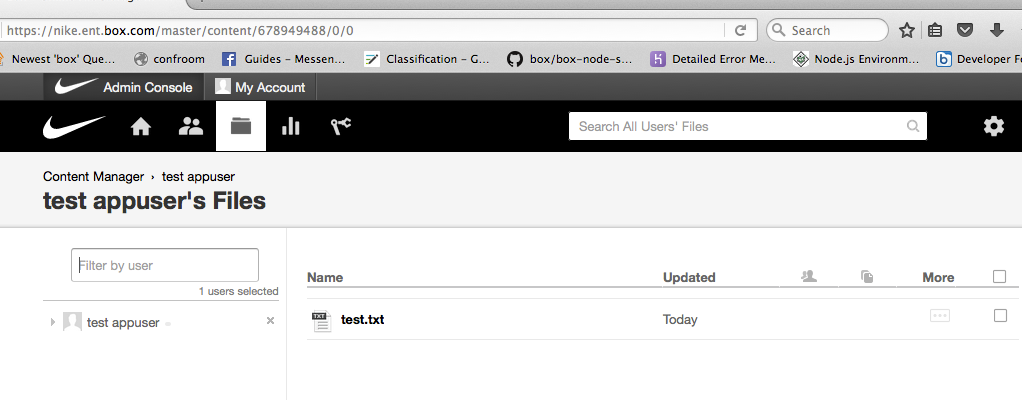
And it shows up in the AppUser's folder


BOX_h0lv0kth9oggpdytrkxrr1bb1ksacffz.png


Forum|alt.badge.img

Thanks Kendomen, yes, I could see the file too, eventually. Also, uploading in other folders, the issue was witht the set access of the App user, fixed and now can see the file.


Cheers,

Danfer.


Forum|alt.badge.img

Uploadng file complete code using .Net SDK, including the instructions where I was having issues, case anybody find it useful

 public async Task UploadFileAsync(string clientId, string clientSecret, string enterpriseId, string privateKeyPath, string privateKeyPassword,
           string publicKeyId, string appUserId, byte[] fileBytes, string fileName)
        {
            var privateKey = File.ReadAllText(privateKeyPath);

            var boxConfig = new BoxConfig(clientId, clientSecret, enterpriseId, privateKey, privateKeyPassword, publicKeyId);
            var boxJWT = new BoxJWTAuth(boxConfig);

            var userToken = boxJWT.UserToken(appUserId);
            var userClient = boxJWT.UserClient(userToken, appUserId);

            try
            {
                using (var fileStream = new MemoryStream(fileBytes))
                {
                    BoxFileRequest req = new BoxFileRequest()
                    {
                        Name = fileName,
                        Parent = new BoxRequestEntity() { Id = "removed for privacy" }

                    };
                    var boxFile = await userClient.FilesManager.UploadAsync(req, fileStream);

                    var sharedLinkReq = new BoxSharedLinkRequest()
                    {
                        Access = BoxSharedLinkAccessType.open,
                        Permissions = new BoxPermissionsRequest
                        {
                            Download = true,
                            Preview = BoxPermissionType.Open,
                        }
                    };
                    var fileLink = await userClient.FilesManager.CreateSharedLinkAsync(boxFile.Id, sharedLinkReq);
                    var shareLinkUrl = fileLink.SharedLink.Url;
                    var shareLinkDownloadUrl = fileLink.SharedLink.DownloadUrl;
                }
            }
            catch (Exception ex)
            {
                //Some exception management
            }

        }