Solved

Lost access to entire Business Box Account, files, folders

  • September 25, 2026
  • 4 replies
  • 53 views
  • Translate All

Hi,


We have lost access to our entire Box account and all our files and folders. Can you help me restore access?

Best answer by Rona Box

Hi ​@chungbatco415, 

Welcome to Box Community, and we will assist regarding your missing folder! 


Do you remember if those missing files and folders are your owned or collaborated folder? If it’s the latter, you should reach out to the owner to restore your Box access as it may have expired or removed. 


Meanwhile, for your owned contents try checking your trash in the Box Web-App. 

To search through your Trash folder:
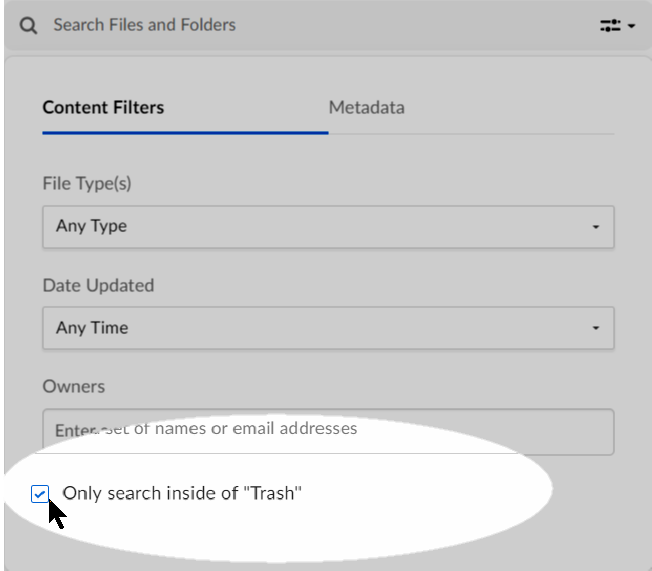
  1. Navigate to your Trash folder.
  2. Toward the top, click the Search Files and Folders.
  3. In the box that displays, enter any search parameters.
  4. Check Only search inside of “Trash”.
  5. Press Enter.

OnlySearchInsideOfTrash.png

To sort and filter all items within the trash folder:You can filter content by items you own, or by items you’ve deleted. To do this, directly beneath the folder label (Trash), click the Items I Own (or Items I Deleted) down arrow. Then click the option you want.
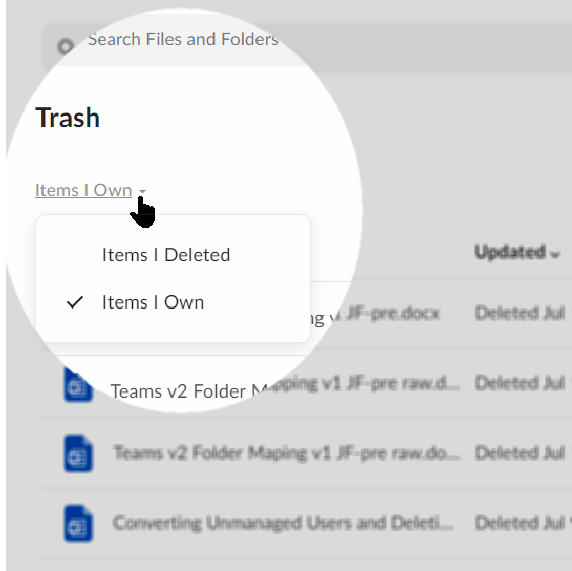
ItemsIOwnDelete.png

  • The Items I deleted filter displays all items you have deleted, regardless of who created or owns the item.
  • The Items I own filter displays all deleted items you own, regardless of who deleted the item.

For deleted files/folders that’s visible in your trash, please go ahead and highlight the file or folder then click Restore. 


In case you need more information about Trash, please check out this article. 


Hope it helps! 

View original

4 replies

Hello, I am missing a folder in The Box Account, I noticed this just about 4 weeks ago.  Can someone please assist me with restoring the missing folder?

Translate

Rona Box
  • Community Manager
  • Answer
  • September 28, 2026

Hi ​@chungbatco415, 

Welcome to Box Community, and we will assist regarding your missing folder! 


Do you remember if those missing files and folders are your owned or collaborated folder? If it’s the latter, you should reach out to the owner to restore your Box access as it may have expired or removed. 


Meanwhile, for your owned contents try checking your trash in the Box Web-App. 

To search through your Trash folder:

  1. Navigate to your Trash folder.
  2. Toward the top, click the Search Files and Folders.
  3. In the box that displays, enter any search parameters.
  4. Check Only search inside of “Trash”.
  5. Press Enter.

OnlySearchInsideOfTrash.png

To sort and filter all items within the trash folder:You can filter content by items you own, or by items you’ve deleted. To do this, directly beneath the folder label (Trash), click the Items I Own (or Items I Deleted) down arrow. Then click the option you want.

ItemsIOwnDelete.png

  • The Items I deleted filter displays all items you have deleted, regardless of who created or owns the item.
  • The Items I own filter displays all deleted items you own, regardless of who deleted the item.

For deleted files/folders that’s visible in your trash, please go ahead and highlight the file or folder then click Restore. 


In case you need more information about Trash, please check out this article. 


Hope it helps! 

Translate

Two of our main folders were deleted with no team member deleting them. This is important data that must be restored. Please contact me immediately. We’ve searched trash and they are nowhere to be found. 

Translate

Rona Box
  • Community Manager
  • September 29, 2026

Hi ​@bdillontcap, welcome to Box Community! 

We moved your post to this related topic, in this thread we’ve detailed the initial steps you should take in locating your missing folder. 


We hope that you find this thread helpful in finding your missing folders. Let us know your thoughts! 

Translate
