

Question

Instantiated Node.js Box SDK (via JWT) Inside of a Box Skill Application Returns 404 on File Access

  • May 22, 2025
  • 4 replies
  • 29 views

Forum|alt.badge.img

I am developing a box skill to send a file from Box to Azure for OCR and then write that OCR'd text back to box as metadata. To do this, I have instantiated an enterprise auth client via JWT, but I am getting a 404 response on any attempt to access files (i.e. client.files.get() and client.files.addMetadata). The peculiar thing with this is that the client succeeds on other API calls like: client.metadata.getTemplates() which leads me to believe that something else is at play here. From what I have researched, This usually has to do with the "Perform actions as users" toggle not being set, but that isn't the case for this application. I haven't been able to find any documentation that would lead me to a solution, so I am hoping that someone here may be able to help. SDK instantiated code below:
 

const _fs = require('fs');
const _boxSdk = require('box-node-sdk');
const _parsedConfig = JSON.parse(_fs.readFileSync(__dirname + '/box-config.json'));
const _sdkInstance = new _boxSdk({
    clientID: _parsedConfig.boxAppSettings.clientID,
    clientSecret: _parsedConfig.boxAppSettings.clientSecret,
    appAuth: {
        keyID: _parsedConfig.boxAppSettings.appAuth.publicKeyID,
        privateKey: _parsedConfig.boxAppSettings.appAuth.privateKey,
        passphrase: _parsedConfig.boxAppSettings.appAuth.passphrase,
        expirationTime: 60,
        verifyTimestamp: false
    }
});

4 replies

Forum|alt.badge.img
API calls listed as well: 
 
var templateResponse = await client.metadata.getTemplates("enterprise", function(error, response) {
    if(error)
    {
        console.log("Error: ", error);
    }
    else
    {
        console.log("Succeeded getting all templates. Response - ", response);
    }
});

var fileResponse = await client.files.get(fileId, function(error, response) {
    if(error)
    {
        console.log("Error: ", error);
    }
    else
    {
        console.log("Succeeded getting file info. Response - ", response);
    }
});

var writeResponse = await client.files.addMetadata(fileId, "enterprise", "metadatasearchtemplate", metadataValues, function(error, response) {
    if(error)
    {
        console.log("Error: ", error);
    }
    else
    {
        console.log("Succeeded writing metadata back to box. Response - ", response);
    }
});

Forum|alt.badge.img

Hey , it sounds like the account you are making calls from does not have access to the content you are making calls to.  This article goes into this in a bit more detail:

https://community.box.com/t5/Developer-Troubleshooting/API-Content-API-404-quot-not-found-quot-Errors-from-the-Box-API/ta-p/53318


I suspect if you invite the account making these calls as a collaborator to the content you are trying to access then you should be good to go.  My guess is that you are making the calls from your service account since you're using a JWT application.  More on service accounts here:

https://developer.box.com/docs/service-account


Forum|alt.badge.img

,


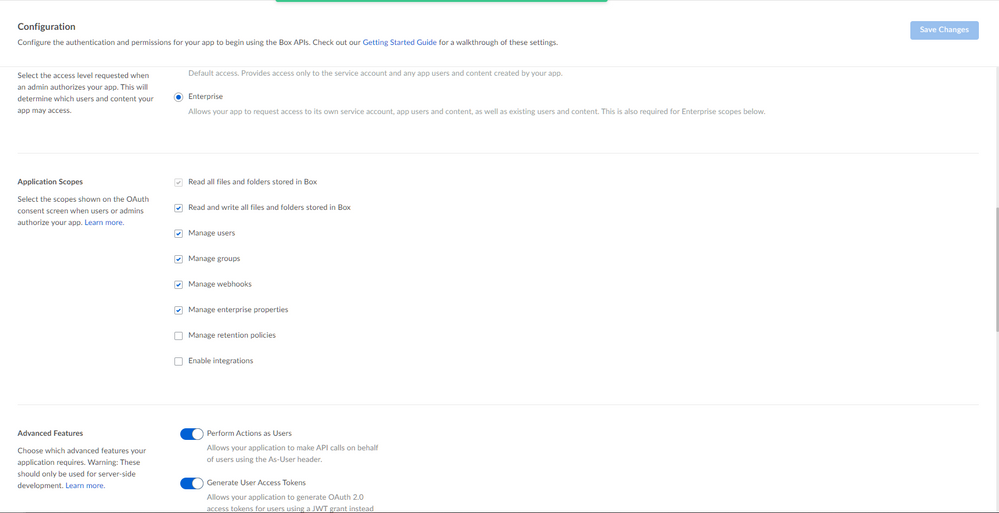
Thank you for the response and the enlightening information about service accounts vs. user accounts. I was indeed making API calls from my service account without enterprise level permissions enabled. I have since enable enterprise level permissions, activated "Perform Actions as Users", activated "Generate User Access Tokens", and reauthorized the app. Despite making these changes, I am still hit with a 404 when accessing user files. I have also tried generating a userClient for the managed user of this application and I am met with a 400 response of "Unexpected API Response [400 Bad Request] invalid_request - Cannot obtain token based on the enterprise configuration for your app". Based on the configuration that I have specified above, I am unsure as to why I am met with this response. Do you have any other clarification on this? **Configuration pictured below


BOX_344tyy8yxe58hd6bs6jlt3khab9bpnnv.png


Forum|alt.badge.img

Hey  , 


If you haven't already, I would recommend opening up a support ticket at support.box.com so we can take a closer look with you and further assist! 


Best, 

Kourtney

Box Technical Support Engineer