

Question

How to let guests download files from Box?

  • May 21, 2025
  • 5 replies
  • 44 views

Forum|alt.badge.img

This seems like a very basic feature, alas I don't see any information on Box site nor on Google how to do this. I uploaded files to a folder in Box and I want to share those files (image files) with people who don't have Box accounts. The closest solution I found is to send them s shared link BUT then the images can be viewed BUT not downloaded!


Looking forward to suggestions!
5 replies

Forum|alt.badge.img


You're on the right track. Shared Links by default allow downloading. See https://support.box.com/hc/en-us/articles/360043697094-Creating-Shared-Linksfor lots of info on Shared Links.

MaryBeth


Forum|alt.badge.img

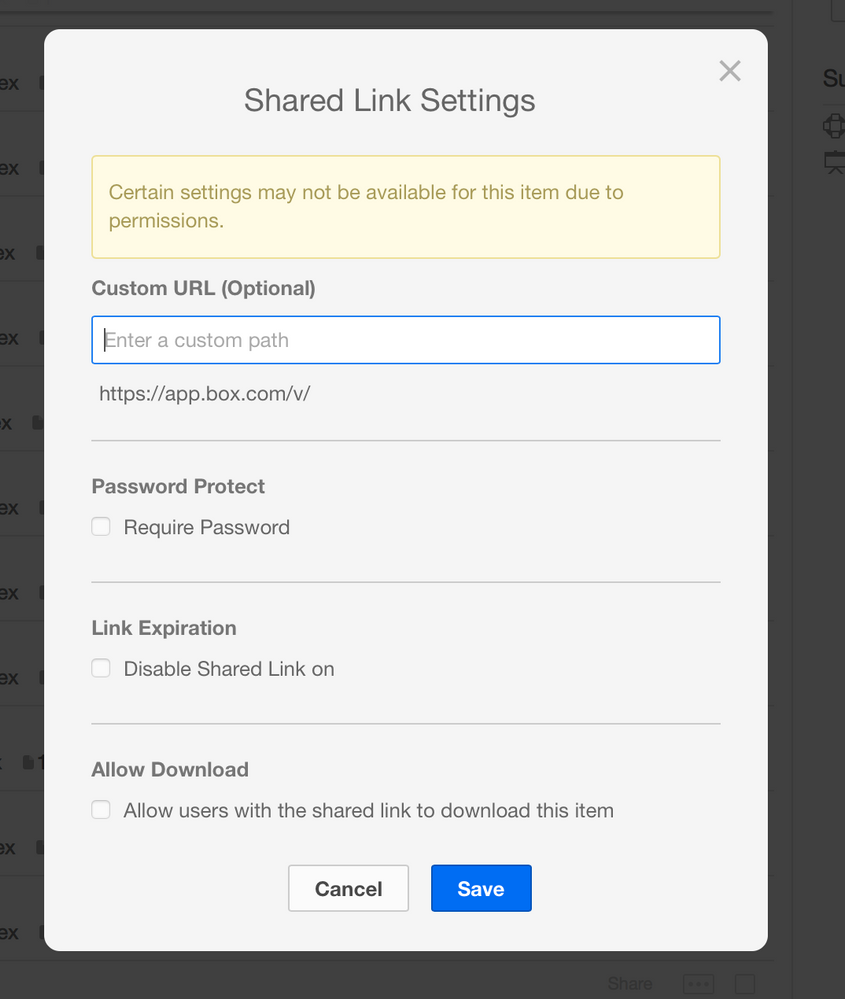
Do I have to own a paid Box account? I have a free one. So when I click on get shared link, another window opens where the Enable downloads checkbox is inactive for me. This is the screenshot:

BOX_8x8srckn2rwiem59p9cidhd6jwyzlfod.png


Forum|alt.badge.img

Downloads are available for free accounts as well. I have a free account as well as an enterprise one and the checkbox is both available to my free account, and it's checked by default.

I'm at a loss here. I wonder if it could be related to the file type. This isn't a Box Note, is it? I suggest you click the link in the top right of community.box.com to CONTACT BOX SUPPORT.

And when you find out what's up, please report back here.

MaryBeth


Forum|alt.badge.img

Found the issue: In Account Settings->Content & Sharing ->Let link viewers preview the shared item only


Now I changed it to: Account Settings->Content & Sharing ->Preview and download the shared item


and now it works


Forum|alt.badge.img

Account settings!! I'll have to remember to look there in the future. 

Kudos to you for figuring it out.

MaryBeth