

Question

How to change user's primary-login via API

  • May 21, 2025
  • 5 replies
  • 50 views

Forum|alt.badge.img

Trying to change primary-login API via Box Content API

-Request
https://api.box.com/2.0/users/xxxxxxxxxxxx
{"login":"******@example.com"}

But response is the following:

-Response
{
"type": "error",
"status": 400,
"code": "bad_request",
"context_info":{
"errors":[
{
"reason": "invalid_parameter",
"name": "new_primary_email",
"message": "Invalid value '******@example.com'."
}
]
},
"help_url": "http://developers.box.com/docs/#errors",
"message": "Bad Request",
"request_id": "***************************"
}

This user has no email aliases.

Is there only way↓ to change user's login?
1.add new login(mail) as email aliases
2.change primary-login (new login(mail))
3.remove old login(mail) from email aliases
5 replies

Forum|alt.badge.img

So, is this true? To change a user's login you have to do the following steps?


1. Create a new email alias

2. Set login to new alias

3. Delete old alias


Seems like a lot of work.


Forum|alt.badge.img

Yes.  I had to do that and also add  {is_confirmed: true} to the new email.  This is an example in node:


// 1.  Add new emailAlias
adminAPIClient.users.addEmailAlias(userId, newEmail, {is_confirmed: true}, function (err, newAlias) {

        // 2.  update user login with new email alias.  This makes the former login an email alias 
        adminAPIClient.users.update(userId, {login: newEmail}, function (err, updatedUser) {                    
            console.log(updatedUser);                                   
            
            // 3.  get the last emailAlias for this user which equals former login
            adminAPIClient.users.getEmailAliases(userId, function (err, emailAliases) {       
                var emailAliasId = emailAliases.entries[emailAliases.entries.length -1].id;
                
                // 4.  remove the last emailAlias
                adminAPIClient.users.removeEmailAlias(userId, emailAliasId, function (err, cleanedUpUser) {                    
                      
                });
            });
        });    
});


Forum|alt.badge.img

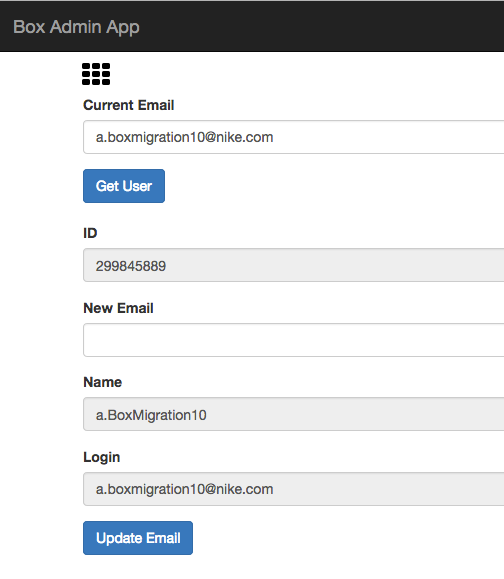
We have a boxadmin app that does just that but it also transfers the content if the new email alias is an existing user.


BOX_h3e4y9kvwt66zngc963otl8q94owjmfu.png


Forum|alt.badge.img

I have been unsuccessful in trying to add an email address and assigning is_confirmed to true. Does this still work for you?  Thanks


Forum|alt.badge.img

Hi  :


Two clarifying questions:


  1. Is the alias you're adding in one of the domains that is associated with your Box Enterprise? If so, is_confirmed should automatically go to "true."
  2. If your Box Enterprise does not use SSO, has the user who you're adding the alias to logged into their account at least once?

Cheers,


Ian Crew

UC Berkeley