Question

How can I restore information lost on document removed from offline

  • Jun 17, 2026 1:07 AM UTC
  • 4 replies
  • 129 views
  • Translate All

I had filled in several pages of a document online in the box app on my IPad and then moved it offline. All the information was still there when it was moved to offline but after I removed it from offline the document was blank and no longer filled in. How can I get back the previously filled in information/restore?

4 replies

Hello, offline copy may not have synced your changes back to Box before it was removed. I'd check the file's version history and recent activity in Box first.

Translate

  • Author
  • New Participant
  • Jun 18, 2026 3:04 AM UTC

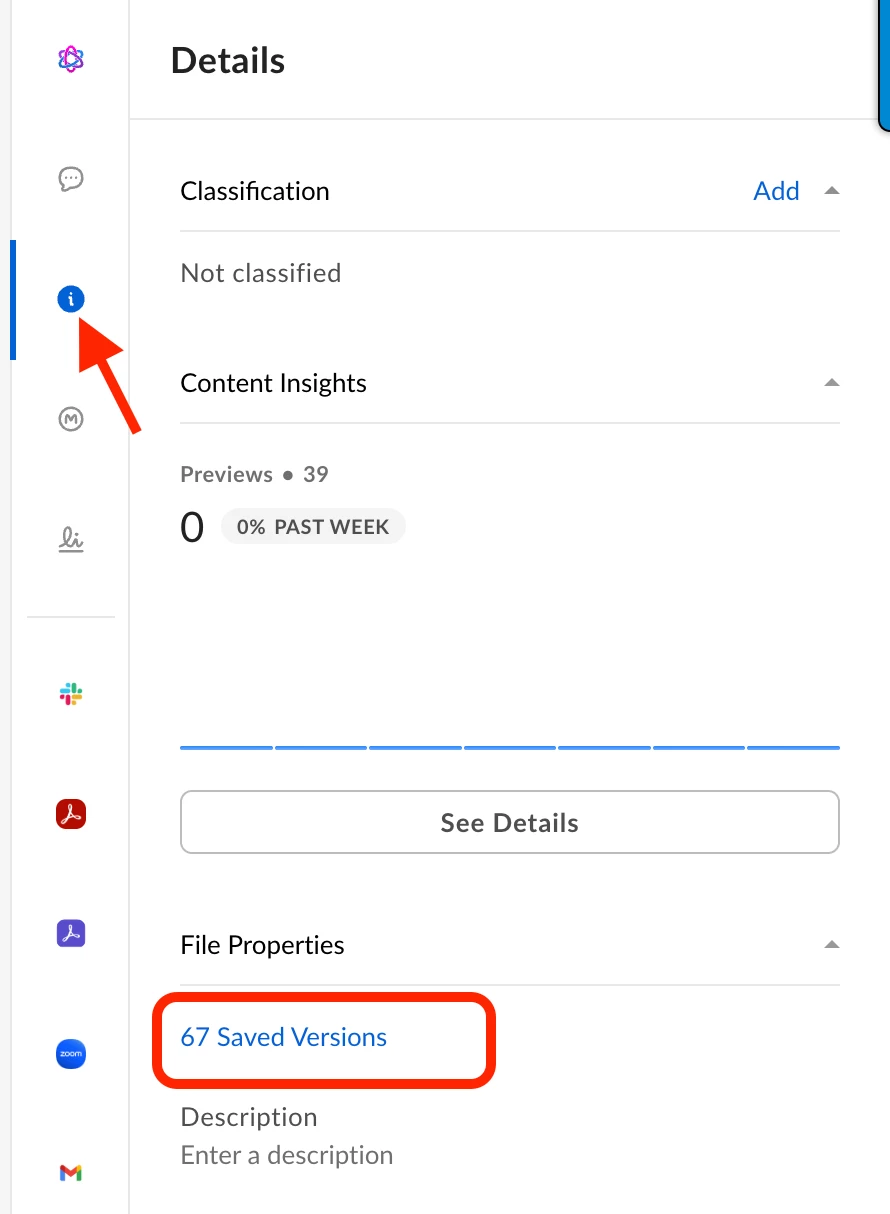
Thanks for replying. I did not have it set to syncing at the time. I’ve retried with set to sync now and same thing happens when remove from offline back to online, the info I filled in gets erased. I don’t see where to find the file’s version history.

Translate

Thanks for replying. I did not have it set to syncing at the time. I’ve retried with set to sync now and same thing happens when remove from offline back to online, the info I filled in gets erased. I don’t see where to find the file’s version history.


When you’re viewing a document in the Box UI, if you have the appropriate privileges, select the “Info” icon on the right-side panel and you can see version history:


Translate

  • Author
  • New Participant
  • Jun 24, 2026 9:31 PM UTC

Thanks for replying and diagram.

Translate