Question

Help using APIs from cmd line

  • May 21, 2025
  • 7 replies
  • 32 views

Forum|alt.badge.img

First time API user.   So far, I've registered for a simple application (redirect url http://localhost).   I've received a clientid and client secret pair.  

I've been trying to invoke a  set  of simple APIs to try out.  I've run some sample curl commands below.


# Create Folder
curl https://api.box.com/2.0/folders \
-H "Authorization: Bearer p3xjupq2ogfksc05l4yw8kjney6pxq9j" \
-d '{"name":"jjd_folder", "parent": {"id": "0"}}' \
-X POST


# Get Folder info
curl https://api.box.com/2.0/folders/jjd_folder -H "Authorization: Bearer p3xjupq2ogfksc05l4yw8kjney6pxq9j"


These commands don't throw any errors but they also don't produce and responses back, so I'm not sure what I'm doing wrong.


The token p3x....9j is my client secret.   I've tried generating a Developer Token but that token always results in 401 security exception so I've stopped using it.


Please help get me started.
7 replies

Forum|alt.badge.img

Hello jjdepaul,


The client secret is not what you have to use here, you have to use a valid token. So, using the developer token was the right thing to do.


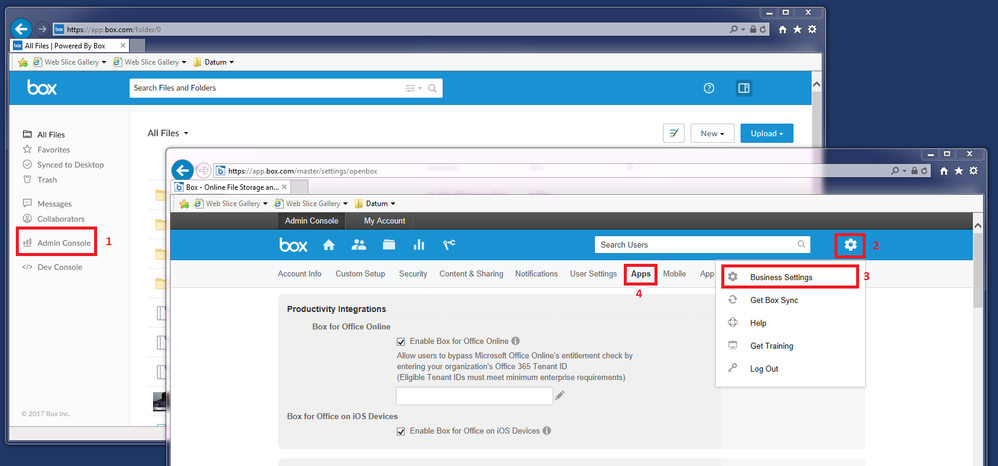
Have you authorized your application in your Admin Console >> Enterprise Settings >> Apps ?


Probably is due to that it is not working.


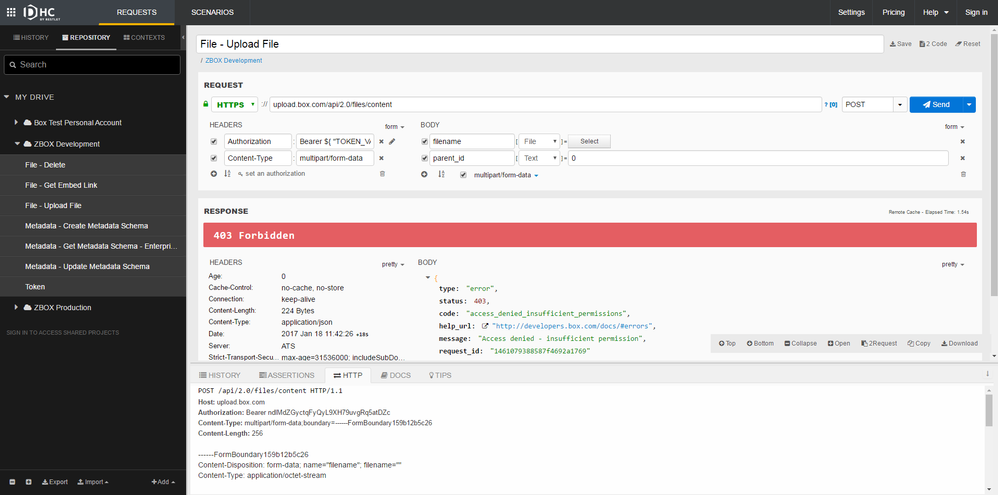
By the way, I would recommend not to use curl but some tool like Postmann (recomended by BOX) or the one I use: "DHC by restlet" chrome plugin. It is quite useful because it is very visual and allows to save executions:


BOX_1rjknwi6y8b96vrllm8i64nminu5hl4x.png

Hope this helps.


Forum|alt.badge.img

I'm sorry to say that I don't konw what an Administrative Console is or where the Enterprise settings are.   What is a typical url there.


Forum|alt.badge.img

Hello there,

I think then you should start for the basics before trying to develop something 🙂 as it will be easier.


If you have a developer account or an enterprise account you have to do the following 4 clics:


BOX_c17sonoch7dr4f5kyjovcqn2agfwk5p6.png


Then,  go to custom applications and copy there the API KEY of the application you are creating.


If not, your application is basically connecting to nowhere.


Thanks


Forum|alt.badge.img

I do not have that option available, and hence my confusion.  I've read all the basic docs and followed most of the documents as best as I could, but some of the features described in the documentation are not available on my screens.


Must be IBM Enterprise settings...


Forum|alt.badge.img

I have a Developer Console available, but not an Admin Console.


Forum|alt.badge.img

You don't need enterprise settings to interact with an API. Another option is going to a page and getting an authorization code manually, then using that to get your tokens. Those tokens can then be used to interact with the API.


Here's a good step-by-step answer I personally found very useful:


https://community.box.com/t5/Developer-Forum/Re-How-I-can-connect-to-OAuth2-from-server-side-script-without/m-p/1980#U1980


Forum|alt.badge.img

Hello jjdepaul,


that's strange 🙂 the screenshoots are from my personal free box account activated as developer so you should have that also... 


Thanks