
Question

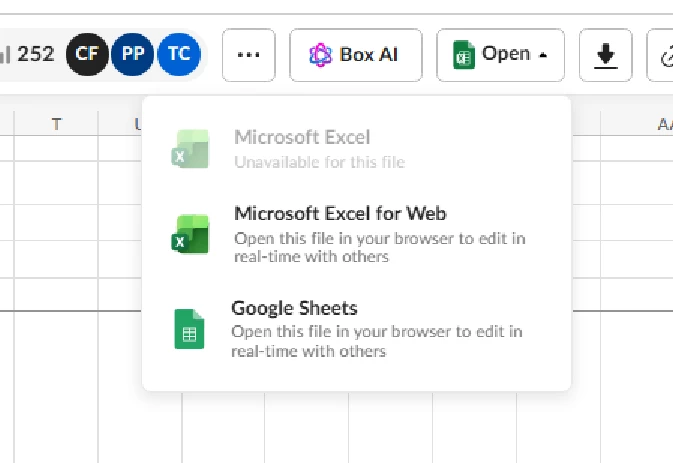
Greyed out open in Excel

  • February 5, 2026
  • 1 reply
  • 11 views

Hi, I'm having issues where I'm not able to edit Microsoft Excel files using the Microsoft Excel under the open dropdown, as the option to open in Excel Desktop is greyed out. Microsoft Excel for web and Google sheets are not greyed out and work, but I prefer to use the first Excel under the open dropdown.  This is occurring with all Excel files for me, but is not a problem for other users. I talked to someone in support and they confirmed that it should be working,  
 

1 reply

Rona Box
  • Community Manager
  • February 10, 2026

Hi ​@Mary Bailey

Welcome to Box Community and we’d love to assist! 


To edit your excel file using your native app, you can install Box Tools. 

Box Tools is the installer package for both Box Edit and Device Trust functionality. The Device Trust component is used only if your administrator has enabled Device Trust for your Box account.


Before installing Box Tools, ensure your .NET framework version is .NET 4.8 or higher.


To install Box Tools on your computer:

  1. Go to https://www.box.com/box-for-devices/ and download the appropriate Box Tools installer for your operating system.
  2. Run the Box Tools installer, and follow the prompts to install or update Box Tools on your computer.
  3. If you use the Safari browser (macOS only), you'll need to perform the following additional steps:
    1. In main menubar at the top of the Safari window, click Safari then select Settings.
    2. In the Extensions tab, check Box Tools. If Box Tools is not listed, relaunch Safari and start again.
    3. In the Extensions tab, with Box Tools checked, click Edit Websites.
    4. Set Box.com to Allow.

For more questions, please don’t hesitate to reply in this thread.
