Question

Getting 403 Forbidden while updating user PUT /users/USER_ID

  • May 21, 2025
  • 6 replies
  • 66 views

Forum|alt.badge.img

Hi,


I am working on Box API 2.0 and integrating USER object in my integration scenario.

I am trying to update user PUT /users/USER_ID docs update-users but getting error 403 Forbidden, please find the request snippet below:

{
  "notify": true,
  "enterprise":"Enterprise name",
  "name": "my user name",
  "login": "login-name.com",
  "language": "en",
  "timezone": "America/Los_Angeles",
  "is_password_reset_required": true
}

All the values provided above are valid. below is the error response:

{
  "type": "error",
  "status": 403,
  "code": "access_denied_insufficient_permissions",
  "help_url": "http://developers.box.com/docs/#errors",
  "message": "Access denied - insufficient permission",
  "request_id": "removed for privacy8234c5056e13g5"
}

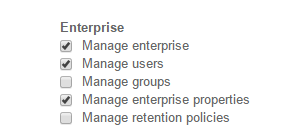
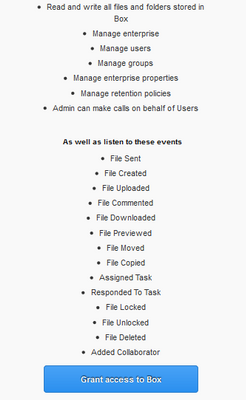
I have created access_token by using admin privileges, but still facing this issue. Please find the attached screen-shot for the access privileges of account while creating access_token.
 

BOX_ljd4o8a91zfhy6bgp2hytwbs1w5b9oot.png


Could you please suggest the possible solution on this?


Thanks.
6 replies

Forum|alt.badge.img

Hello,

What value are you trying to update for the user? 

Are you updating  your own (logged in user)  field by using  URL end point  "/users/me"  OR updating some other user with As-User with URL end point "/users/"?

If you are using As-User then you should have your API key to be enabled for that using Box ticket.  Please provide some more details if possible.


thanks,

Bibek


Forum|alt.badge.img

Hi Bibek,


Thanks for the reply, I am using end point "/users/" for updating user details.

I have also shared the permissions for the generated access token in the attached image file.


Thanks.


Forum|alt.badge.img

Hi,

This method only works for "enterprise-admins". Make sure you are logged in as enterpriese admin not even co-admin. Please try that.


thanks,

Bibek


Forum|alt.badge.img

Hi Bibek,


I have registered for Developer box.com account.

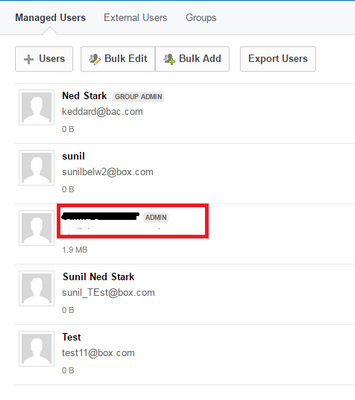
Could you please let me know, how can I check whether I am enterprise-admin or co-admin?


I am having Admin access, Does it means I am enterprise-admin or coadmin?


BOX_l9mz962nm4eph2rdskqx6uok79o2ed7d.png


Thanks.


Forum|alt.badge.img

Yes your account has the right authority.  Also, make sure that the app has the following feature checked. 

BOX_7iqh1u5u95cpnfsmz5g14acyo9p9n1gm.png

If this is the case, then it should work.  If you need to make changes on the app, make sure to re-authenticate to reflect the change. 


Forum|alt.badge.img

Hi,


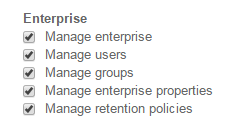
I have checked all the check box.

BOX_inwfzu2i072h5ya5nfmd2sgajc9pviqa.png

Could you please suggest any more solution ?