Question

Get Access Token using RefreshToken

  • May 22, 2025
  • 11 replies
  • 76 views

Forum|alt.badge.img


How to generate Access token using refresh token once accesstoken expire
 
attached the 4 steps screenshots 
 
Step1:
based on above url generate the Authcode
 
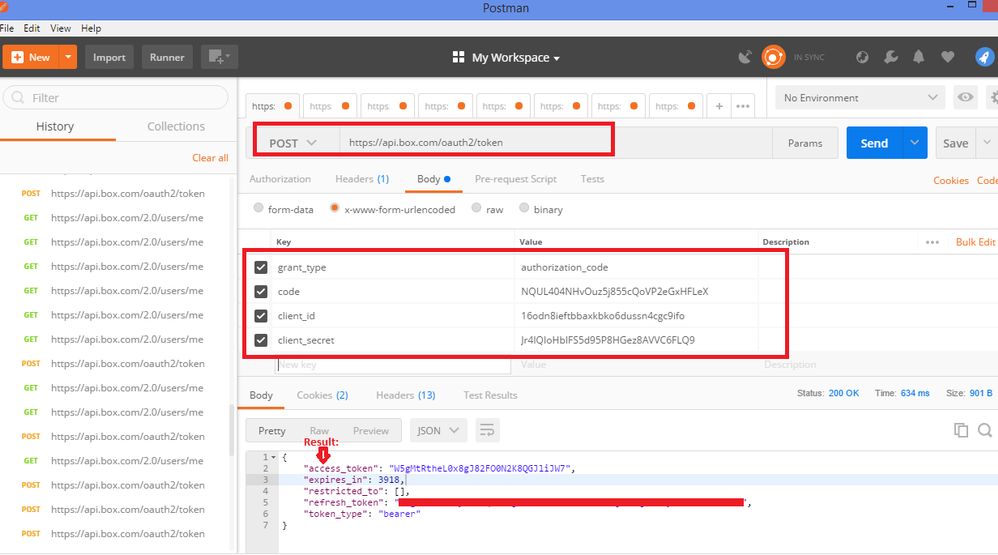
in step 1 screen shot  get refresh token using Auth code
Grant_type
code
client_id
client_secret
given the code and get the result
result:
 
{
    "access_token": "W5gMtRtheL0x8gJ82FO0N2K8QGJliJW7",
    "expires_in": 3918,
    "restricted_to": [],
    "refresh_token": "********************************************",
    "token_type": "bearer"
}


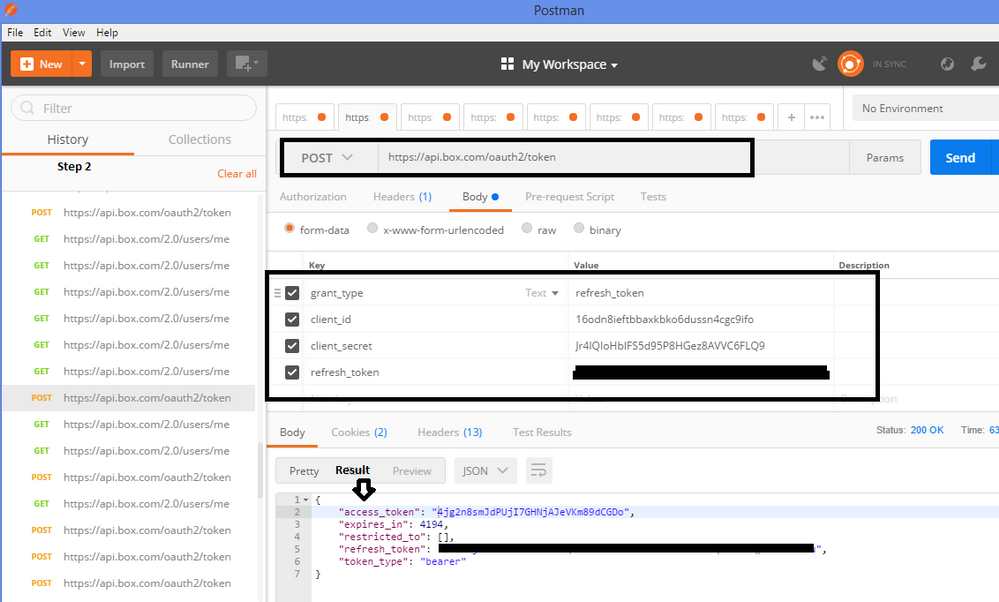
in step 2 screen shot  get Access Token using refresh token
grant_type
client_id
client_secret
refresh_token
 
then get the access token successfully.
Result:
 
{
    "access_token": "4jg2n8smJdPUjI7GHNjAJeVKm89dCGDo",
    "expires_in": 3918,
    "restricted_to": [],
    "refresh_token": "***********************************************",
    "token_type": "bearer"
}


in step 3 screen shot  get current user data
H Authorization Bearer 4jg2n8smJdPUjI7GHNjAJeVKm89dCGDo
result:
 
{
    "type": "user",
    "id": "***number removed for privacy***4",
    "name": "Praveenkumar",
    "login": "***email address removed for privacy***",
    "created_at": "2017-08-04T04:08:59-07:00",
    "modified_at": "2018-04-23T04:15:03-07:00",
    "language": "en",
    "timezone": "America/Los_Angeles",
    "space_amount": ***number removed for privacy***40,
    "space_used": 90364,
    "max_upload_size"***phone number removed for privacy***,
    "status": "active",
    "job_title": "",
    "phone":***phone number removed for privacy***",
    "address": "",
}


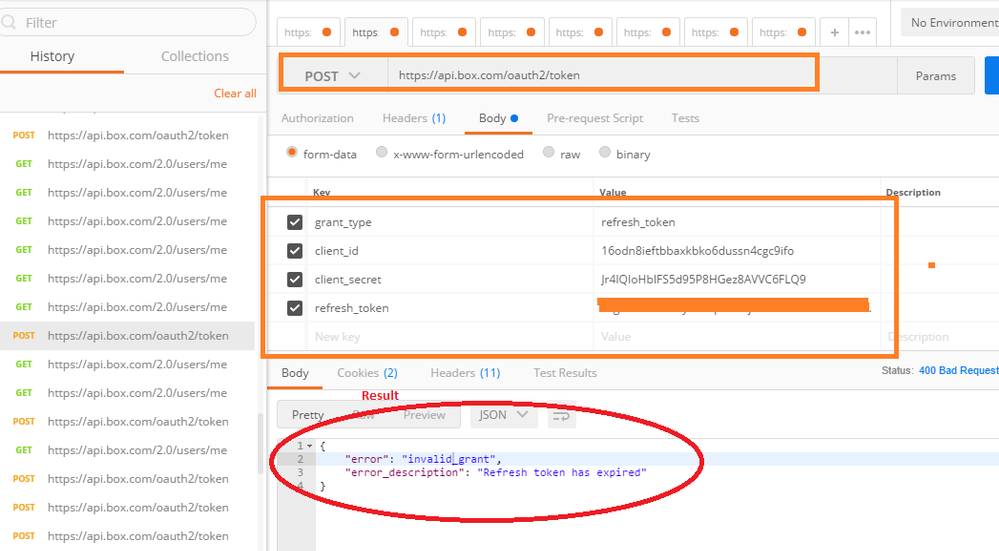
Screen shot step 4 attached
after getting the result then i go for 2 step again
 
in step 2 screen shot  get Access Token using refresh token
grant_type
client_id
client_secret
refresh_token
 
click on send button below error message getting refresh token time 60 min but i am using step 2 repeat with 5 min time gap
 
Result:
 
 
{
    "error": "invalid_grant",
    "error_description": "Refresh token has expired"
}
 Added 4 Screen shotsBOX_3gi1bktlxpfi4ihhmrstag58a0o26hoj.pngStep 1: Generate Refresh Token using authcodeBOX_tiwja86uh81w1oyedknp8snerccurp7a.pngStep 2: Generate AccessToken using authcodeBOX_image_not_found.pngBOX_8eu24fd84sk1wk5v5nkne5b35ag3yrn8.pngStep 4: get access token error for 2nd request


let me know how to generate token using refresh token after one transaction complete.
as per documentation generate token using refresh token once expire the access token
 

11 replies

Forum|alt.badge.img

 For the second request, are you using the new refresh token that you got back after the first refresh?  The refresh token changes every time you refresh, and you can't use the same refresh token twice.


Forum|alt.badge.img

Thank u for ur support


Thanks & Regards,
Praveenkumar Thatikonda


Forum|alt.badge.img

hi,


sometimes doing a second request using the same refresh_token works, and in theory, shouldn't work. Is that normal?

Even doing more request. The expires_in changes, so they are different requests.


Forum|alt.badge.img

How should generate the access token by using the same refresh token? My refresh token expires after first use.


Forum|alt.badge.img

 The refresh token changes every time you refresh, and you can't use the same refresh token twice.  When you make the API call to refresh, the API send back both a new access token and a new refresh token.  You'll need to store the new refresh token when you refresh the first time, and use the new refresh token when you want to refresh a second time.


Forum|alt.badge.img

 How are you generating the AuthCode in Step-1 ? when i am trying this, it redirect me to sign-in page and after login got redirected to root folder instead of generating any AuthCode. Please help.


Forum|alt.badge.img

 , it sounds like your redirect URL is set to your root folder / home page on Box (e.g. app.box.com). You'll want to change your app's redirect URL to a URL that you control instead, because after the user logs in, Box will redirect the user to your redirect URL and then append the authorization code to the URL.


At that point, your app would then take the authorization code and exchange it for an access token.


To change your redirect url:

  • Go to your Developer Console (app.box.com/developers/console)
  • Select your app
  • Select Configuration on the left hand sidebar
  • Find the "OAuth 2.0 Redirect URI" Section
  • change the redirect url to the URL for your app (e.g. myapp.heroku.com/oauth2)

You can see more about it in our docs:

https://developer.box.com/docs/authenticate-with-oauth-2


Hope that helps!


Forum|alt.badge.img

  i tried below method for Authentication.

https://developer.box.com/docs/authenticate-with-jwt

Once the client is created and i tried to get a folder info it throws Following Error.

"GET https://api.box.com/2.0/folders/7984021****/items?offset=0" 404 322
{'Content-Type': 'application/json', 'Content-Encoding': 'gzip', 'Date': 'Wed, 26 Jun 2019 12:28:15 GMT', 'BOX-REQUEST-ID': '1u9ukebuecgsfkjqgr37ghe2b5l', 'Cache-Control': 'no-cache, no-store', 'Strict-Transport-Security': 'max-age=31536000', 'Transfer-Encoding': 'chunked', 'Vary': 'Accept-Encoding', 'Connection': 'keep-alive'}
{'code': '---ound',
 'context_info': {'errors': [{'message': "Invalid value 'd_7984021****'. "
                                         "'folder' with value 'd_7984021****' "
                                         'not found',
                              'name': 'folder',
                              'reason': 'invalid_parameter'}]},
 'help_url': 'http://developers.box.com/docs/#errors',
 'message': 'Not Found',
 'request_id': '19xhakg4etyd80q8',
 'status': 404,
 'type': 'error'}

But if i create a client from manually generated Developer Token from console. I can get the same folder Info.

Forum|alt.badge.img


Developer tokens are associated with the account that's logged into the developer console when the token is generated. Therefore, you'll only be able to interact with folders/files that account owns or has collaborator access to. A 404 indicates that the token you're making this call with does not have access to the folder you're trying to get. 


Best, 

Kourtney 


Forum|alt.badge.img

 This is how i am making request. Correct me if i am doing anything wrong. Already authorized app from Admin Console.


from boxsdk import OAuth2, Client
from boxsdk import JWTAuth

sdk = JWTAuth.from_settings_file('./box_config.json')
ac_token = sdk.authenticate_instance(enterprise='21073****')

auth = OAuth2(
client_id=,
client_secret=,
access_token=ac_token
)
client = Client(auth)
folder=client.folder(folder_id='798402*****').get_items()


Tried this also but didn't work:

sdk = JWTAuth.from_settings_file('./box_config.json')

client = Client(sdk)
folder=client.folder(folder_id='798402*****').get_items()


Forum|alt.badge.img

  You're getting a token and making calls for your JWT application's service account. Taking a look on the backend, this user doesn't own or collaborate on any content. You need to add this user as a collaborator on the folder you're trying to access, 798402*****.