

Hello everyone.
I can download files from Box to local pc(default path) using Box-sdk-python.
But I want to download the file to the specified path.
Please give me some advice.
First of all, I executed the following source code.
Source code used this time : "test_download.py"
Source code's path : "C:\Users\user\script\box\test_download.py"
# -*- coding: utf-8 -*-

from boxsdk import JWTAuth
from boxsdk import Client

# Configure JWT auth object
sdk = JWTAuth.from_settings_file(
        'C:/Users/user/Desktop/*********_******_config.json')

client = Client(sdk)

userid="*********"
user=client.user(user_id = userid)

###file name = photo.png, folder path = '0'
box_file = client.as_user(user).file(file_id='***********').get()
output_file = open(box_file.name, 'wb')
box_file.download_to(output_file)
When you execute the source code, photo.png is downloaded to the same path as the source code.
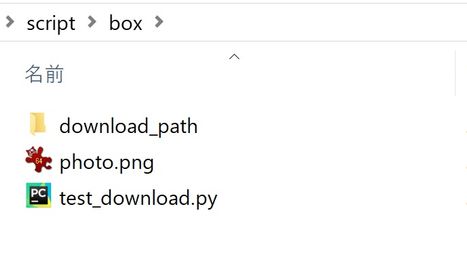
But, I want to download to "C:\Users\user\script\box\download_path\".
How can I download to "C:\Users\user\script\box\download_path\"?
Please give me some advice.
thank you for reading.
Please give me some advice.
thank you for reading.