
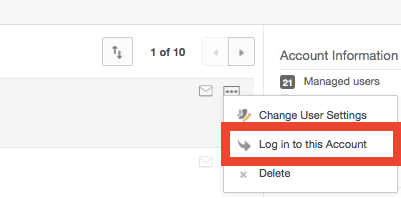
Okay, I feel like an idiot. The other day I was messing around in my developer's account and I was able to switch user accounts. The account I switched to was that of one of my authorized apps. Once switched, I could see all folders and files the app had created and uploaded. How do I get back to this view? I thought it was the content manager from the admin console, but that only allows you to view/delete and download content. I want to add new content from my developer's console. Can anyone point me in the right direction?

Question
Developer authorized app content access
Sign up
Already have an account? Login
Community access is available only with a Box Account.
Sign in with your Box AccountSign in to the Box Community
Community access is available only with a Box Account.
Sign in with your Box AccountEnter your E-mail address. We'll send you an e-mail with instructions to reset your password.