Question

Curl + shared link

  • May 22, 2025
  • 11 replies
  • 132 views

Forum|alt.badge.img

I want to get the shared link of a file on my box account, to store it in a variable. I have found a curl commando to do that (Get link), but I don’t really understand it. How, do you specify from which file you get te link. I use Box Drive, and I have the path to the file. 

11 replies

Forum|alt.badge.img

Hi  , a web link is not a shared link.


To get a shared link for a file, update the file to enable the shared link for it.

curl -X PUT https://api.box.com/2.0/files/12345 \
     -H 'Authorization: Bearer " '
     -H 'Content-Type: application/json" '
     -d '{
       "shared_link": {
         "access": "open"
       }
     }'


https://developer.box.com/reference/put-files-id/#param-shared_link


You can use our SDK to do this as well.


https://developer.box.com/guides/shared-links/create/#Create-Shared-Link-for-File


Forum|alt.badge.img

If I understand it good, in the example of , the 'acces token' must be replaced by the API I get from my box account, and the '12345' is the ID of my file. How do I get the ID of the file (with a program). And, if I enabled schared link, how does I get it?


Because, in the end, I want to write script that can send a link to share the file on my box account. Composing a mail is not a problem, but getting the link to share..


Forum|alt.badge.img

You can get the file ID a few different ways. Either, you can go to box.com and find the file and open the preview. You can then see the ID of the file in the URL bar:


BOX_q9oavsldbkgh6nszgbl29jbtnqqlx2fc.png

In this case the part after "file/" is the file ID.


Another way is to find the file ID by using the API. You can traverse the files and folders in your Box account with our APIs.

https://developer.box.com/reference/get-folders-id-items/

https://developer.box.com/guides/folders/bulk/build-folder-tree/

---

By the way, depending on your programming skills you might wan to use our Box CLI instead.


https://github.com/box/boxcli


Forum|alt.badge.img

Hi  , I tried using your advice and set shared_link attribute on an existing file:


curl -X PUT https://api.box.com/2.0/files/*** \
     -H 'Authorization: Bearer ' \
     -H 'Content-Type: application/pdf"' \
     -d '{
       "shared_link": {
         "access": "open"
       }
     }'   


The request was successful. But then when I check the file stats, for some reason the "shared_link" is set to null, and I cannot create a shared link. 


Also, do you know if there is a way to get a shared link for a file using curl? It looks like in the docs there are only four SDK examples.


Forum|alt.badge.img

Have you tried to request the shared link field on the file?

curl https://api.box.com/2.0/files/1234?fields=shared_link


Does this return a file object with a shared link set to null?


Forum|alt.badge.img

 That command doesn't give me any output at all (no errors either)


I tried running this command instead:


curl -X GET https://api.box.com/2.0/files/67***phone number removed for privacy***?fields=shared -H 'Authorization: Bearer '


And the response is:

{"type":"file","id":"67***phone number removed for privacy***","etag":"0","shared_link":null}


Forum|alt.badge.img

Interesting. What kind of Enterprise are you using? Are you on a free personal account? Could you try setting the shared link in the web app and then requesting it via the API?


I just tested and this definitely works:


Set the shared link

curl --location --request PUT 'https://api.box.com/2.0/files/123456789' \
--header 'Content-Type: application/json' \
--header 'Authorization: Bearer [TOKEN]' \
--data-raw '{
  "shared_link": {
    "access": "open"
  }
}'


Get the shared link

curl --location --request GET 'https://api.box.com/2.0/files/123456789?fields=shared_link' --header 'Authorization: Bearer [TOKEN]' 


Forum|alt.badge.img

 We're on Enterprise account.

Unfortunately this did not help. That curl command runs successfully but then I get as a response to the second one.


{"type":"file","id":"***","etag":"1","shared_link":null}


I was able to set he shared link in the web app but then API still reports it as null.

I think I will try to open a ticket with support to investigate further.


Forum|alt.badge.img

 can you confirm for me that you can create shared links via the web app?


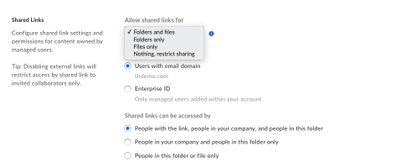
We do have some admin settings to prevent users from creating shared links.


BOX_ufoy2kk2udrt2kjnx83kblg158klit1x.png


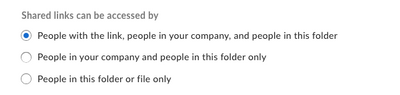
We also have settings to restrict the visibility of shared links.


BOX_qsthsapy3n98rlczsmrqa0a7vruxnf4a.png


It might be that if you try the following your API call will work.


curl --location --request PUT 'https://api.box.com/2.0/files/123456789' \
--header 'Content-Type: application/json' \
--header 'Authorization: Bearer [TOKEN]' \
--data-raw '{
  "shared_link": {
    "access": "collaborators"
  }
}'

This would create a shared link that is only accessible to those who already have access to the file. You can see all the possible values here. https://developer.box.com/reference/put-files-id/#param-shared_link-access


Forum|alt.badge.img

We found out that if we create a custom app with Oauth2+JWT authentication, it works.

Before we were using App Tokens, and that's when the API "fails silently" without creating a shared link.


Forum|alt.badge.img

Ahh yes, we generally advice against using App Tokens, they are generally only intended to be used in the context of Box View.