Question

CORS Errors with Box UI Kit

  • May 21, 2025
  • 12 replies
  • 51 views

Forum|alt.badge.img

I am using the Content Picker in the Box UI Kit, but when I call the .show() function of the Content Picker, I get the following javascript error on Google Chrome:


Fetch API cannot load https://api.box.com/2.0/folders/0?offset=0&limit=1000&fields=name%2Curl%2Ct…lowed_shared_link_access_levels%2Chas_collaborations%2Cis_externally_owned. No 'Access-Control-Allow-Origin' header is present on the requested resource. Origin 'http://localhost:3267' is therefore not allowed access. The response had HTTP status code 401. If an opaque response serves your needs, set the request's mode to 'no-cors' to fetch the resource with CORS disabled.

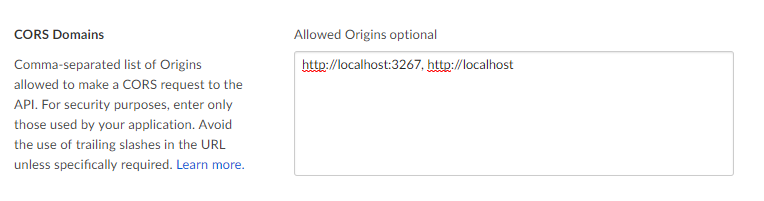
I have added "http://locahost:3267" and "http://localhost" to my allowed CORS domains, but the problem persists. It also occurs on other browsers. For example, in IE11, I receive the following error:


SEC7120: Origin http://localhost:3267 not found in Access-Control-Allow-Origin header.

Is there something else I should be doing, other than adding localhost to the allowed CORS domains? My javascript code intializing the Content Picker is minimal, but seems to be compatible with the code in the tutorial:

var folderID = '0';
var accessToken = getParameterByName('code');
var filePicker = new Box.FilePicker()

filePicker.show(folderID, accessToken, {
    container: '.container'
});

Why am I experiencing these errors?
12 replies

Forum|alt.badge.img

Hello - thanks for reaching out! 


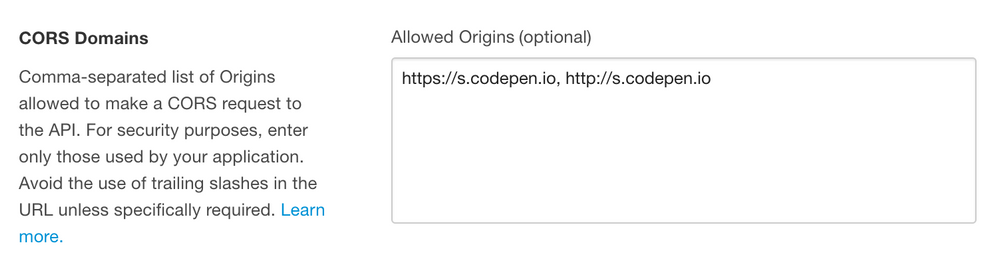
It looks like there's an issue with the CORS allowed domains. Are the URLs entered as below (with your own localhost url, of course)? There should be a comma between the two values and no trailing slashes. 


BOX_ip3wwf6c8v3y9vtxkib1uawgb6fg52hg.png


Forum|alt.badge.img

Yes, the URLs are comma-separated and contain no trailing slashes.


BOX_y1470tvgm49pl1ml0psak38yx1avsx1t.png


Forum|alt.badge.img

Thanks for sharing. We have not been able to replicate this issue. 


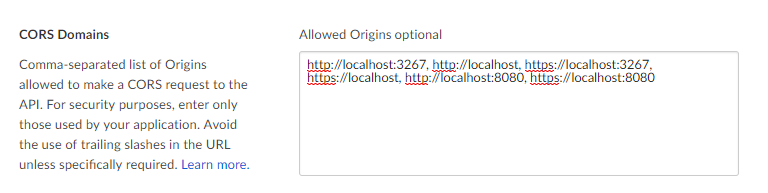
In your CORS, can you please add https: in addition to http: for port 3267? Or, can you try using port 8080 instead? 


Forum|alt.badge.img

I added the domains with HTTPS to my allowed CORS domains, and also ran the project using port 8080. Unfortunately, the issue persists:


BOX_ad4oolwgmae0d37ep658pzmzd5jkl9g8.png


Forum|alt.badge.img

What is the token that you're using? The easiest way to test this is to use a Developer Token. You can generate this in the Box Developer Console. This token expires after 60 minutes, so if you're using an older token, you might need to refresh it. 


Does that work?


Forum|alt.badge.img

I was using a token generated by OAuth. But even substituting this for a freshly generated developer token, the error does not change or go away. 


Forum|alt.badge.img

This issue unfortunate still persists. I noticed when I went back to my application settings that they seemed to have forgotten the allowed domains I had entered before. However, even upon entering the appropriate domains and clicking "save changes", the error persisted.


Forum|alt.badge.img

Does your folder id / auth token combination work if you use it here https://codepen.io/box-platform/pen/PWPxBm. Replace the values shown in there and click Run on top. Don't save.


Forum|alt.badge.img

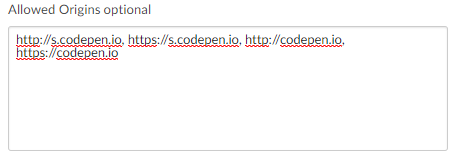
I'm afraid that produces the same 401 error, even though I have all relevant URLs within my allowed CORS Domains:


BOX_n67agy1f1xjqtp3psdphtbwf1lsbziyl.png


Forum|alt.badge.img

Unfortunately that generally means that token you got is not working. Does the developer token (that you generate on the developer console's config page) work instead on that codepen?


Forum|alt.badge.img

I produced that 401 error by testing with the developer token I generated. It does not work.


Forum|alt.badge.img

You just need to revoke your current developer token and try with the new one!


Enjoy!