

Question

CLI error: Not a true config file.

  • May 22, 2025
  • 12 replies
  • 30 views

Forum|alt.badge.img

I am on step 5 of installing the CLI, https://developer.box.com/docs/installation-and-setup, and I get an error when I run the following command:


box configure environments add ~/Downloads/config.json --name CLI


The error is "Not a true config file" but I am using the generated file, which in my case is called 7645002_lu0bc0c2_config. The file looks good to me with the appAuth detaild filled in with very long GUIDs.


12 replies

Forum|alt.badge.img

Help. Can anyone help me with this? Please?


Forum|alt.badge.img

 Is the "Not a true config file" the only error output you received?  Looking at the CLI code that processes the config file, it should give more context around why the config file was rejected.  For example, this is what I see when I try to add a config file that doesn't exist:


15:09 $ box configure environments add ~/Downloads/config.json --name CLI
Adding new environment
Looking for file at this path /Users/mwiller/Downloads/config.json
Couldn't open config file at this path: /Users/mwiller/Downloads/config.json
Not a true config file.
Couldn't add this environment.

Forum|alt.badge.img

Yes, the message you posted is exactly the complete error message I get. But the file is there and I get the error even if I run the command from the Downloads directory.


Forum|alt.badge.img

The config file generated by Box is named something like 7961026_fujjycxb_config and I tried renaming it to config to match the exact command in the docs but still no luck. I ran from my command prompt where it opens at C:\Users\myname and from C:\Users\myname\Downloads where the file is but it won't work. I did all the steps quite a few times and regenerated the file again and again.


Forum|alt.badge.img

 Okay, so let's try a complete step-by-step breakdown and see if that works:


  1. Ensure that your generated config file is located at C:\Users\yourname\Downloads\config.json
  2. Run the CLI command to add the config: box environments add C:\Users\yourname\Downloads\config.json

If that doesn't work, could you copy/paste the full error output here so we can debug further?


Forum|alt.badge.img

Microsoft Windows [Version 6.3.9600]
(c) 2013 Microsoft Corporation. All rights reserved.

C:\Users\myname>cd Downloads

C:\Users\myname\Downloads>box configure environments add config.json --name CLI
Adding new environment
Looking for file at this path \C:Users\myname\Downloads\config.json
Couldn't open config file at this path: \C:Users\myname\Downloads\config.json
Not a true config file.
Couldn't add this environment.

C:\Users\myname\Downloads>


Forum|alt.badge.img

 Please run the command exactly as I described (using the absolute path to the config file) and let me know if that works for you.


Forum|alt.badge.img

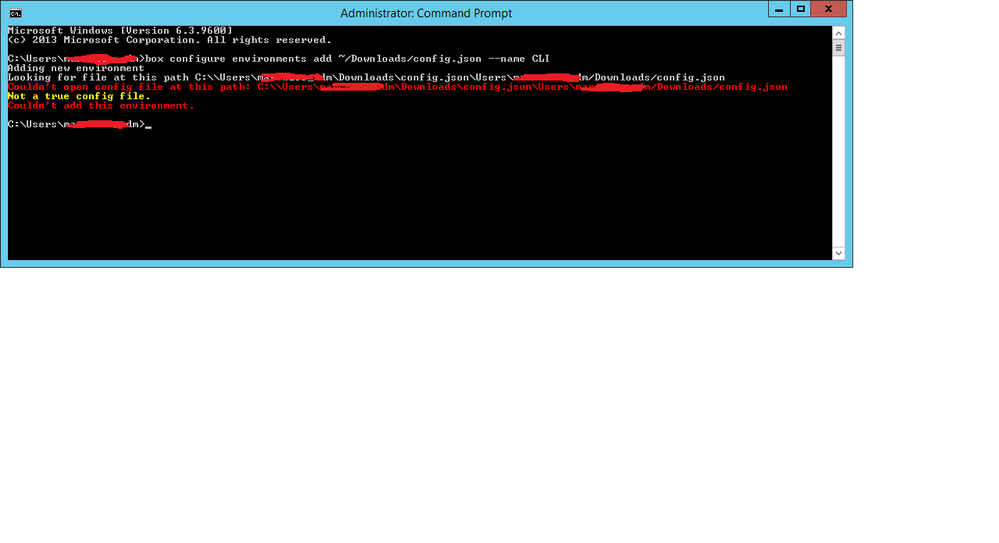
BOX_vv156sr9m7myyr85bzu7zwllrt2wrjhi.png


Forum|alt.badge.img

 The command in the screenshot is not the command I described (with an absolute path); please copy and paste the command from my previous post and run it exactly as shown there to see if that works.


Forum|alt.badge.img

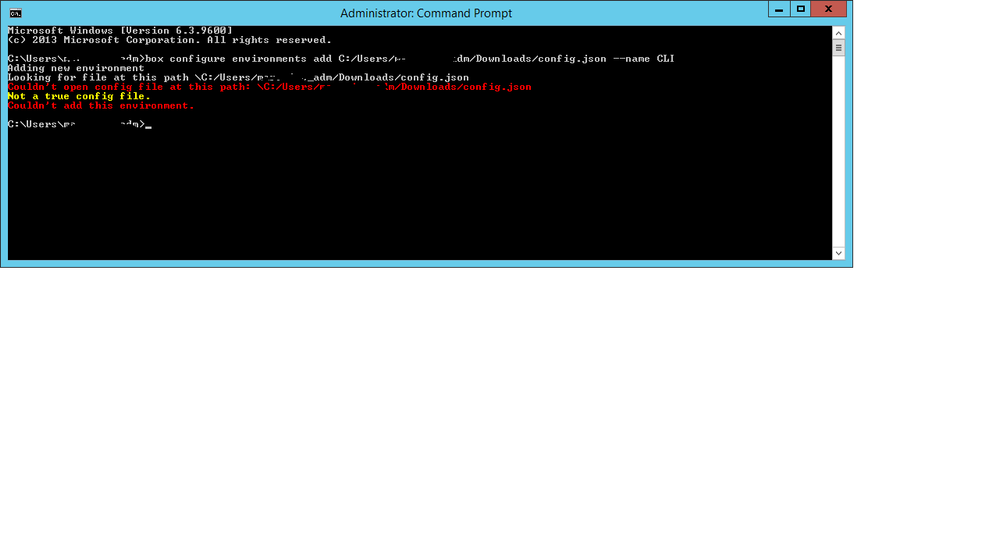
How about this? If I paste that same path into an explorer window the config file is found.

BOX_0d7w9wv06yqcrrx72kzghpl2gx7w6abn.png


Forum|alt.badge.img

 Please note the slashes in the path you're passing to the CLI — you are using UNIX-style (/) while the CLI on Windows expects Windows-style (\).  You should pass the valid Windows absolute path to the config file.


Forum|alt.badge.img

Argh! That was it. Thank you! I'll keep moving along to the next step now.