
Question

Cannot view Box Notes!

  • November 14, 2025
  • 1 reply
  • 9 views

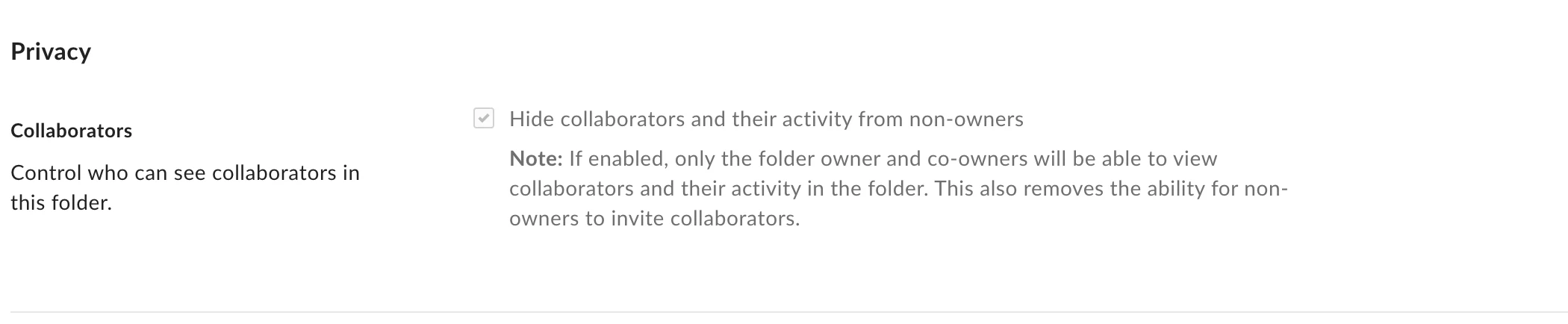
I have been struggling with this issue for years, and cannot seem to resolve it. When I have an invited collaborator make a box note in their folder, I cannot view it. it says that the hide collaborator’s feature is on and you cannot view it because of that. 


However, when I go to the folder settings, the option to turn that feature off is grayed out. I have looked in enterprise settings, content and sharing, within the sub folder, parent folder, everywhere. Can someone please help me figure out how to turn this off so we can read notes?



1 reply

Rona Box
  • Community Manager
  • November 18, 2025

Hi ​@isbellfamilyfilms

Welcome to Box Community, and we’ll assist modify your folder settings. 


To help you disable the hide collaborators setting, you might want to check these two first: 

  • What is your folder permission, are you the folder owner or co-owner? 
  • Did you check out the folder settings in the first-level folder?


Thanks for posting, and we look forward to hear back from you!