

Question

Box Sync for Mac Finder Extension Missing

  • May 21, 2025
  • 21 replies
  • 99 views
  • Translate All

Forum|alt.badge.img

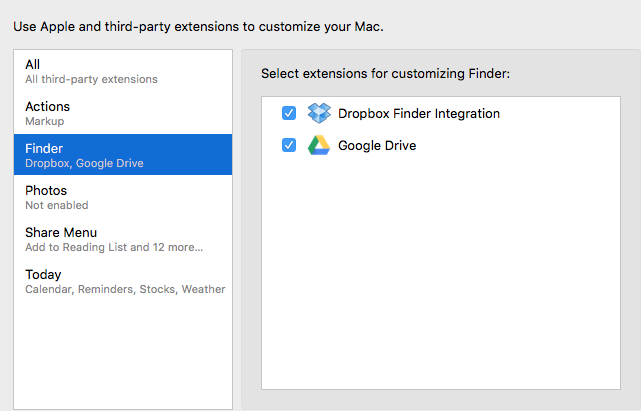
When I start my Mac (10.11.2), Box Sync shows a message, Unable to Display Box Sync Icons - Enable Box Sync Finder Extension in System Preferences.  Problem is that the Box Sync Finder Extension isn't in my System Preferences.


I've tried exiting Box Sync, and reinstalling, and rebooting, but it isn't there.  Not sure what to do now.  Box Sync version 4.0.7076.
 

BOX_x2ooadpc6v4r46fc79hj3aq4o0jacea5.png

21 replies

Forum|alt.badge.img

Hi .


Is it possible to check your Diagnostic Reports folder (located here: ~/Library/Logs/DiagnosticReports) to see if there are any reports that the Box Sync Finder Extension has crashed?

If so, this may be something the User Services team may be better able to assist you with. Please submit a case and they will be able to help.

Translate

Forum|alt.badge.img

There is nothing in my ~/Library/Logs/DiagnosticReports folder.

Translate

Forum|alt.badge.img

I had the exact issue on my Mac. I found the Box Sync Finder Extension when I clicked on the top option, "All third-party extensions" and Box was listed there.  I checked the box an then Box Sync icon will show up in the Finder.  Hope that helps.  

Translate

Forum|alt.badge.img

I'm having the same problem. Checked in both places after re-installing several times.  Still not there!  Is there a way to simply install the Finder extensions by themselves (stand-alone installer). Syncing seems to work just fine.

Translate

Forum|alt.badge.img

hi, where can i find the box sync finder extension? tryin to see if you solve works for my Mac. thanks!

Translate

Forum|alt.badge.img

I managed to fix it by typing this this in the Terminal -

pluginkit -a /Applications/Box\ Sync.app/Contents/Plugins/FinderSyncExt.appex
Translate

Forum|alt.badge.img

That worked! Thank you!

Translate

Forum|alt.badge.img

I tried your method and in System preference, it flashed in All third-party extensions then disappeared.

Translate

Forum|alt.badge.img

Sorry, Tried again, and it worked. Thanks!

Translate

Forum|alt.badge.img

I'm having this same issues on my new mac.  I entered that link into terminal but now what do I do?  I still don't see the box.com sync extension under system preferences.  Thanks for any help!

Translate

Forum|alt.badge.img

This worked for me. Ran the command line then went back to "System Preferences -> Extensions -> All" and Box Sync was listed. 

Translate

Forum|alt.badge.img

This worked for me as well (typing this into terminal, then re-checking Box in the Extrensions)


pluginkit -a /Applications/Box\ Sync.app/Contents/Plugins/FinderSyncExt.appex


Very strange and unpleasant.  


Translate

Forum|alt.badge.img

And what if the solution with the terminal command doesn't work?

Translate

Forum|alt.badge.img

Thanks for this response. I applied, and it worked. Extension option is found in System Preference

Translate

Forum|alt.badge.img

Thank you - worked perfectly!


The terminal commend follow by checking the Box Sync extension in System Preferences fixed it for me too.

Translate

Forum|alt.badge.img

Work for me!!
Thanks, but only work when i wrote 'sudo'. first
sudo +

pluginkit -a /Applications/Box\ Sync.app/Contents/Plugins/FinderSyncExt.appex
Translate

Forum|alt.badge.img

I'm on Mac Os Sierra.

I tried the

pluginkit -a /Applications/Box\ Sync.app/Contents/Plugins/FinderSyncExt.appex

command and then did the check extension in systems Preferences, but no luck.  The files are syncing but i cannot see the icons.

Translate

Forum|alt.badge.img

Hi ,


Welcome to the Box Community and thanks for your first post in the forum!


Your post seems like it may require account specific information/configuration to help solve it. I'd suggest that you contact Box Support so they can take a closer look at the issue you described to help you directly.


Be sure to read our guidelines, Subscribe to content you like, and complete your profile on the community.

Translate

Forum|alt.badge.img

 wrote:

I managed to fix it by typing this this in the Terminal -

pluginkit -a /Applications/Box\ Sync.app/Contents/Plugins/FinderSyncExt.appex

A genius!!! It worked for me too. THANKS!!!

Translate

Forum|alt.badge.img

wow, that worked, looked for it for weeks. this was the solution i was looking for. thank you so much!

Translate

Forum|alt.badge.img

When I tried this solution, I receive the message "invalid plugin path". I am new to iOS, any help is appreciated.


 wrote:

I managed to fix it by typing this this in the Terminal -

pluginkit -a /Applications/Box\ Sync.app/Contents/Plugins/FinderSyncExt.appex


Translate