Question

Box Drive - Copy Shared Link

  • July 14, 2026
  • 13 replies
  • 431 views

cmarch111

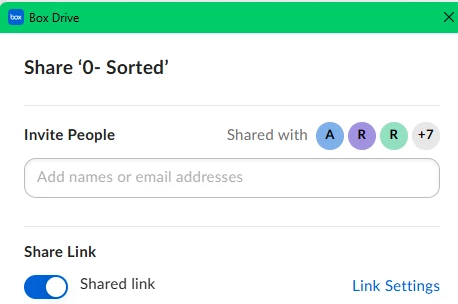
There seems to have been an update and there is a confirmation window popping up every time I want to quickly copy a shared link on Box Drive.  Is there a way to disable this?  I have looked for an option to disable, but can’t find one.

13 replies

Rona Box
  • Community Manager
  • July 14, 2026

Hi ​@cmarch111

Welcome to Box Community, and we’re glad to help! 

Let me submit a support ticket and have someone from the Box Product Support team to help get you rid of this pop up message from your machine. Please keep an eye out and we will reach out to you shortly. 


Thanks for posting! 


  • New Member
  • July 15, 2026

Hi! I have the same issue, is there a way to solve it? I found this new feature unnecessary and slows down my workflow, and as they mentioned before I couldn’t find a way to deactivate it. Thank you!


  • New Member
  • July 15, 2026

This is the such a terrible idea in terms of UX. Surely adding more friction points to the end user should be avoided at all costs as having a seamless flow should be Box’s utmost priority. What were you guys thinking?


cmarch111
  • Author
  • New Participant
  • July 15, 2026

@Rona Box Thanks so much!


@Facun ​@MrJuli I agree.  Maybe some people would find this feature beneficial, but we should definitely have an option to not have it appear.  It definitely slows me down.  My company spends a few hundred thousand dollars a year with Box so hopefully they’ll hear us out.  Waiting patiently...


  • New Member
  • July 16, 2026

Also having this issue. It’s absolutely slowing down workflow, so an option to turn it off would be very appreciated!


  • New Member
  • July 17, 2026

Throwing my hat into the ring to say that I also do not like this update and it has significantly affected my and my team’s workflow. An option to toggle this off would be VERY appreciated. 


Hi! I have the same issue, is there a way to solve it? I found this new feature unnecessary and slows down my workflow, and as they mentioned before I couldn’t find a way to deactivate it. Thank you!

agree - 100%


Jey Bueno Box
Forum|alt.badge.img
  • Community Manager
  • July 17, 2026

Hi everyone,


Thank you for sharing your feedback with us regarding Box Drive. We appreciate you taking the time to let us know how this update impacts your daily workflow.


Currently, there is no setting or option to disable or suppress this confirmation popup in Box Drive. This window is a built-in security and user-experience feature designed to prevent accidental exposure of files by ensuring you are fully aware when a shared link is created, along with its default access permissions (such as public, company-wide, or restricted to collaborators).


We understand that this extra step can add friction to your routine. As an alternative approach to bypass this popup, we recommend copying shared links directly from the Box Web Application (by hovering over the file and clicking the “Copy Shared Link” icon), which copies the link directly to your clipboard without triggering a desktop-level confirmation dialog.


We always want to make Box work better for you, so we encourage you to submit this as a feature request on Box Pulse. Our Product Team actively reviews Pulse for future enhancements, and your idea would help shape the direction of Box.


Thank you so much!


I agree with this, is there already a feature request on Box Pulse? I definitely want to vote for that asap

This is the such a terrible idea in terms of UX. Surely adding more friction points to the end user should be avoided at all costs as having a seamless flow should be Box’s utmost priority. What were you guys thinking?


  • New Member
  • July 20, 2026

Hi everyone,

I also second the request to remove the popup window. I have seen there are two requests on Box Pulse, I voted for both.


  • New Member
  • July 20, 2026

How to disable the popup for "Copy Shared Link" context-menu selection?

When you’re running Box in Explorer, and right-click on a file to obtain a sharing link for that file, it now pops up a new window with sharing options/confirmation that I have to close. It never did that before. Is there a way to disable that and just have it copy silently again?


  • New Member
  • July 21, 2026

bei mir geht zwar das Fenster auf aber dann kommt eine Fehlermeldung. Auf einem anderen Laptop geht alles wie immer, es öffnet sich zwar neuerdings ein Popup aber da kann ich wählen was ich machen möchte, auch Windows 11 pro. 

Es liegt wahrscheinlich an den Windows Updates. Das Update von Ende Juni 2026. Leider kann ich das besagte Update nicht mehr rückgängig machen, somit brauche ich bitte Unterstützung.

Dieses ist die Fehlermeldung : Inhalte konnten aufgrund eines Serverfehlers nicht geladen werden. Bitte versuchen Sie es in Kürze erneut


Was kann ich machen das es wieder reibungslos funktioniert?

Danke


  • New Member
  • July 26, 2026

Schade das hier niemand auf Fragen antwortet. Es kann doch nicht sein das bei mir nur die Probeme auftauchen.

Der Ticketsupport kann nicht helfen weil ich die Freeversion von Box.com habe und da wird natürlich nicht geholfen wenn es Probleme auf  Box Drive gibt