Question

Box App: Unable to find client_secret for requesting an access token

  • May 22, 2025
  • 3 replies
  • 69 views

Forum|alt.badge.img

Hello


I am new to using Box API, but not new to using OAuth 2.0. Typical for any OAuth 2.0 authentication, a client_secret is required to acquire its access_token and refresh_token.


After reading Box API Authentication section:

https://developer.box.com/reference#token


To get the client secret for your application, log in to your Box developer console and click the "Edit Application" link for the application you're working with. In the OAuth 2 Parameters section of the configuration page, find the item labeled "client_secret". 


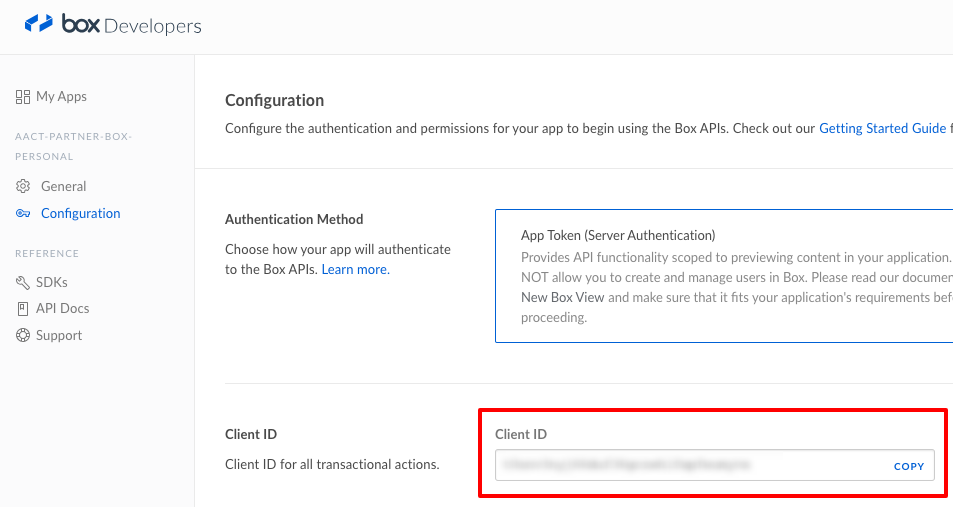
I had already created a Box App in the Box developer console and within its Configuration page, I do see this app's client_idHowever, I do not see "Edit Application" link nor do I see "client_secret".
 
Am I looking in the wrong place?
 
Thank you for any assistance!
 
BOX_image_not_found.pngBOX_hdrx5jli6d2prizp0o9qtthagbbko0uo.png

3 replies

Forum|alt.badge.img

Hello , 


Thanks so much for using our platform and development forum and welcome to Box! 


This is because you have created what we call a Box view application--- specifically, the one highlighted here:
https://cloud.box.com/s/gvaq2b61nr1qtixt2xlbdh2tvon9wroj. Therefore, you're using server authentication (auth 2 with JWT) and not standard auth. If you create a new application and select standard oauth2, you'll see the client secret in the configuration tab for your application in the developer console. 


Best, 

Kourtney 


Best, 


Forum|alt.badge.img

Thank you for the suggestion!

But, what is the way to use the APP Token method in NodeJS? as there isn't a client secret in the box view application, I would like to just preview the files on the folders


Forum|alt.badge.img

Hey  


The NodeJS SDK doesn't explicitly support the app token authentication method, but it is possible to use the app token method with NodeJS. 


Code example


const axios = require('axios');

// Set metadata add / update URL
const urlToken = `https://api.box.com/oauth2/token`;

const string = 'subject_token=REPLACE_THIS_WITH_YOUR_TOKEN&subject_token_type=urn:ietf:params:oauth:token-type:access_token&scope=item_preview item_upload&grant_type=urn:ietf:params:oauth:grant-type:token-exchange';

// Make request to add metadata to file
axios.post(urlToken, string).then(function (response) {
  console.log(response.data);
})
.catch(function (error) {
  console.error(error.response.data);
});

 The endpoint is a little weird in that it wants the data/body payload to be a string. Keep that in mind if you need to make modifications!